Accelerating IBM Granite 4.0 with FP8 using AMD Quark on MI300/MI355 GPUs#
In this post, we demonstrate how AMD Quark, a high-performance quantization library optimized for AMD Instinct™ MI300 and MI355 GPUs, enables FP8 quantization to deliver excellent accuracy retention and substantial throughput uplift for the IBM Granite 4.0 model family. For instructions on deploying Granite 4.0 on AMD GPUs, please refer to the previous blog post.
Large language models (LLMs) such as IBM Granite 4.0 demand massive computing and memory bandwidth, especially when deployed at scale. To reduce inference cost, without sacrificing accuracy, precision-accuracy-aware quantization techniques have emerged as a critical model optimization strategy. The following sections detail the application of AMD Quark to the IBM Granite 4.0 quantization process.
Quantization with AMD Quark#
AMD Quark is a comprehensive cross-platform deep learning toolkit designed to simplify and enhance the quantization of deep learning models. For LLMs quantization, Quark is tightly integrated with ROCm™ and optimized for matrix-core acceleration. It provides:
Multiple numeric formats (FP8, MXFP4, MXFP6, INT8, INT4, etc.) Modular quantization flows (PTQ, QAT, etc.) Support for large LLMs (Granite, Llama, Qwen, DeepSeek, etc.) Seamless integration of quantized models into vLLM / SGLang inference engines
Preparation#
Below is an example environment configuration tested for Granite 4.0 quantization on MI300/MI355:
Docker: rocm/vllm-dev
FP8 Quantization#
FP8 is an 8-bit floating-point format (E4M3 or E5M2) that offers an excellent balance between precision and dynamic range while significantly reducing memory bandwidth for activations and weights. AMD Instinct™ MI300 and newer GPUs provide native matrix-core support for FP8 operations, enabling high-throughput inference and training with improved efficiency and scalability.
An example of an FP8 quantized model can be found here.
The following sample Python script demonstrates the step-by-step procedure for FP8 quantization using AMD Quark. The parameters can be adjusted to accommodate different hardware configurations.
import argparse
import os
import sys
import warnings
from pathlib import Path

import torch
from transformers import AutoProcessor

from quark.torch import (
    LLMTemplate,
    ModelQuantizer,
    export_safetensors,
)
from quark.torch.export.api import _move_quantizer_to_dict
from quark.torch.utils.device import TPDeviceManager

from quark.torch.utils.data_preparation import get_calib_dataloader
from quark.torch.utils.model_preparation import get_model, get_tokenizer, prepare_for_moe_quant

def quant_granite(model_dir="ibm-granite/granite-4.0-h-small",
                  output_dir="ibm-granite-4.0-h-small_fp8"):
    # 1. Define original model
    device = "cuda"

    model, model_dtype = get_model(
        model_dir,
        "auto",
        device,
        multi_gpu=True,
    )

    prepare_for_moe_quant(model) #, None)

    tokenizer = get_tokenizer(
        model_dir, max_seq_len=1024,
        trust_remote_code=True
        )


    # 2. Define calibration dataloader (this step is still required for weight-only and dynamic quantization in the current version of Quark).
    # When the model is small, accelerate will place it on the last device
    main_device = model.device
    calib_dataloader = get_calib_dataloader(
        dataset_name="pileval",
        processor=None,
        tokenizer=tokenizer,
        batch_size=16,
        num_calib_data=128,
    )

    # 3. Quantization
    # Set quantization configuration using LLMTemplate
    model_config_type = (
        model.config.model_type if hasattr(model.config, "model_type") else  model.config.architectures[0]
        )

    template = LLMTemplate.get(model_config_type)

    quant_config = template.get_config(
            scheme="fp8",
            algorithm=None,
            kv_cache_scheme="fp8",
            min_kv_scale=0.01,
            layer_config={},
            attention_scheme=None,
            exclude_layers=["*router.*", "*lm_head*"],
        )

    # In-place replacement of model modules with quantized versions.
    quantizer = ModelQuantizer(quant_config, multi_device=True)
    model = quantizer.quantize_model(model, calib_dataloader)

    # After quantization, models are frozen - moving from soft weights that are quantized on the fly to e.g. `QuantLinear.weight` actually holding the fake quantized weights.
    model = quantizer.freeze(model)

    # 4. Model exporting
    with torch.no_grad():
         export_safetensors(
                    model=model,
                    output_dir=output_dir,
                    custom_mode="quark",
                    weight_format="real_quantized",
                    pack_method="reorder",
             )

         tokenizer.save_pretrained(output_dir)

def main():
    quant_granite()

if __name__ == "__main__":
    main()
Accuracy Evaluation#
Accuracy was evaluated using the LM-Evaluation-Harness open-source framework, and the results are presented in Table 1 below.
Benchmark |
ibm-granite/granite-4.0-h-small |
ibm-granite/granite-4.0-h-small-fp8 |
Recovery |
|---|---|---|---|
GSM8K |
85.60 |
84.53 |
98.75% |
IFEVAL- Instruct, Strict |
79.02 |
79.50 |
100% |
IFEVAL- Prompt, Strict |
70.79 |
70.71 |
99.88% |
Table 1. FP8 Accuracy Recovery.
Performance Uplift#
Token-serve throughput was evaluated using the vllm bench serve framework and the following script was used for the performance benchmark on MI300. The results are summarized in Table 2 and graphically represented in Figure 1 below.
export VLLM_USE_V1=1
export VLLM_ROCM_USE_AITER=0
export VLLM_V1_USE_PREFILL_DECODE_ATTENTION=0
export CUDA_VISIBLE_DEVICES=7
MODEL_DIR=ibm-granite/granite-4.0-h-small/

vllm bench serve / --backend openai-chat / --endpoint /v1/chat/completions / --dataset-name random / --model $MODEL_DIR / --num-prompts 1000 / --tokenizer $MODEL_DIR / --save-result
Benchmark Device |
Model |
Total Token throughput (tok/s) |
|---|---|---|
MI300 |
ibm-granite/granite-4.0-h-small |
13018.16 |
MI300 |
ibm-granite/granite-4.0-h-small-fp8 |
25541.64 |
Table 2. FP8 Performance Uplift.
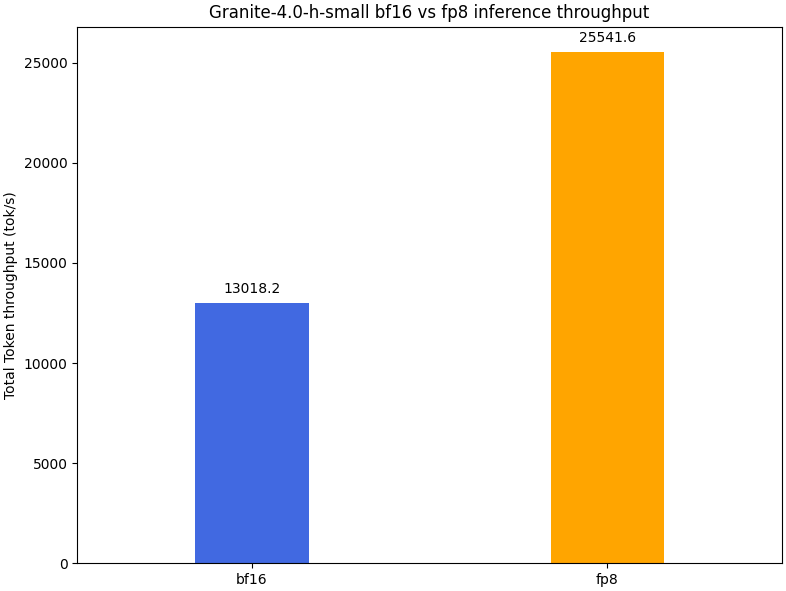
Figure 1. FP8 Performance Uplift Bar Chart.
Summary#
This blog provides a practical, step-by-step guide to quantizing and accelerating IBM Granite 4.0 models using AMD Quark on AMD Instinct™ MI300 and MI355 Series GPUs. It introduces Quark as AMD’s unified quantization framework and walks through hands-on instructions for FP8 quantization, accuracy evaluation, and performance benchmarking. By combining Quark’s flexible quantization workflows with the native matrix-core capabilities of MI300-class GPUs, developers can efficiently deploy large language models with higher throughput and a lower memory footprint—while maintaining near-lossless accuracy.
Disclaimers#
Third-party content is licensed to you directly by the third party that owns the content and is not licensed to you by AMD. ALL LINKED THIRD-PARTY CONTENT IS PROVIDED “AS IS” WITHOUT A WARRANTY OF ANY KIND. USE OF SUCH THIRD-PARTY CONTENT IS DONE AT YOUR SOLE DISCRETION AND UNDER NO CIRCUMSTANCES WILL AMD BE LIABLE TO YOU FOR ANY THIRD-PARTY CONTENT. YOU ASSUME ALL RISK AND ARE SOLELY RESPONSIBLE FOR ANY DAMAGES THAT MAY ARISE FROM YOUR USE OF THIRD-PARTY CONTENT.