PyTorch Offline Tuning with TunableOp#

In an earlier blog post, we explored how PyTorch TunableOp can potentially accelerate models through online tuning - where during model execution, PyTorch benchmarks and selects optimal BLAS kernels. While online tuning is effective, it introduces overhead due to the time needed to execute the ML model from end-to-end. If this is done once, the overhead may be acceptable, but for repeated tuning it may be cost-prohibitive to keep re-running the model.
Offline tuning addresses this challenge by decoupling the tuning process from model execution. This approach allows you to collect operations during one run and tune them separately. In this blog, we’ll explore:
The differences between offline and online tuning
Major updates to TunableOp since our last blog
A practical walkthrough of offline tuning with real examples
Note: PyTorch TunableOp offline tuning is available in PyTorch v2.6 or later.
Quick Start#
To get started with offline tuning:
Identify your key inference or training workloads
Run the collection phase with representative inputs
Perform offline tuning on dedicated hardware
Deploy the tuned results to production
Monitor performance and extend tuning entries as needed
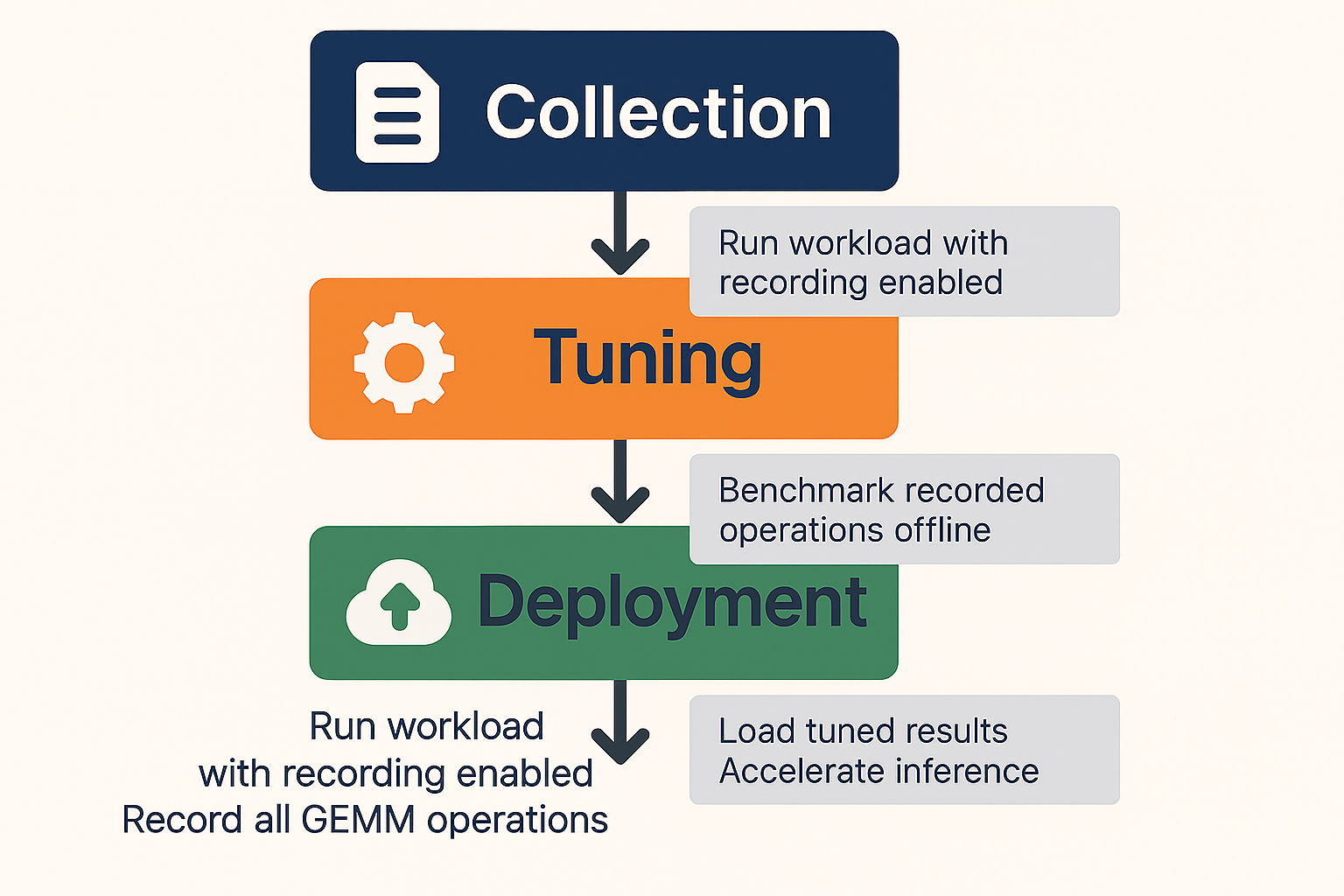
The offline tuning workflow is depicted in the figure below:
Offline versus Online Tuning#
Understanding the distinction between online and offline tuning is essential for choosing the right approach for your workload.
Online Tuning#
With online tuning, TunableOp performs the following steps during your workload execution:
Encounter Operation: When a GEMM operation is executed, TunableOp checks whether it has been tuned before
Benchmark: If not tuned, it queries all available implementations from the BLAS library
Test Each Solution: Benchmarks every candidate solution (potentially hundreds or thousands)
Select Best: Records the fastest solution
Continue Execution: Uses the optimal solution for subsequent calls
Advantages:
Simple to use - just set a single environment variable:
PYTORCH_TUNABLEOP_ENABLED=1No separate tuning step required.
Practical for single-shot tuning, where additional re-tuning is not planned.
Disadvantages:
May not be practical for large models or limited compute-time budgets.
Requires having access to the ML model.
Offline Tuning#
Offline tuning separates the tuning process into distinct phases:
Collection Phase: Run your workload with recording enabled to capture all GEMM operations.
Tuning Phase: Separately benchmark the recorded operations without executing the full workload.
Advantages:
Flexible tuning environment – Ability to tune on a separate machine or separate environment. For example, the tuning phase can occur on a different number of GPUs than the collection phase.
More cost effective re-tuning – Able to re-tune with newer AMD ROCm™ software stack without re-running the original ML model.
Disadvantages:
Requires a two-step process (collection + tuning).
Major Updates to TunableOp#
Datatype Support#
In addition to FP64, FP32, FP16 and BF16, TunableOp now supports TF32 and FP8 datatypes on AMD Instinct™ MI300 series GPUs. We are in the process of supporting the MX FP8 and FP4 formats on AMD Instinct™ MI350 series GPUs.
Improved quality of tuning results#
To improve tuning results, TunableOp now uses a rotating buffer to benchmark solutions under conditions which are closer to model runtime conditions. A rotating buffer is a tuning technique for simulating a cold cache. The default rotating buffer size is equal to the size of the L2 data cache (4MB on MI300 GPU). Rotating buffer sizes as large as 512 MB have been shown to improve tuning results. Additionally, we also flush the instruction cache which can be beneficial for small GEMMs.
Real-time results#
Rather than waiting until the very end of model execution to write results, TunableOp now immediately saves new tuning results to disk. This enhancement minimizes the risk of losing tuning results due to unexpected model runtime issues. (Available on PyTorch 2.10 and later).
Numerical check#
For numerically sensitive models, we have an improved numerical check that accepts both absolute and relative tolerance. (Available on PyTorch 2.10 and later). This numerical check uses the default GEMM kernel as the gold reference and verifies that the evaluated kernel is within the specified numerical tolerance. If it finds that the kernel is outside the numerical tolerance, it will reject the kernel from the list of acceptable solutions.
New GEMM operations#
In addition to tuning the standard GEMM operations, tuning of batch GEMM and GEMM with bias is now supported.
TunableOp Offline Tuning Example#
Let’s walk through a complete offline tuning example using an OPT-125m language model. We’ll demonstrate the three phases: collection, tuning, and deployment.
Prerequisites#
Before starting, ensure you have:
AMD GPU with ROCm software version 7.0 or later
PyTorch 2.7+ with ROCm support
Transformers library (pip install transformers)
Step 1: Recording Untuned Operations#
The first step is to run your workload while recording all GEMM operations that TunableOp encounters. Create a file called llm_inference_forward.py:
import os
import torch
import transformers

# Configure offline tuning - collection phase
os.environ['PYTORCH_TUNABLEOP_ENABLED'] = '1'
os.environ['PYTORCH_TUNABLEOP_TUNING'] = '0'  # Disable actual tuning
# Record all untuned operations
os.environ['PYTORCH_TUNABLEOP_RECORD_UNTUNED'] = '1'
# Optional: increase verbosity to see tuning progress
os.environ['PYTORCH_TUNABLEOP_VERBOSE'] = '2'

def run_inference():
    """Run forward pass workload with fixed shapes"""

    # Load model and tokenizer
    model_name = "facebook/opt-125m"
    tokenizer = transformers.AutoTokenizer.from_pretrained(model_name)
    model = transformers.AutoModelForCausalLM.from_pretrained(
        model_name,
        torch_dtype=torch.float16,
    ).to("cuda")

    # Prepare fixed-size batched input
    prompts = ["Hello, how are you doing today?"] * 8  # Batch of 8
    inputs = tokenizer(
        prompts,
        return_tensors="pt",
        padding="max_length",
        max_length=128,  # Fixed sequence length
        truncation=True
    ).to("cuda")

    # Run multiple forward passes to capture GEMM operations
    print("Running forward passes to collect GEMM operations...")
    model.eval()
    with torch.no_grad():
        for i in range(10):
            outputs = model(**inputs)
            if i == 0:
                print(f"Output shape: {outputs.logits.shape}")

    print(f"\nRecorded GEMM operations saved to tunableop_untuned0.csv")

if __name__ == "__main__":
    run_inference()
Run the collection phase:
python llm_inference_forward.py
Output:
Running forward passes to collect GEMM operations...
Output shape: torch.Size([8, 128, 50272])

Recorded GEMM operations saved to tunableop_untuned0.csv
After this step, you’ll have a tunableop_untuned0.csv file containing
all unique GEMM operations encountered during inference. Let’s
examine its contents:
cat tunableop_untuned0.csv
Sample output:
GemmAndBiasTunableOp_Half_TN,tn_768_1024_768_ld_768_768_768
GemmStridedBatchedTunableOp_float_TN,tn_128_128_64_B_96_ld_64_64_128
GemmStridedBatchedTunableOp_float_NN,nn_64_128_128_B_96_ld_64_128_64
GemmAndBiasTunableOp_Half_TN,tn_3072_1024_768_ld_768_768_3072
GemmAndBiasTunableOp_Half_TN,tn_768_1024_3072_ld_3072_3072_768
GemmTunableOp_Half_TN,tn_50272_1024_768_ld_768_768_50272
Each line represents a unique GEMM operation defined by:
Operation type:
GemmAndBiasTunableOp_Half_TN(with datatype + transpose configuration)Problem size:
tn_768_1024_768_ld_768_768_768(matrix and leading dimensions)
Step 2: Offline Tuning#
Now we tune the recorded operations separately, without running the full model. Create tune_offline.py:
import os
import torch

# Configure offline tuning - tuning phase
os.environ['PYTORCH_TUNABLEOP_ENABLED'] = '1'  # TunableOp Enabled
os.environ['PYTORCH_TUNABLEOP_TUNING'] = '1'  # Enable tuning
os.environ['PYTORCH_TUNABLEOP_ROTATING_BUFFER_SIZE'] = '512'  # set rotating buffer size in MBs
# Optional: increase verbosity to see tuning progress
os.environ['PYTORCH_TUNABLEOP_VERBOSE'] = '2'

def main():
    """
    The offline tuning process will:
    1. Read tunableop_untuned0.csv
    2. For each unique GEMM, benchmark all available implementations
    3. Write the fastest solution to tunableop_results0.csv
    """
    print("Starting offline tuning process...")
    print("This may take several minutes depending on the number of operations.\n")

    # Tune all GEMM operations from the untuned file
    # The environment variables already configure the tuning behavior
    input_file = 'tunableop_untuned0.csv'
    print(f"Reading untuned operations from {input_file}...")
    torch.cuda.tunable.tune_gemm_in_file(input_file)
    print("\nOffline tuning complete!")

if __name__ == "__main__":
    main()
Run the offline tuning:
python tune_offline.py
Output (abbreviated):
Starting offline tuning process...
This may take several minutes depending on the number of operations.

Reading untuned operations from tunableop_untuned0.csv...
reading tuning results from tunableop_results0.csv
could not open tunableop_results0.csv for reading tuning results
finding fastest for GemmAndBiasTunableOp_Half_TN(tn_768_1024_768_ld_768_768_768) out of 148 candidates
Rotating buffer 512 MiB. Needed Size: 4 MiB. Needed number of param copies: 125
└──found fastest for GemmAndBiasTunableOp_Half_TN(tn_768_1024_768_ld_768_768_768) Default
└──top five solutions for GemmAndBiasTunableOp_Half_TN(tn_768_1024_768_ld_768_768_768)
   0.040352 Default
   0.040888 Gemm_Hipblaslt_1104
   0.042097 Gemm_Hipblaslt_1100
   0.048308 Gemm_Hipblaslt_1085
   0.052723 Gemm_Hipblaslt_1079
GemmAndBiasTunableOp_Half_TN(tn_768_1024_768_ld_768_768_768) -> Default,0.0403524
finding fastest for GemmStridedBatchedTunableOp_float_TN(tn_128_128_64_B_96_ld_64_64_128) out of 1074 candidates
Rotating buffer 512 MiB. Needed Size: 12 MiB. Needed number of param copies: 43
└──found fastest for GemmStridedBatchedTunableOp_float_TN(tn_128_128_64_B_96_ld_64_64_128) Gemm_Rocblas_-1140856325
└──top five solutions for GemmStridedBatchedTunableOp_float_TN(tn_128_128_64_B_96_ld_64_64_128)
   0.033487 Gemm_Rocblas_-1140856325
   0.034511 Gemm_Rocblas_-1140856333
   0.037934 Gemm_Rocblas_-1140856334
...

Offline tuning complete!
The tuning process benchmarks every available implementation for each
GEMM and records the fastest. The output
file tunableop_results0.csv now contains the optimal solutions. An entry
called Default means that TunableOp was unable to identify a
solution that was better than the default implementation provided by the
preferred PyTorch BLAS library. On MI series GPUs, this will be the
hipBLASLt library.
Step 3: Using Tuned Results#
Finally, use the tuned results in production for accelerated inference.
Create llm_inference_optimized_forward.py:
import os
import torch
import transformers

# Configure to use tuned results - no tuning, just loading existing tuned results
os.environ['PYTORCH_TUNABLEOP_ENABLED'] = '1'  # TunableOp enabled
os.environ['PYTORCH_TUNABLEOP_TUNING'] = '0'  # Disable tuning
# Optional: increase verbosity to see tuning progress
os.environ['PYTORCH_TUNABLEOP_VERBOSE'] = '2'

def benchmark_inference():
    """Benchmark forward pass inference"""

    # Load model
    model_name = "facebook/opt-125m"
    tokenizer = transformers.AutoTokenizer.from_pretrained(model_name)
    model = transformers.AutoModelForCausalLM.from_pretrained(
        model_name,
        torch_dtype=torch.float16,
    ).to("cuda")

    # Prepare fixed-size batched input
    prompts = ["Hello, how are you doing today?"] * 8  # Batch of 8
    inputs = tokenizer(
        prompts,
        return_tensors="pt",
        padding="max_length",
        max_length=128,  # Fixed sequence length
        truncation=True
    ).to("cuda")

    # Warmup
    print("Warming up...")
    model.eval()
    with torch.no_grad():
        for _ in range(5):
            outputs = model(**inputs)

    # Benchmark
    n_iterations = 100

    print(f"Benchmarking {n_iterations} iterations...")

    start_event = torch.cuda.Event(enable_timing=True)
    end_event = torch.cuda.Event(enable_timing=True)

    start_event.record()
    torch.cuda.synchronize()

    with torch.no_grad():
        for _ in range(n_iterations):
            outputs = model(**inputs)

    end_event.record()
    torch.cuda.synchronize()

    elapsed = start_event.elapsed_time(end_event) / 1000
    throughput = n_iterations / elapsed

    print(f"\n{'='*60}")
    print(f"  Total time: {elapsed:.2f}s")
    print(f"  Iterations: {n_iterations}")
    print(f"  Throughput: {throughput:.2f} iterations/s")
    print(f"  Time per iteration: {elapsed/n_iterations*1000:.2f}ms")
    print(f"{'='*60}\n")

    return throughput

if __name__ == "__main__":
    tuned_throughput = benchmark_inference()
Note the use of PYTORCH_TUNABLEOP_TUNING=0. This is the best practice for benchmarking tuned models. This suppresses additional tuning that may occur in scenarios where GEMM sizes are dynamic and depend on runtime conditions. The PyTorch TunableOp environment variables can either be set on the command line or from inside the PyTorch script using the Python OS module.
Run the optimized inference with TunableOp:
python llm_inference_optimized_forward.py
Output:
reading tuning results from tunableop_results0.csv
Validator PT_VERSION=2.9.1
Validator HIP_VERSION=701
Validator HIPBLASLT_VERSION=100100-de5c1aebb6
Validator GCN_ARCH_NAME=gfx1100
Validator ROCBLAS_VERSION=5.1.0.de5c1aebb6
ROCBLAS_VERSION validation: expect 5.1.0.de5c1aebb6 to match 5.1.0.de5c1aebb6
GCN_ARCH_NAME validation: expect gfx1100 to match gfx1100
HIPBLASLT_VERSION validation: expect 100100-de5c1aebb6 to match 100100-de5c1aebb6
HIP_VERSION validation: expect 701 to match 701
PT_VERSION validation: expect 2.9.1 to match 2.9.1
Loading results
GemmAndBiasTunableOp_Half_TN(tn_768_1024_768_ld_768_768_768) -> Default,0.0403524
GemmAndBiasTunableOp_Half_TN(tn_3072_1024_768_ld_768_768_3072) -> Gemm_Hipblaslt_1104,0.102215
GemmAndBiasTunableOp_Half_TN(tn_768_1024_3072_ld_3072_3072_768) -> Default,0.107536
GemmStridedBatchedTunableOp_float_TN(tn_128_128_64_B_96_ld_64_64_128) -> Gemm_Rocblas_-1140856325,0.0334875
GemmStridedBatchedTunableOp_float_NN(nn_64_128_128_B_96_ld_64_128_64) -> Gemm_Rocblas_-1140854047,0.0337423
GemmTunableOp_Half_TN(tn_50272_1024_768_ld_768_768_50272) -> Gemm_Rocblas_-1140856876,0.873926

Warming up...
Benchmarking 100 iterations...

============================================================
  Total time: 0.97s
  Iterations: 100
  Throughput: 103.01 iterations/s
  Time per iteration: 9.71ms
============================================================
Now let’s compare with baseline (TunableOp disabled). You will need to modify the llm_inference_optimized_forward.py script by modifying this one line:
os.environ['PYTORCH_TUNABLEOP_ENABLED'] = '0' # TunableOp disabled
Now re-run the script to get a baseline:
python llm_inference_optimized_forward.py
Output:
Warming up...
Benchmarking 100 iterations...
============================================================
  Total time: 1.12s
  Iterations: 100
  Throughput: 89.46 iterations/s
  Time per iteration: 11.18ms
============================================================
As shown, using the offline tuning results yields approximately a 15% improvement in end-to-end performance.
Note: These results were obtained on an AMD Radeon PRO W7900 (gfx1100) using the docker image rocm/pytorch:rocm7.1_ubuntu24.04_py3.13_pytorch_release_2.9.1.
Summary#
In this blog you learned how to potentially accelerate PyTorch workloads with TunableOp offline tuning. Offline tuning splits the process into two phases: recording GEMM operations during a representative run, then benchmarking them separately. Decoupling tuning from model execution lets you tune on different hardware and re-tune with updated ROCm without re-running the full model. We covered recent TunableOp updates, including new datatype support, rotating buffer techniques, and improved numerical checks. We walked through a practical example with an OPT-125m model from collection through tuning to deployment. You saw how to record operations, run offline tuning, and load the results for inference. The example showed a clear performance gain when using the tuned results. Offline tuning offers a flexible way to improve performance while keeping tuning separate from your main workload.
Additional Resources#
Disclaimers#
Third-party content is licensed to you directly by the third party that owns the content and is not licensed to you by AMD. ALL LINKED THIRD-PARTY CONTENT IS PROVIDED “AS IS” WITHOUT A WARRANTY OF ANY KIND. USE OF SUCH THIRD-PARTY CONTENT IS DONE AT YOUR SOLE DISCRETION AND UNDER NO CIRCUMSTANCES WILL AMD BE LIABLE TO YOU FOR ANY THIRD-PARTY CONTENT. YOU ASSUME ALL RISK AND ARE SOLELY RESPONSIBLE FOR ANY DAMAGES THAT MAY ARISE FROM YOUR USE OF THIRD-PARTY CONTENT.