Out-of-the-Box ROLL Support on AMD GPUs: Accelerating Reinforcement Learning at Scale#

Reinforcement learning (RL) is rapidly becoming a foundational technology for Large Language Models (LLMs)—powering key abilities such as reasoning and agentic behaviors. As RL workloads grow more complex and computationally intensive, the ecosystem increasingly depends on scalable, high-performance frameworks that can fully utilize modern GPU clusters.
ROLL, an open-source RL framework developed by Alibaba, is designed specifically for this new era of large-scale, distributed RL. Built with modular components and a flexible architecture, ROLL efficiently supports modern RL algorithms and high-throughput simulation pipelines. An overview of ROLL can be found in Figure 1.
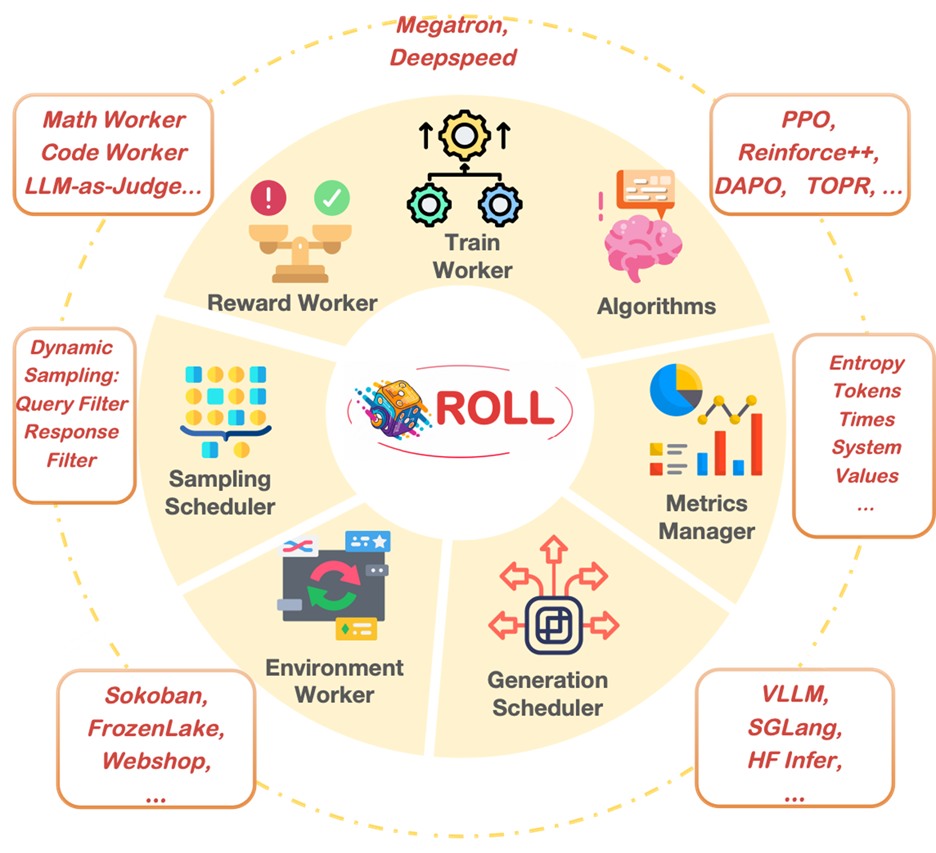
Figure 1: Overview of ROLL#
AMD has collaborated with the ROLL development team and contributed several upstream improvements to enhance compatibility and performance. As a result, ROLL now runs out-of-the-box (OOTB) on AMD Instinct™ GPUs with the AMD ROCm™ software—with no code changes, no custom patches, and no nonstandard builds required. In this blog, we provide an overview of the enablement effort, the workloads we validated on AMD hardware, and how this integration fits into AMD’s broader strategy to build a robust, production-ready RL ecosystem for the community. By reading this article, you’ll learn basic knowledge about ROLL and how to run it on AMD GPU seamlessly.
Overview of ROLL#
ROLL is a user-friendly, scalable, and modular reinforcement learning framework developed by Alibaba for training Large Language Models on distributed GPU clusters. It supports algorithms such as PPO, GRPO, DPO, RLHF, and multi-agent RL, and uses a flexible Actor–Learner architecture built on Ray. ROLL integrates seamlessly with modern LLM backends—including Megatron-Core, SGLang, and vLLM—to deliver efficient rollout generation and fast learner updates. ROLL provides two core capabilities that make it particularly effective for RL on LLMs:
Asynchronous Execution — Rollout generation and policy learning run independently, improving GPU utilization and scaling efficiency, please refer to Figure 2.
Agentic Training — Native support for multi-agent, multi-role, and multi-turn workflows, enabling richer LLM reasoning and agent behaviors, please refer to Figure 3.
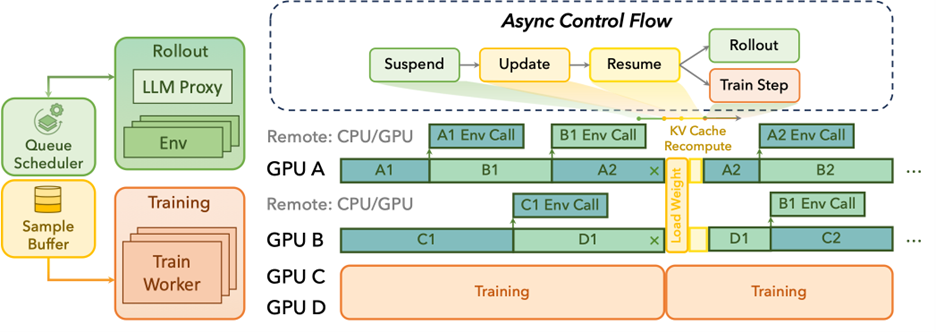
Figure 2: Async flow of ROLL#
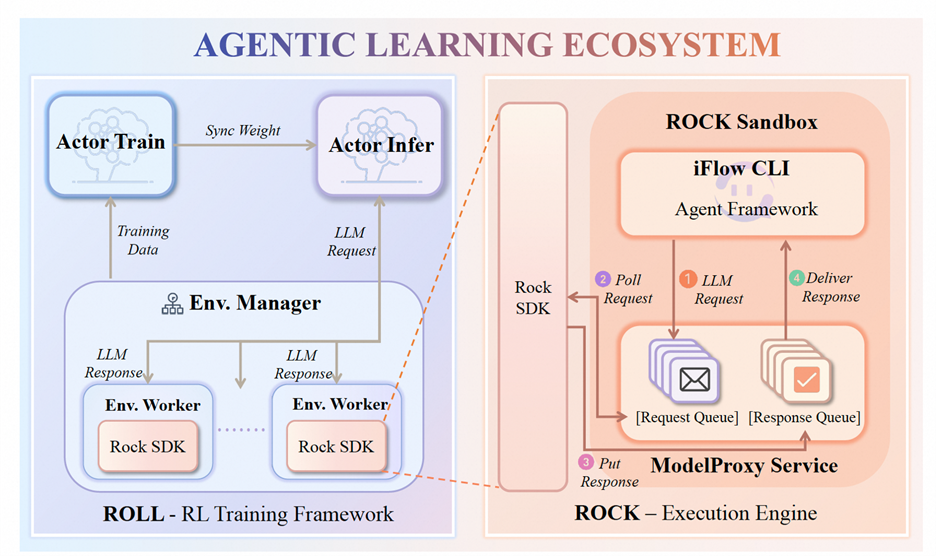
Figure 3: Agentic flow of ROLL#
Combined with its clean API design and practical abstractions, ROLL offers a user-friendly yet high-performance solution for large-scale RL research and LLM-based reasoning workloads.
AMD Enablement Work for ROLL#
To ensure that ROLL runs smoothly on AMD Instinct™ GPUs with full feature coverage, AMD collaborated with Alibaba and contributed several upstream enhancements across the ROLL stack. These improvements span rollout backends, runtime behavior, environment setup, and framework interoperability. The following updates are now integrated into the official ROLL repository.
Upstream Code Contributions for Native AMD GPU Support#
We contributed official code changes directly to the ROLL codebase, enabling full ROCm functionality without any user-side modifications. This ensures that ROLL runs natively on AMD GPUs with standard commands and configurations. (Reference link: https://github.com/alibaba/ROLL/pull/137)
vLLM Sleep Mode Compatibility#
ROLL relies heavily on vLLM as the rollout backend. However, sleep-mode behavior differs across vLLM versions in ROCm:
vLLM ≥ 0.11.0 — Sleep mode is fully supported upstream. You can use any upstream version which ROLL supports.
vLLM < 0.11.0 — Requires a special ROCm-enabled branch to correctly enable sleep mode.
This behavior is now documented and supported in the AMD ROLL integration.
Dual vLLM Engine Support (Engine v0 and v1)#
vLLM introduced a new Engine v1 offering improved architecture, scheduling behavior, and scalability. ROLL primarily uses vLLM for rollouts, and AMD added support for both:
Engine v0 (legacy)
Engine v1 (recommended for better throughput and stability)
Both engines now run correctly on AMD GPUs. (PR link: https://github.com/alibaba/ROLL/pull/141)
Ray Compatibility Fixes (HIP_VISIBLE_DEVICES)#
ROLL uses Ray to launch actors and distribute rollout and learner jobs. Ray versions prior to 2.48 contain device visibility logic that is incompatible with ROCm. AMD upstreamed fixes in Ray ≥ 2.48 to solve HIP_VISIBLE_DEVICES and CUDA_VISIBLE_DEVICES compatibility. This ensures correct GPU binding for both rollout workers and learner processes. In the docker image provided, we set Ray>= 2.48 as default. For users building environments from scratch, be careful about the Ray version.
Recommended: Use the Official ROLL Docker Image#
For users seeking a fully out-of-the-box experience without any environment setup or manual patching, AMD strongly recommends using the official Docker resources:
Docker Hub image: rlsys/roll_opensource
Dockerfile: Dockerfile.torch280.vllm.AMD
These images already include all ROCm dependencies, Ray patches, vLLM engine support, performance optimizations using AITER, and upstream ROLL fixes. All the enablement work described above is included in the official ROLL repository and ready to use.
Running ROLL on AMD GPUs#
We will give example instructions to run ROLL on AMD GPUs step by step.
Docker build#
First, you can build the Docker image using the Dockerfile provided in the ROLL project. Alternatively, you can also directly use the pre-built docker image we provide:
docker pull rlsys/roll_opensource:v20250815

Docker Launch
docker run \
  -v /dev/shm:/dev/shm\
  --device=/dev/kfd \
  --device=/dev/dri \
  --security-opt \
  seccomp=unconfined \
  --group-add video \
  -it \
  --rm \
  --network=host \
  --privileged=true \
  rlsys/roll_opensource:v20250815
Data preparation#
Download ./data/geoqa_data from leonardPKU/GEOQA_R1V_Train_8K Datasets at Hugging Face if you need math data to train. Other data is contained in the ROLL repository.
Training Configs#
We provide training configs for multiple models in ROLL for AMD users. ‘rlvr_config_amd.yaml’ is largely the same as the configuration used on other platforms. If you encounter any OOM problem, you can try to reduce the ‘gpu_memory_utilization’ hyper-parameter of VLLM. During RLHF training, the vLLM engine instance may switch to sleep mode and offload weights and KV cache to CPU memory, which can lead to CPU memory OOM on certain systems (for example, Ray may report that a worker was killed due to an OOM).
actor_infer:
  model_args:
    disable_gradient_checkpointing: true
    dtype: bf16
  generating_args:
    max_new_tokens: ${response_length}
    top_p: 0.99
    top_k: 100
    num_beams: 1
    temperature: 0.99
    num_return_sequences: ${num_return_sequences_in_group}
  data_args:
    template: qwen2_5
  strategy_args:
    strategy_name: vllm
    strategy_config:
      gpu_memory_utilization: 0.6 #change to a smaller ratio if you encounter CPU OOM memory problem.
      block_size: 16
      max_model_len: 8000
  device_mapping: list(range(0,12))
  infer_batch_size: 1
Single-node Training#
For training qwen2.5-7B-rlvr, use the run_rlvr_pipeline.sh script:
set +x
CONFIG_PATH=$(basename $(dirname $0))
python examples/start_rlvr_pipeline.py --config_path $CONFIG_PATH  --config_name rlvr_config_amd
change rlvr_config to rlvr_config_amd.
Multi-node Training#
For the master node, we need to set certain environment variables:
export MASTER_ADDR="ip of master node"
export MASTER_PORT="port of master node"  # Default: 6379
export WORLD_SIZE=2
export RANK=0
export NCCL_SOCKET_IFNAME=ens50f1
export GLOO_SOCKET_IFNAME=ens50f1
You can configure world_size according to your training configuration requirements and available hardware.
MASTER_ADDR should be the IP of the master node itself.
NCCL_SOCKET_IFNAME and GLOO_SOCKET_IFNAME are network interfaces used for GPU/cluster communication. For AMD GPU servers, it is mostly ens50f1. You can find it using the “ifconfig” command.
Then you can run scripts such as the 7B configuration on the master node:
bash examples/qwen2.5-7B-rlvr_megatron/run_rlvr_pipeline.sh
For other working nodes, you can also set the environment variables like the master node, but don’t forget to change the rank:
export MASTER_ADDR="ip of master node"
export MASTER_PORT="port of master node"  # Default: 6379
export WORLD_SIZE=2
export RANK=1
export NCCL_SOCKET_IFNAME=ens50f1
export GLOO_SOCKET_IFNAME=ens50f1
Then start the Ray server on other worker nodes:
ray start --address='ip of master node:port of master node' --num-gpus=gpus_you_have_on_this_node
When all nodes are ready, the training will begin! Enjoy your ride!
Summary#
In this blog, you learned how to run Alibaba’s ROLL framework out-of-the-box on AMD Instinct™ GPUs with ROCm for scalable RL training of LLMs, from single-node setup to multi-node distributed workloads. We also explored AMD’s enablement work across the ROLL software stack, including upstream compatibility improvements, vLLM integration, Ray support, and ROCm optimization support. As reinforcement learning continues to play a central role in advancing reasoning and agentic AI capabilities, seamless platform support and ecosystem compatibility remain important for scaling RL workloads efficiently. Looking ahead, we plan to continue collaborating with the Alibaba ROLL team on performance tuning, improving large-scale training stability, and enabling support for more emerging models and RL workflows on AMD GPUs. We also encourage developers to try ROLL on AMD GPUs using the official Docker image and explore how easily RL workloads can be deployed and scaled on modern GPU platforms.
Disclaimers#
Third-party content is licensed to you directly by the third party that owns the content and is not licensed to you by AMD. ALL LINKED THIRD-PARTY CONTENT IS PROVIDED “AS IS” WITHOUT A WARRANTY OF ANY KIND. USE OF SUCH THIRD-PARTY CONTENT IS DONE AT YOUR SOLE DISCRETION AND UNDER NO CIRCUMSTANCES WILL AMD BE LIABLE TO YOU FOR ANY THIRD-PARTY CONTENT. YOU ASSUME ALL RISK AND ARE SOLELY RESPONSIBLE FOR ANY DAMAGES THAT MAY ARISE FROM YOUR USE OF THIRD-PARTY CONTENT.