AMD-Powered 3D Gaussian Splatting for Autonomous Driving Scenes#
3D Gaussian Splatting (3DGS) is an innovative, explicit scene representation and rendering technique. It reconstructs photorealistic 3D environments from a set of images of the scene from a variety of angles. It represents a scene as a vast, learnable collection of 3D Gaussians, which are optimized with backpropagation using a differentiable rasterizer. This pipeline enables real-time novel view synthesis of the scene – generating images of the scene from previously unseen angles. It also permits easy scene editing by moving, copying, recolouring, etc. parts of the reconstructed 3D structure.
However, the original algorithm is limited to static scenes and is therefore not directly applicable to highly dynamic environments including moving actors, like autonomous driving scenarios, which involve moving vehicles, pedestrians and so on. Street Gaussians (SG) is an extension to 3DGS, which models street scenes by explicitly separating the representation into components for the static background and multiple dynamic foreground objects.
In this blog post, we explore the capabilities and limitations of Street Gaussians for dynamic street-scene reconstruction and rendering. At the time of writing, there are two implementations of SG, both optimized for efficient training on NVIDIA GPUs. Accompanying this blog post, we release a new fork of one of them that trains scenes efficiently on AMD GPUs using ROCm™, along with several other smaller enhancements. We discuss the full practical workflow – installation on AMD ROCm™, migrating SG to the latest gsplat API, running training and rendering on the Waymo dataset, and benchmarking quality and performance. The entire stack is tested and validated on AMD Instinct™ MI300X GPUs. We highlight what works well today versus what still requires engineering or research to make SG robust for production-grade autonomous driving scene editing.
The two existing implementations of SG are the “official” implementation, released by the authors of the method, and a later “unofficial” implementation that builds on the nerfstudio toolkit. This work builds on the unofficial implementation of SG, utilizing the GPU-optimized gsplat framework for rendering. For more details, please refer to our previous blog post on porting gsplat to AMD GPUs. From this point onward, we will refer to the unofficial SG implementation simply as “original SG”.
Overview of Street Gaussians#
Street Gaussians (SG) is a technique for real-time visualization of complex, dynamic street scenes. It improves upon 3DGS by explicitly decomposing the scene into a static background model, for roads and structures represented by a stationary set of 3D Gaussians in the world coordinate system, and several foreground object models, where each moving object (like a vehicle) is represented by its own dedicated set of 3D Gaussians defined in its local coordinate system. The key to handling motion is the use of initial tracking data to produce precise vehicle poses, which seamlessly transform and integrate the local object representations into the global scene for accurate rendering.
SG models sky as a view-dependent cube texture map, whose parameters are optimized alongside the 3D Gaussians during the training process. The use of cube map avoids complex optimization of massive large-scale Gaussians otherwise needed for modeling the sky.
Using a fixed set of spherical harmonics (SH) coefficients for a moving object is inadequate because its appearance (reflections, shading) changes over time. To address this, Street Gaussians replaces each static SH coefficient with a learnable set of Fourier coefficients, which encode temporal variation, resulting in the 4D Spherical Harmonics representation. At any time step, the dynamic SH coefficient is reconstructed via an Inverse Discrete Fourier Transform (IDFT), allowing the model to efficiently capture time-varying appearance without storing separate coefficients for every frame.
The loss function utilized in Street Gaussians is a weighted combination of several terms designed to enforce high-quality rendering and geometric constraints:
primarily the color reconstruction loss, which blends the L1 loss for RGB reconstruction plus a Differentiable SSIM loss for perceptual fidelity;
auxiliary terms for depth consistency against the depth computed by LiDAR data;
a sky loss, which is a binary cross entropy to supervise the sky region;
a semantic loss, which uses a per-pixel softmax cross-entropy loss on the rendered semantic logits, supervised by 2D segmentation maps;
a regularization loss, formulated as an entropy loss applied to the accumulated alpha values of the individual foreground object models for better separation of background and foreground.
The following diagram (taken from Yan et al. (2024)) gives an overview of the model architecture.
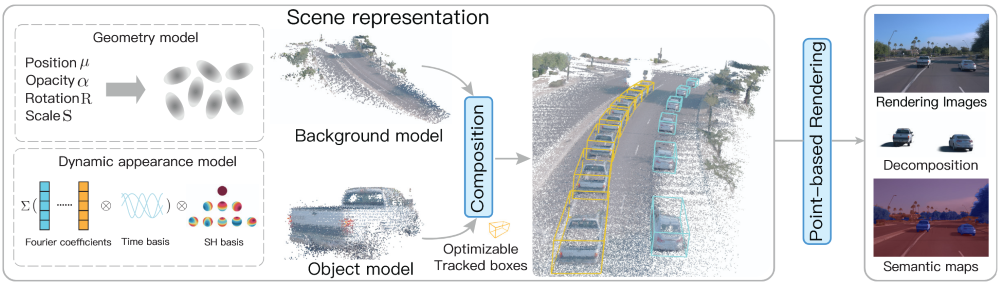
Street Gaussians Overview, showing the decomposition of background and foreground objects.#
Migration to gsplat’s Latest Release#
gsplat is a GPU-optimized library that provides a high-performance implementation of 3DGS. In order to support efficient computation on AMD and NVIDIA GPUs, we migrated to using a recent version of gsplat that supports AMD GPUs. This necessitated some changes to the way SG uses the library.
Starting from v1.0.0, gsplat simplified its rendering API by collapsing the legacy two-stage pipeline (explicit projection followed by rasterization) into a single rasterization front-end. This change reduces Python-side overhead, streamlines integration, and exposes intermediate projection results through returned metadata when needed (further migration details here).
Before (v0.1.11): The rasterization pipeline in older gsplat versions was a two-stage process:
project_gaussians: Project 3D Gaussians to 2D (computing 2D positions, depths, radii, conics, etc.)
rasterize_gaussians: Take those projected results and do the actual tile sorting and rasterization.
After Migration (v1.0.0+): The separate projection and rasterization functions are merged under a single rasterization call. This unified function:
Handles the projection of 3D Gaussians internally
Performs sorting and per-pixel compositing
Returns both final rendered results and intermediate data (e.g., 2D positions) via a metadata dictionary
Original SG uses gsplat==0.1.13, while the AMD-enabled gsplat is based on v1.5.3, so we migrated the Street Gaussians code to the newer gsplat API.
Installing Street Gaussians on AMD GPUs#
Requirements#
GPU platform: AMD Instinct™ MI300X
ROCm: version 6.4.3 (recommended)
AMD enabled gsplat for 3DGS rendering
PyTorch and NeRFStudio for the training pipeline
Docker for container builds
COLMAP and transformers for the data processing
Download and Pre-process the data#
Build the data pre-processing Dockerfile and run it.
git clone https://github.com/silogen/ai-samples.git
cd ras/street-gaussians
docker build -t street-gaussians-data-proc -f Dockerfile.data_proc .
Download the dataset and put it under /app/street-gaussians-ns/data directory.
Extract the data using the Waymo tool
python scripts/pythons/extract_waymo.py --waymo_root ./data --out_root ./data
Run the data preprocessing pipeline, including image segmentation for sky mask generation, dynamic object mask creation, COLMAP-based reconstruction of an initial point cloud, combining with LiDAR point cloud data, and extraction of object-specific regions into individual point clouds.
bash -e scripts/shells/data_process.sh [scene_dir]
Training and Evaluation#
Build the Street Gaussian docker file and run it.
git clone https://github.com/silogen/ai-samples.git
cd ras/street-gaussians
docker build -t street-gaussians .
Perform training:
sgn-train street-gaussians-ns \
    --experiment_name street-gaussians \
    --output_dir output/ \
    colmap-data-parser-config \
    --data [scene_dir]
Check the parameters that you can modify:
sgn-train -h
sgn-train street-gaussians-ns -h
sgn-train street-gaussians-ns colmap-data-parser-config -h
You can find the default parameters in sgn_config.py script.
Render using the trained model:
# To see all the parameters that you can modify: sgn-render -h
sgn-render \
    --load-config [config_path] \
    --model_names full_scene all_objects background
Evaluate the model:
sgn-eval --load-config [config_path]
New Rendering and Editing Features#
Our new release of SG adds some new features to the post-training rendering tools. Original SG included a rendering tool that loaded a trained scene and camera poses from the training data and rendered exactly the same views of the scene that were used for training the model, producing a video with frames corresponding to the frames of the training video.
We enhanced the rendering script to permit rendering of smooth videos at a higher framerate than the original training data by interpolating the training poses. This involves rendering views of the scene not seen at training time, which reveals new insights into the fidelity of the scene reconstruction outside the exact training poses.
We are interested in being able to use SG to generate novel training data for autonomous driving systems. SG permits easy generation of novel scenarios, since it explicitly separates the moving objects, making it easy to manipulate them to produce a modified scene. For example, we can change the speed of other cars or adjust their trajectory to simulate a car veering into the wrong lane, thus generating important but hard-to-collect training data.
As a simple demo of this capability, we introduce into SG’s rendering tool the possibility of specifying a number of different types of edits to the loaded training scenario. These include adjusting the speed of an individual car, making a car stop in the middle of its trajectory and swapping the trajectories of two cars.
Street Gaussians in Action#
We are using the Waymo Open Dataset for our experiments. This dataset is a large-scale, public dataset released to support research in autonomous driving and 3D computer vision. It contains high-resolution sensor data collected from real urban driving, including LiDAR point clouds, multiple camera images, and vehicle pose information, with detailed annotations for tasks like 2D/3D object detection, tracking, and motion prediction. The dataset features diverse environments (day/night, different weather, complex traffic scenes) and provides standardized benchmarks that allow researchers to fairly compare models, making it one of the most widely used and influential datasets in self-driving perception research.
You can perform scene editing using the commands below and the edit configuration files provided here.
# Edit ego vehicle pose
sgn-render \
    --load-config [config_path] \
    --model_names full_scene \
    --vehicle_config [edit_config_path] \
    --fps 30

# Edit moving vehicles
sgn-render \
    --load-config [config_path] \
    --model_names full_scene \
    --edits [edit_config_path] \
    --fps 30
The following video shows:
(top left) training data;
(top right) reconstruction of the training data;
(bottom left) the same reconstruction using interpolation to generate a smoother video at a higher framerate;
(bottom right) an edited version of the scenario (see below for examples of specific editing operations).
The following video illustrates a rendered Waymo scene, along with separate renderings that isolate only the moving vehicles and only the static background, showing how the model decomposes the scene into independent dynamic objects.
From left to right, you can see rendering of moving vehicles, background, and the whole scene.
Below, we present a couple of simple scene editing examples in which the vehicle trajectories are slightly modified.
A simple scene‑editing example where the ego vehicle is shifted to the right lane. Although all cameras were used during training, some aspects of the scene were not captured due to limitations in data collection.
A simple scene‑editing example where the blue vehicle is accelerated first and then stopped suddenly, and two other vehicles (the second and third cars in the right-to-left lane) swap places.
A simple scene‑editing example where two vehicles have been removed from the scene.
A simple scene‑editing example where the original vehicles are duplicated and rescaled.
Performance Benchmarks on AMD Instinct™ MI300X#
The following metrics have been used for evaluation:
PSNR (Peak Signal-to-Noise Ratio) measures how close a reconstructed or generated image is to a reference image by computing pixel-wise error; higher PSNR means less distortion, but it correlates poorly with human perception.
SSIM (Structural Similarity Index) improves on PSNR by comparing images based on luminance, contrast, and structural information, making it more aligned with perceived visual quality. It ranges from 0 to 1, where 1 means perfect similarity.
LPIPS (Learned Perceptual Image Patch Similarity) goes further by using deep neural network features to estimate perceptual similarity in a way that better aligns with human perception, making it especially effective for evaluating generative and enhancement models where perceptual realism matters more than pixel accuracy. It typically ranges from 0 to 1, where lower is better.
The table below reports the quality metrics and training time obtained by training on a collection of Waymo scenes.
Scene ID |
Frame Range |
Cameras |
PSNR |
SSIM |
LPIPS |
Training time (m:ss) |
|---|---|---|---|---|---|---|
1906113358876584689_1359_560_1379_560 |
Full scene |
Front camera |
32.59 |
0.93 |
0.26 |
17:50.67 |
[100, 190] |
FRONT camera |
37.25 |
0.95 |
0.19 |
19:31.57 |
|
2094681306939952000_2972_300_2992_300 |
Full scene |
Front camera |
32.96 |
0.93 |
0.21 |
34:47.04 |
[20, 115] |
FRONT camera |
34.12 |
0.93 |
0.21 |
25:12.93 |
|
8398516118967750070_3958_000_3978_000 |
Full scene |
Front camera |
32.56 |
0.90 |
0.26 |
17:16.39 |
[0, 160] |
FRONT camera |
34.41 |
0.93 |
0.20 |
16:03.89 |
|
10448102132863604198_472_000_492_000 |
Full scene |
Front camera |
27.39 |
0.85 |
0.27 |
20:28.26 |
[0, 85] |
FRONT camera |
25.76 |
0.82 |
0.38 |
20:25.74 |
Summary#
We demonstrated a practical migration of Street Gaussians to the modern gsplat rendering interface and validated a full AMD ROCm™ workflow on AMD Instinct™ MI300X. The resulting implementation is simpler to integrate, reduces legacy API friction, and provides a maintainable baseline for dynamic street-scene reconstruction and rendering on AMD GPUs.
This is a foundation for richer, more interactive street-scene workflows - including controllable trajectory edits, object behavior manipulation, and viewpoint changes in reconstructed 3D environments. We will share more results in follow-up posts, including stronger pipelines, improved robustness in challenging driving scenes, and new directions that push visual quality and controllability toward state-of-the-art.
Explore the codebase and technical specifications on our GitHub.
Acknowledgments#
The videos in this blog post were made using the Waymo Open Dataset, provided by Waymo LLC under the Waymo Dataset License Agreement for Non-Commercial Use, available at https://www.waymo.com/open/terms. Access to and use of the dataset and any derivative works are governed by the terms and conditions therein.
Additional Resources#
Kerbl, Bernhard, Georgios Kopanas, Thomas Leimkühler, and George Drettakis. “3D Gaussian Splatting for Real-Time Radiance Field Rendering.” ACM Trans. Graph. 42, no. 4 (2023): 139-1.
Ye, Vickie, Ruilong Li, Justin Kerr, Matias Turkulainen, Brent Yi, Zhuoyang Pan, Otto Seiskari et al. “gsplat: An open-source library for Gaussian splatting.” Journal of Machine Learning Research 26, no. 34 (2025): 1-17.
Yan, Yunzhi, Haotong Lin, Chenxu Zhou, Weijie Wang, Haiyang Sun, Kun Zhan, Xianpeng Lang, Xiaowei Zhou, and Sida Peng. “Street Gaussians: Modeling dynamic urban scenes with gaussian splatting.” In European Conference on Computer Vision, pp. 156-173. Cham: Springer Nature Switzerland, 2024.
Waymo Open Dataset: An autonomous driving dataset, https://www.waymo.com/open, 2019-2025.
Disclaimers#
Third-party content is licensed to you directly by the third party that owns the content and is not licensed to you by AMD. ALL LINKED THIRD-PARTY CONTENT IS PROVIDED “AS IS” WITHOUT A WARRANTY OF ANY KIND. USE OF SUCH THIRD-PARTY CONTENT IS DONE AT YOUR SOLE DISCRETION AND UNDER NO CIRCUMSTANCES WILL AMD BE LIABLE TO YOU FOR ANY THIRD-PARTY CONTENT. YOU ASSUME ALL RISK AND ARE SOLELY RESPONSIBLE FOR ANY DAMAGES THAT MAY ARISE FROM YOUR USE OF THIRD-PARTY CONTENT.