Optimizing MI300X Inter-Chiplet Communication via the RCCL Tuner API#

The AMD Instinct MI300X’s chiplet architecture introduces non-uniform communication paths when running in CPX/NPS4 mode — and RCCL default algorithms don’t account for this topology.
In this blog, you will learn how the MI300X’s XCD, IOD, and HBM hierarchy creates cross-IOD latency and bandwidth bottlenecks, how to use the RCCL Tuner Plugin API to build a rule-based, topology-aware tuner that selects the optimal algorithm and protocol per collective operation, and how to validate the results with rccl-tests.
By the end, you will have a working CSV-driven tuner plugin that automatically detects CPX/SPX mode and adapts its strategy accordingly.
Prerequisites#
Before diving in, make sure you have the following background and tools ready:
Hardware: Access to an AMD Instinct MI300X system (single-node with 8 GPUs)
Software: ROCm 6.3 or later installed, MPI runtime (e.g., OpenMPI)
Tools:
amd-smifor partition mode management,rccl-testsfor benchmarkingKnowledge: Familiarity with collective communication operations (AllReduce, AllGather), basic understanding of NUMA concepts, and ability to read C code
If you haven’t built RCCL from source before, refer to the RCCL GitHub repository for build instructions. The tuner plugin example is located at ext-tuner/example/ within the RCCL source tree.
Hardware Architecture: MI300X Chiplet and Non-Uniform Topology#
Before you can optimize communication on the MI300X, you need to understand its internal topology. Let’s walk through the building blocks step by step.
Building Blocks: XCD, IOD, CPX, and NPS#
The MI300X is not a monolithic chip — it is a chiplet-based design composed of multiple smaller dies connected through advanced 3D stacking. Take a look at the architecture diagram below (Source: AMD CDNA 3 architecture white paper):
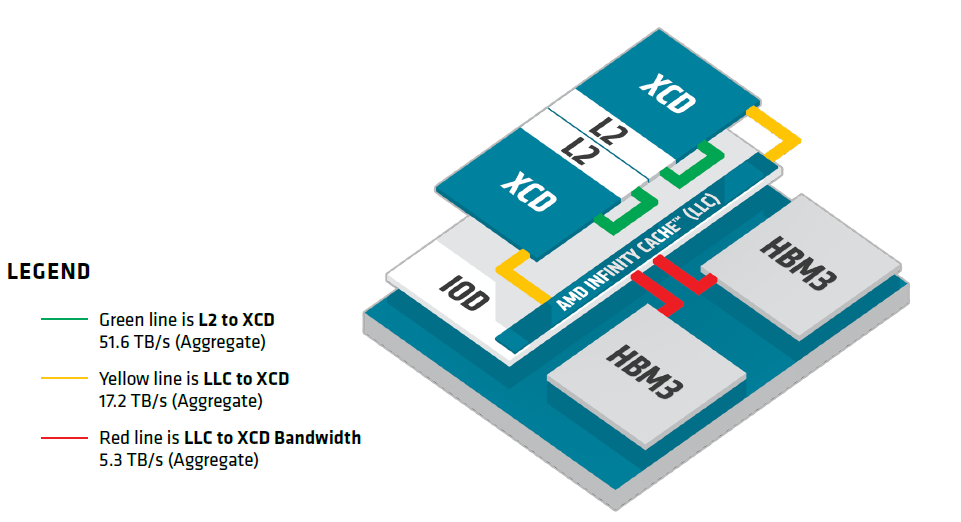
Notice the three-tier bandwidth hierarchy. Each tier represents a significant bandwidth drop:
Tier |
Component |
Aggregate Bandwidth |
What it means for you |
|---|---|---|---|
Top |
XCD (with L2 cache) |
51.6 TB/s (L2 ↔ XCD) |
Fastest tier — data stays within the compute die |
Middle |
IOD (with AMD Infinity Cache™ / LLC) |
17.2 TB/s (LLC ↔ XCD) |
~3x slower — data crosses from compute to I/O die |
Bottom |
HBM3 memory stacks |
5.3 TB/s (HBM ↔ LLC) |
~10x slower than top — the memory bandwidth bottleneck |
Within the same IOD, the data path follows XCD → L2 → LLC → HBM3 — fast and direct. But what happens when an XCD needs data from a different IOD? It must additionally traverse the Infinity Fabric die-to-die interconnect. Keep this in mind — it becomes critical in the next section.
Here are the key components you should know:
XCD (Accelerator Complex Die) — Each XCD contains 38 Compute Units (CUs) and its own L2 cache. The MI300X has 8 XCDs in total (304 CUs). Think of each XCD as a self-contained “mini-GPU.”
IOD (I/O Die) — Each IOD serves as the interconnect hub and memory controller, and contains the AMD Infinity Cache™ (LLC). The MI300X has 4 IODs, each managing 2 XCDs (3D-stacked on top) and 2 HBM3 stacks.
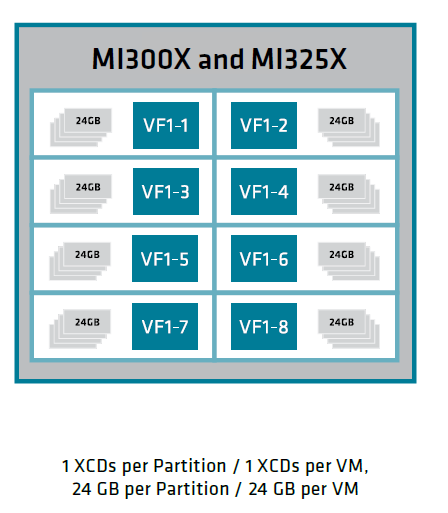
CPX (Core Partitioned Accelerator) — A compute partitioning mode that exposes each XCD as an independent logical GPU. Run amd-smi set --gpu all --compute-partition CPX to enable it.
Mode |
XCDs per Logical GPU |
Logical GPUs per MI300X |
|---|---|---|
SPX |
8 |
1 |
DPX |
4 |
2 |
CPX |
1 |
8 |
NPS (NUMA Per Socket) — Controls how 192 GB of HBM3 is logically divided:
SPX (MI300X) |
CPX (MI300X) |
|
|---|---|---|
NPS1 |
✔ |
✔ |
NPS4 |
✔ |
In NPS1, all HBM stacks are interleaved into a single address space — software sees uniform memory. In NPS4, each IOD owns its local 48 GB. This is where things get interesting.
To check your current partition mode, run amd-smi static --partition. To switch to CPX/NPS4, use:
amd-smi set --gpu all --compute-partition CPX followed by amd-smi set --gpu all --memory-partition NPS4.
From Uniform to Non-Uniform: The Case for a Tuner#
So why can’t RCCL handle this automatically? As described in “Hidden Costs Beneath the Unified Memory View”, RCCL default tuning model assumes:
All GPU-to-memory paths have uniform latency and bandwidth
Algorithms (Ring vs. Tree) and protocols (Simple, LL, LL128) are selected based on a generic model
No distinction between same-IOD and cross-IOD communication costs
Under xGMI full-mesh topology (SPX mode), this works fine — all GPU-to-GPU paths are roughly similar. But in CPX/NPS4 mode, the paths are no longer uniform:
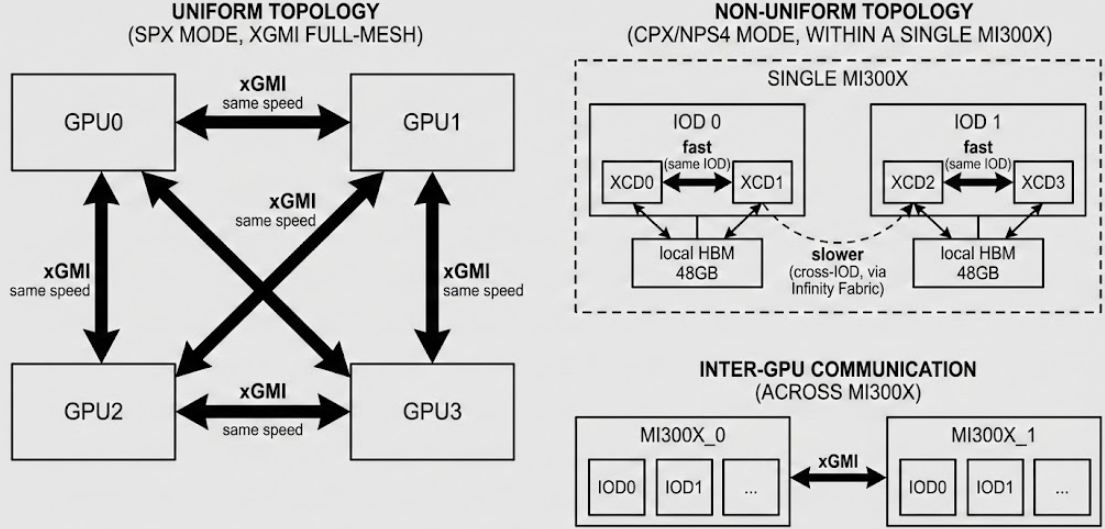
A custom tuner plugin can make topology-aware decisions at runtime. Here’s what it enables:
Decision Point |
Default Behavior |
What the Tuner Does |
|---|---|---|
Algorithm selection |
Generic model, path-unaware |
Selects Tree or Ring based on topology and message size |
Protocol selection |
Based on message size only |
Chooses LL, LL128, or Simple considering path characteristics |
Channel count |
Fixed or heuristic |
Adjusts channels based on actual interconnect bandwidth |
Config switching |
Static configuration |
Detects CPX/SPX mode at |
The key insight: the optimal communication strategy depends on both the message size AND the physical topology of the data path.
RCCL Tuner API Deep Dive#
Now that you understand why a tuner is needed, let’s explore how the RCCL Tuner Plugin API works. This section covers the API structure, the rule-based decision flow, and why a plugin is superior to environment variables.
API Structure: ncclTuner_v5_t#
The RCCL Tuner plugin is a shared library (.so file) that RCCL loads at runtime. It must export a symbol ncclTunerPlugin_v5 of type ncclTuner_v5_t:
typedef struct {
  const char* name;

  ncclResult_t (*init)(
    void** context, uint64_t commId,
    size_t nRanks, size_t nNodes,
    ncclDebugLogger_t logFunction,
    ncclNvlDomainInfo_v5_t* nvlDomainInfo,
    ncclTunerConstants_v5_t* constants
  );

  ncclResult_t (*getCollInfo)(
    void* context, ncclFunc_t collType,
    size_t nBytes, int numPipeOps,
    float** collCostTable, int numAlgo, int numProto,
    int regBuff, int* nChannels
  );

  ncclResult_t (*finalize)(void* context);
} ncclTuner_v5_t;
The lifecycle is straightforward — three functions, called at three points:
init()— Called once whenncclCommInitRank()creates a communicator. Read topology info, load your config files, and allocate state here.getCollInfo()— Called for every collective operation. This is where you influence algorithm/protocol selection.finalize()— Called onncclCommFinalize(). Clean up your resources.
Rule-Based Decision: How getCollInfo Works#
In our implementation, we don’t manually tune the internal cost table. Instead, we define declarative rules in a CSV config file and let getCollInfo match the current collective against these rules at runtime.
Each time RCCL is about to execute a collective, it calls getCollInfo() with the following runtime context:
Runtime Context |
What it tells you |
|---|---|
|
What operation? (AllReduce, AllGather, …) |
|
How large is the message? |
|
How many ranks and nodes? |
|
How many pipelined operations? |
The plugin iterates through its loaded rules and applies the first match. Here’s the format:
Rule Format:
  colltype, minbytes, maxbytes, algorithm, protocol, channels, nNodes, nRanks

Example:
  allreduce, 0, 262144, tree, ll, -1, 1, 64

Matching Logic:
  if (rule.collType == collType &&
      nBytes >= rule.minBytes && nBytes <= rule.maxBytes &&
      rule.nNodes == nNodes && rule.nRanks == nRanks)
    → apply this rule
Here’s what each field does:
Rule Field |
Meaning |
|---|---|
|
Which collective to match ( |
|
Message size range this rule applies to |
|
|
|
|
|
Number of channels ( |
|
Topology filter — only apply when topology matches |
Why rules instead of manual cost table tuning? The underlying API uses a cost table (collCostTable[algo][proto]), but directly manipulating cost values requires deep knowledge of RCCL internal latency model. The rule-based approach abstracts this: when a rule matches, the plugin sets the preferred algo/proto cost to 0.0 (lowest cost wins). You focus on what to select, not how the cost model works.
If no rule matches, getCollInfo() returns without modifying anything and RCCL falls back to its default tuning. This means your plugin never makes things worse for uncovered scenarios — a safe design pattern.
Plugin vs. Environment Variables#
You might ask: “Can’t I just set NCCL_ALGO=RING and NCCL_PROTO=SIMPLE as environment variables?” Yes — but that’s a static, global decision. Compare the two approaches:
Aspect |
Environment Variables |
Tuner Plugin |
|---|---|---|
Granularity |
One setting for ALL collectives |
Per-collective, per-size |
Adaptability |
Fixed at process start |
Runtime topology-aware |
Message size awareness |
✗ |
✔ |
Collective type awareness |
✗ |
✔ |
Topology awareness |
✗ |
✔ |
Fallback safety |
If wrong, everything suffers |
RCCL falls back to defaults |
Consider this scenario: for a 1 KB AllReduce (latency-bound), you want Tree + LL. For a 1 GB AllReduce (bandwidth-bound), you want Ring + Simple. A tuner handles both cases with different rules; a single environment variable cannot.
Implementation: A CPX-Aware Tuner Plugin#
Ready to build your own tuner? This section walks you through the RCCL example plugin, shows you how to extend it for CPX-awareness, and gets it running on your system.
Code Walkthrough: CSV-Driven Plugin#
The RCCL repository includes an example tuner plugin that reads tuning configurations from a CSV file. Let’s walk through the key components.
Step 1: Define the plugin entry point#
Every RCCL tuner plugin must export a ncclTunerPlugin_v5 symbol. This tells RCCL which functions to call:
const ncclTuner_v5_t ncclTunerPlugin_v5 = {
  .name      = "Example",
  .init      = pluginInit,
  .getCollInfo = pluginGetCollInfo,
  .finalize  = pluginFinalize
};
Step 2: Initialize and load rules#
In pluginInit(), allocate your context and load tuning rules from a config file:
ncclResult_t pluginInit(void** context, uint64_t commId,
                        size_t nRanks, size_t nNodes,
                        ncclDebugLogger_t logFunction,
                        ncclNvlDomainInfo_v5_t* nvlDomainInfo,
                        ncclTunerConstants_v5_t* constants) {
  TunerContext* ctx = (TunerContext*)malloc(sizeof(TunerContext));
  ctx->nRanks = nRanks;
  ctx->nNodes = nNodes;
  ctx->logFunction = logFunction;

  const char* configFile = getenv("NCCL_TUNER_CONFIG_FILE");
  if (!configFile) configFile = "nccl_tuner.conf";
  loadConfig(ctx, configFile);

  *context = ctx;
  return ncclSuccess;
}
Step 3: Match rules in getCollInfo()**#
For each collective call, iterate through loaded rules and apply the first match:
ncclResult_t pluginGetCollInfo(void* context, ncclFunc_t collType,
                               size_t nBytes, int numPipeOps,
                               float** collCostTable,
                               int numAlgo, int numProto,
                               int regBuff, int* nChannels) {
  TunerContext* ctx = (TunerContext*)context;
  float (*table)[NCCL_NUM_PROTOCOLS] =
    (float (*)[NCCL_NUM_PROTOCOLS])collCostTable;

  for (int i = 0; i < ctx->numConfigs; i++) {
    TuningConfig* config = &ctx->configs[i];
    if (config->collType == collType &&
        nBytes >= config->minBytes &&
        nBytes <= config->maxBytes &&
        /* topology matching ... */) {
      table[config->algorithm][config->protocol] = 0.0;
      if (config->nChannels != -1)
        *nChannels = config->nChannels;
      return ncclSuccess;
    }
  }
  return ncclSuccess;
}
Step 4: Write your config file**#
Create nccl_tuner_nps4.conf with your tuning rules:
# colltype, minbytes, maxbytes, algorithm, protocol, channels, nNodes, nRanks
allreduce, 0, 262144, tree, ll, -1, 1, 64
This rule tells the plugin: for AllReduce with messages ≤ 256 KB on a single-node 64-rank setup, use Tree + LL.
Why does Tree + LL work well here? In CPX/NPS4 mode with 64 ranks, a Ring AllReduce requires 2(n-1) = 126 sequential steps, each traversing cross-IOD and cross-GPU links. A Tree AllReduce requires only 2·log₂(n) = 12 steps — a 10x reduction. Combined with the LL protocol’s lower per-message latency, Tree + LL significantly reduces end-to-end latency for small, latency-bound messages.
Tree + LL advantage reverses for large messages. Tree’s fan-in/fan-out creates bandwidth bottlenecks at root nodes, and LL 50% data overhead becomes significant. Always bound your Tree + LL rules to small message sizes and add separate ring, simple rules for larger transfers.
Step 5: Add CPX/SPX auto-detection#
To make the plugin topology-aware, read the Linux sysfs to detect the current compute partition mode:
static int detect_cpx_mode(void) {
    for (int card = 0; card < 16; card++) {
        char path[256];
        char buf[64] = {0};

        snprintf(path, sizeof(path),
                 "/sys/class/drm/card%d/device/current_compute_partition", card);

        FILE* f = fopen(path, "r");
        if (!f) continue;

        if (fgets(buf, sizeof(buf), f)) {
            buf[strcspn(buf, "\n")] = 0;
            fclose(f);
            if (strcmp(buf, "CPX") == 0) return 1;
            if (strcmp(buf, "SPX") == 0) return 0;
            return -1;
        }
        fclose(f);
    }
    return -1;
}
Then use it in pluginInit() to load the right config file:
ncclResult_t pluginInit(void** context, ...) {
    TunerContext* ctx = (TunerContext*)malloc(sizeof(TunerContext));
    // ... initialize ctx ...

    int isCpxMode = detect_cpx_mode();
    if (isCpxMode == 1) {
        loadConfig(ctx, "/path/to/nccl_tuner_nps4.conf");
    } else {
        loadConfig(ctx, "/path/to/nccl_tuner_nps1.conf");
    }

    *context = ctx;
    return ncclSuccess;
}
The plugin now automatically adapts:
CPX mode → Loads NPS4-specific rules optimized for cross-IOD NUMA topology
SPX mode → Loads NPS1 rules using default strategies for unified memory
Try verifying the detection by running with NCCL_DEBUG=INFO NCCL_DEBUG_SUBSYS=TUNING — the plugin should log which config file it loaded.
Build and Install#
Follow these steps to build and deploy your tuner plugin:
Step 1: Build the plugin#
cd $RCCL_HOME/ext-tuner/example/
make
This produces libnccl-tuner.so.
Step 2: Set environment variables and run**#
export NCCL_TUNER_PLUGIN=/path/to/libnccl-tuner.so
export NCCL_DEBUG=INFO
export NCCL_DEBUG_SUBSYS=TUNING
The plugin auto-detects CPX/SPX mode at initialization — no need to manually specify NCCL_TUNER_CONFIG_FILE.
Common pitfall: If the plugin doesn’t load, verify the .so file path is correct and the file has read permissions. Check the RCCL debug output for messages like TUNER: Initializing tuner.... If you see no tuner-related messages, the path is likely wrong.
Performance Validation#
With your tuner plugin built and configured, let’s validate it. This section shows you how to run benchmarks and interpret the results.
Benchmark Setup#
Use the rccl-tests suite to benchmark AllReduce on an 8x MI300X node in CPX/NPS4 mode (64 ranks).
Test environment: Single node with 8 AMD Instinct MI300X GPUs, CPX compute partition, NPS4 memory partition (64 logical GPUs), ROCm 7.2, RCCL develop branch, OpenMPI 5.0.
Step 1: Run baseline (default RCCL — typically Ring + Simple)#
mpirun -np 64 --bind-to numa \
  rccl-tests/build/all_reduce_perf -b 1 -e 128M -f 2 -g 1
Step 2: Run with tuner plugin#
mpirun -np 64 --bind-to numa \
  -x NCCL_TUNER_PLUGIN=/path/to/libnccl-tuner.so \
  rccl-tests/build/all_reduce_perf -b 1 -e 128M -f 2 -g 1
Step 3 (optional): Profile all algorithm/protocol combinations#
To understand which combination works best at each message size, run all six combinations individually:
# Ring + Simple (default baseline)
mpirun -np 64 --bind-to numa -x NCCL_ALGO=ring -x NCCL_PROTO=simple \
  rccl-tests/build/all_reduce_perf -b 1 -e 128M -f 2 -g 1

# Tree + LL (optimized for small messages)
mpirun -np 64 --bind-to numa -x NCCL_ALGO=tree -x NCCL_PROTO=ll \
  rccl-tests/build/all_reduce_perf -b 1 -e 128M -f 2 -g 1

# Repeat for: ring+ll, ring+ll128, tree+ll128, tree+simple
# Note: some combinations require additional env vars or source patches.
# See "Reproducibility notes" in the results analysis section for details.
Compare the time and busbw columns across all runs to identify the optimal algorithm/protocol for each message size range.
Troubleshooting: If you see no performance difference, check:
Is the tuner actually loaded? Look for
TUNERrelated information in the debug output.Do your rules match the test topology? Verify
nRanksandnNodesin your config match the actual run.Is the message size range covered? Rules only apply within their
minbytes-maxbytesrange.
Results Analysis#
To understand the performance landscape, we benchmarked all six algorithm/protocol combinations for 64-rank AllReduce on a single MI300X node in CPX/NPS4 mode. The results reveal clear performance zones that inform tuner rule design.
Tree+LL latency speedup vs. default RCCL (Ring+Simple)#
The following figure shows the latency speedup of Tree + LL relative to the default RCCL behavior (Ring + Simple). Values above the 1.0x baseline indicate Tree + LL is faster.
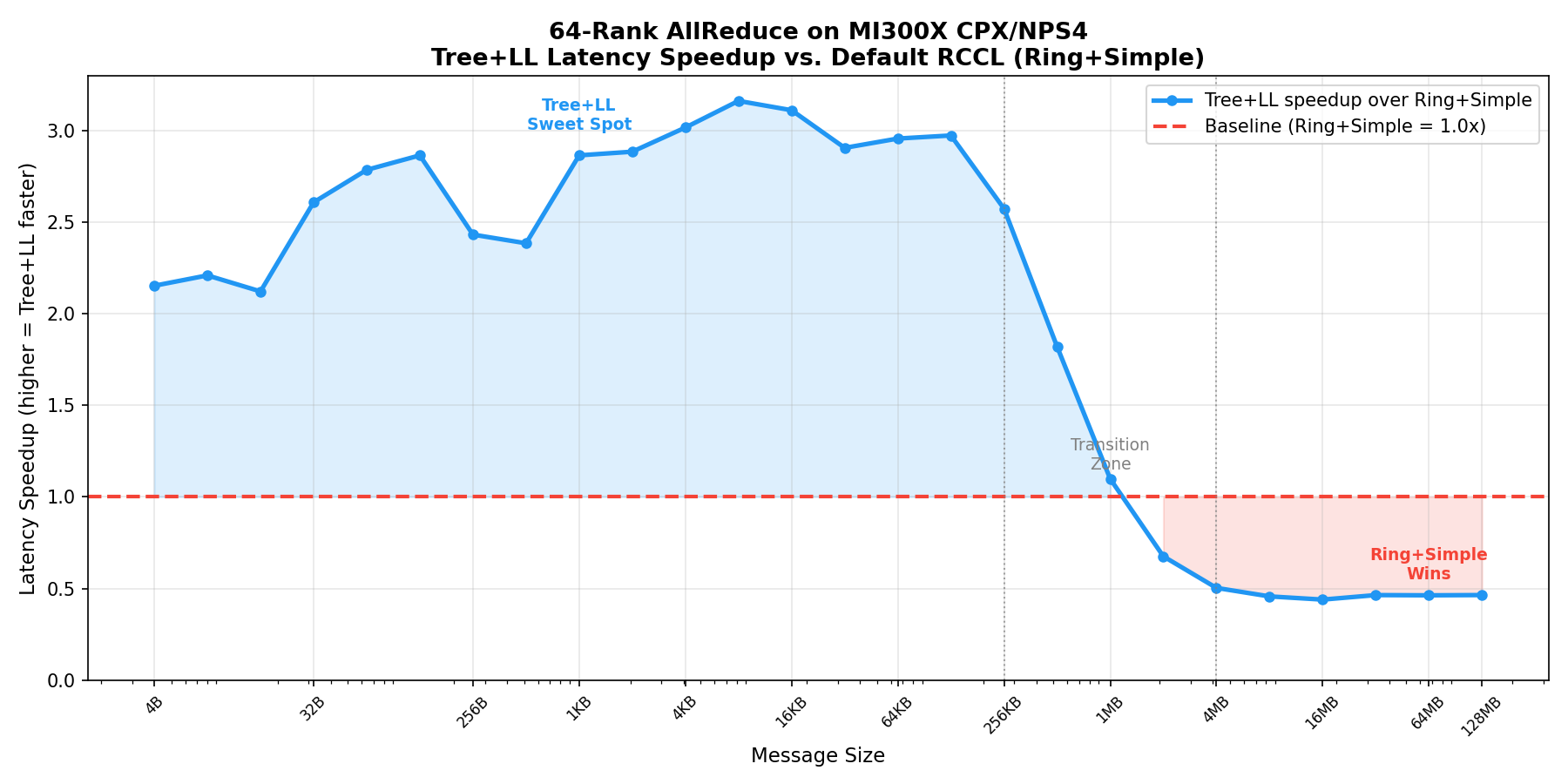
The curve reveals that Tree + LL delivers 2-3x lower latency across a wide range of small message sizes, with peak speedup of ~3.1x around 4 KB - 16 KB. The crossover point — where Ring + Simple becomes faster — occurs around 1-4 MB.[1]
Bus bandwidth across all algorithm/protocol combinations#
The next figure compares the achieved bus bandwidth for all six combinations, showing how each configuration saturates at different throughput levels.
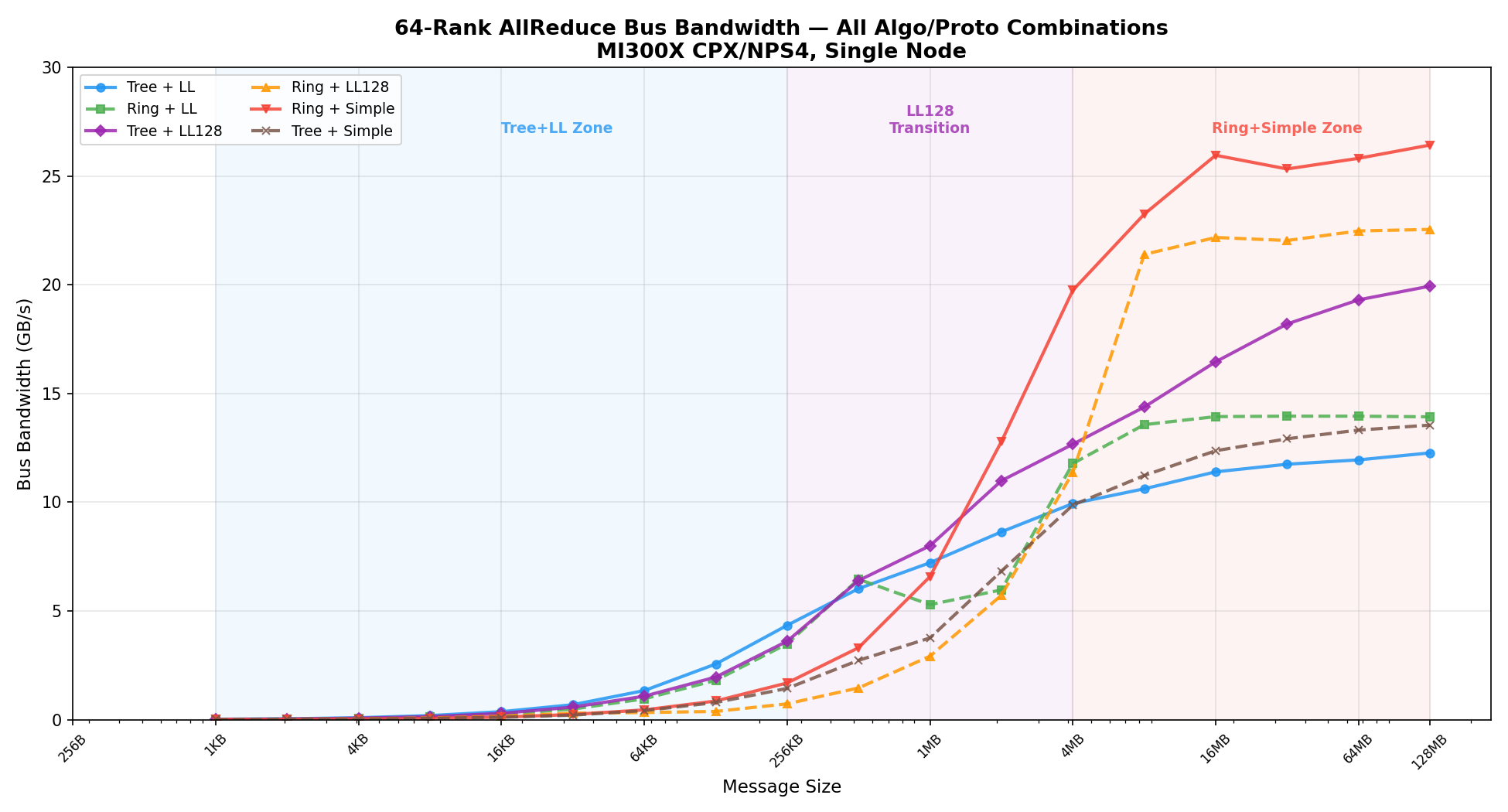
Ring + Simple reaches the highest peak bandwidth (~26 GB/s), while Tree + LL saturates around ~12 GB/s due to the LL protocol’s 50% data overhead. Tree + LL128 offers a middle ground, reaching ~20 GB/s — making it the best choice in the transition zone.
Latency comparison (representative message sizes)#
The following table shows measured out-of-place latency (in microseconds) for each combination. The lowest latency per row is highlighted:
Size |
Tree+LL |
Ring+LL |
Tree+LL128 |
Ring+LL128 |
Ring+Simple |
Tree+Simple |
|---|---|---|---|---|---|---|
32 B |
76 |
70 |
106 |
97 |
198 |
244 |
1 KB |
94 |
154 |
123 |
203 |
268 |
248 |
16 KB |
87 |
129 |
111 |
197 |
271 |
302 |
256 KB |
119 |
148 |
143 |
706 |
306 |
359 |
1 MB |
286 |
390 |
258 |
708 |
314 |
549 |
4 MB |
831 |
701 |
652 |
726 |
418 |
836 |
128 MB |
21541 |
18970 |
13251 |
11720 |
9996 |
19503 |
Three distinct performance zones emerge from the data:
Message Size Range |
Best Configuration |
Why |
|---|---|---|
< 256 KB |
Tree + LL |
Tree’s logarithmic step count (12 vs Ring’s 126) dominates; LL protocol minimizes per-step latency. Speedup: 2-3x over default. |
256 KB - 4 MB |
Tree + LL128 |
LL128 reduces data overhead compared to LL while retaining Tree’s step advantage. This transition zone bridges latency-bound and bandwidth-bound regimes. |
> 4 MB |
Ring + Simple |
Communication becomes bandwidth-bound. Ring’s pipelined data flow and Simple protocol’s full-bandwidth transfers yield the highest throughput (~26 GB/s). |
Why these zones? The latency model#
RCCL internally estimates the cost of each algorithm/protocol combination using a latency model. Understanding this model explains why the zone boundaries fall where they do.
For a given message of nBytes, the estimated time is:
time = latency + nBytes / bandwidth
Where latency depends on the algorithm’s step count:
Algorithm |
Step Count (nRanks = 64) |
Latency Formula |
|---|---|---|
Ring |
2 x nRanks - 1 = 127 |
baseLat + 127 x hwLat |
Tree |
2 x log2(nRanks) = 12 |
baseLat + 12 x hwLat |
For small messages, nBytes / bandwidth is negligible — latency dominates. Tree’s 12-step path is ~10x fewer hops than Ring’s 127 steps, which directly translates to the 2-3x speedup we measured.
As message size grows, the nBytes / bandwidth term takes over. Tree’s fan-in/fan-out topology creates bandwidth bottlenecks at interior nodes, while Ring’s pipelined data flow achieves higher sustained throughput. This is why Ring + Simple overtakes Tree + LL around 1-4 MB.
The LL protocol adds another dimension: it uses 4-byte flags per 8-byte payload (50% overhead), limiting effective bandwidth. LL128 reduces this overhead by packing 120 useful bytes per 128-byte line (~6% overhead), explaining why Tree + LL128 outperforms Tree + LL in the transition zone.
Recommended tuner configuration#
In the implementation walkthrough, we started with a single Tree + LL rule targeting small messages. The profiling results above reveal that a complete configuration needs additional rules for the transition and bandwidth-bound zones. A production-ready config file for 64-rank CPX/NPS4 AllReduce should use three rules:
# colltype, minbytes, maxbytes, algorithm, protocol, channels, nNodes, nRanks
allreduce, 0, 262144, tree, ll, -1, 1, 64
allreduce, 262145, 4194304, tree, ll128, -1, 1, 64
allreduce, 4194305, 17179869184, ring, simple, -1, 1, 64
Reproducibility notes#
Not all algorithm/protocol combinations are available by default in RCCL on MI300X (gfx942). The following table summarizes what is needed to test each combination:
Algo + Proto |
How to Enable |
Additional Requirements |
Reason |
|---|---|---|---|
Ring + Simple |
|
None (default behavior) |
RCCL default selection for MI300X |
Ring + LL |
|
None |
Supported out of the box |
Tree + LL |
|
None |
Supported out of the box |
Ring + LL128 |
|
|
LL128 is disabled by default for certain topologies on MI300X |
Tree + LL128 |
|
|
Same as above |
Tree + Simple |
Not available via env vars |
Source code patch required |
RCCL unconditionally blocks Tree+Simple on gfx942/gfx950 single-node in |
The tuner plugin is not subject to these restrictions when selecting Ring+LL128 or Tree+LL128, because it modifies the internal cost table directly. However, Tree+Simple cannot be selected even by the tuner — RCCL marks it as IGNORE in the cost table before the tuner runs, so setting its cost to 0.0 has no effect.
Key takeaways from the results:
The sweet spot for Tree + LL is 4 B - 256 KB: Tree’s hierarchical reduction reduces the 126-step Ring path to just 12 steps. Combined with LL low per-message latency, this yields up to 3.1x speedup over the default Ring + Simple configuration.
The crossover occurs at 1-4 MB, not 256 KB: Tree + LL remains faster than Ring + Simple well beyond 256 KB. A middle-ground configuration using Tree + LL128 bridges the gap between the latency-bound and bandwidth-bound regimes.
A three-zone config outperforms any single rule: No single algorithm/protocol combination is optimal across all message sizes. The recommended three-rule config ensures each size range uses its best-performing combination, while RCCL default tuning handles any uncovered scenarios.
Extend to other collectives: Profile your actual AI training workload to identify which collective types (AllGather, ReduceScatter) and message sizes dominate, then add corresponding rules to your config file.
Summary#
Optimized RCCL configurations can improve small message AllReduce latency and deliver balanced performance across message sizes on AMD Instinct™ MI300X GPU systems.[1]
MI300X CPX/NPS4 mode exposes a non-uniform communication topology that generic collective tuning does not fully capture. By walking through the XCD, IOD, HBM, and xGMI data paths, this blog showed why collective performance varies with message size and why a single, static algorithm choice is often too coarse for real workloads.
You also learned how to turn that topology knowledge into an actionable RCCL tuner plugin. Starting from the RCCL example plugin, you built a CSV-driven rule system, added CPX/SPX mode auto-detection through sysfs, and used rccl-tests to validate which algorithm and protocol combinations perform best across the latency-bound, transition, and bandwidth-bound message ranges. The result was a three-zone tuner configuration — Tree + LL for small messages, Tree + LL128 for the transition zone, and Ring + Simple for large transfers — that covers the full size spectrum while safely falling back to RCCL defaults for anything uncovered.
The main deliverable is a repeatable tuning workflow rather than a one-off config: profile your target collective patterns, map each message-size range to its best algorithm and protocol, encode those choices as tuner rules, and validate every change before applying it to production training. Use this approach as a starting point for adapting RCCL tuning to your own MI300X topology and application mix.
Additional Resources#
Disclaimers#
Third-party content is licensed to you directly by the third party that owns the content and is not licensed to you by AMD. ALL LINKED THIRD-PARTY CONTENT IS PROVIDED “AS IS” WITHOUT A WARRANTY OF ANY KIND. USE OF SUCH THIRD-PARTY CONTENT IS DONE AT YOUR SOLE DISCRETION AND UNDER NO CIRCUMSTANCES WILL AMD BE LIABLE TO YOU FOR ANY THIRD-PARTY CONTENT. YOU ASSUME ALL RISK AND ARE SOLELY RESPONSIBLE FOR ANY DAMAGES THAT MAY ARISE FROM YOUR USE OF THIRD-PARTY CONTENT.