Spur: Modern GPU Job Scheduling for HPC and AI Workloads#

The explosion of AI and large-scale model training has fundamentally changed how organizations think about GPU clusters. Traditional HPC schedulers were built in an era when CPUs dominated, and GPU support was retrofitted as an afterthought. Meanwhile, Kubernetes emerged from the cloud-native world with powerful orchestration primitives—but batch GPU scheduling and Slurm-style job workflows remain friction points unless you assemble a full ecosystem of operators, custom schedulers, and queueing layers on top of the default control plane.
We’re introducing Spur and Spur-Cloud—a modern, GPU-first job scheduler written in Rust, developed by AMD and open-sourced under Apache 2.0 as part of AMD’s Open Ecosystem initiative. Spur provides Slurm-compatible CLI and APIs (with broader parity actively under development) while delivering features designed for today’s AI infrastructure: topology-aware GPU scheduling, embedded high availability via Raft consensus, native Kubernetes integration, and vendor-agnostic device management through the Container Device Interface (CDI).
In this post, we’ll explore how Spur addresses operational pain points in GPU cluster management, demonstrate its core capabilities with hands-on examples, and show how Spur-Cloud extends the platform into a complete GPU-as-a-Service solution.
The GPU Scheduling Challenge#
Managing GPU clusters at scale presents unique challenges. Training a large language model might require 64 MI300X GPUs with XGMI interconnect topology, scheduled across 8 nodes with precise locality constraints. A computer vision pipeline might need fractional GPU allocation—8 independent jobs sharing a single 8-GPU node. Inference workloads demand rapid placement and teardown across heterogeneous hardware (MI300X, MI250, A100). Traditional schedulers struggle with this complexity.
Consider a common scenario: you submit a multi-node training job requesting --gres=gpu:mi300x:8 across 4 nodes. Your scheduler must:
Identify suitable nodes with the correct GPU type and available capacity
Respect topology to minimize inter-GPU communication latency
Backfill efficiently by allowing smaller jobs to run without delaying high-priority work
Handle failures gracefully when a GPU goes offline mid-job
Integrate with containers for reproducible environments
Spur was built from the ground up to handle these requirements with first-class GPU support, not as an afterthought.
Why a New Scheduler?#
The HPC Legacy: Operational Complexity#
Traditional HPC schedulers proved the batch job model over decades, but architectures designed for the 2000s carry operational overhead that modern infrastructure shouldn’t require: external database dependencies for accounting, shared state management for HA, C codebases accumulating memory-safety CVEs, and plugin-based GPU support that requires careful flag combinations rather than sensible defaults.
The Cloud-Native Path: Assembly Required#
Kubernetes provides powerful orchestration primitives and a rich ecosystem, but running GPU batch workloads requires assembling multiple components:
Install K8s cluster (control plane, workers, CNI)
Deploy GPU device plugin (vendor-specific)
Add custom scheduler (Volcano, Yunikorn) for advanced placement
Install queue manager (Kueue) for batch job queuing
Configure topology awareness via custom schedulers
Set up resource quotas, RBAC, monitoring
This flexibility is valuable for organizations running diverse workloads, but for GPU-focused clusters, the complexity becomes overhead. Default K8s behavior requires explicit podAffinity and topologySpreadConstraints to guarantee GPU locality—possible, but not automatic.
Spur’s Philosophy: GPU-First, Batteries Included#
Spur asks: what if we rebuilt HPC batch scheduling with 2026 technology and GPU workloads as the primary use case?
Slurm’s proven patterns (GRES syntax, backfill scheduling, partition model) plus Rust memory safety
Embedded Raft consensus (no external database) + automatic failover
Built-in container runtime (no external dependencies) + CDI GPU injection
Topology-aware GPU scheduling as default behavior, not opt-in flags
The result: operational simplicity without sacrificing the batch job model that HPC users rely on.
Architecture Overview#
Spur consists of modular components that can be deployed standalone or within Kubernetes:
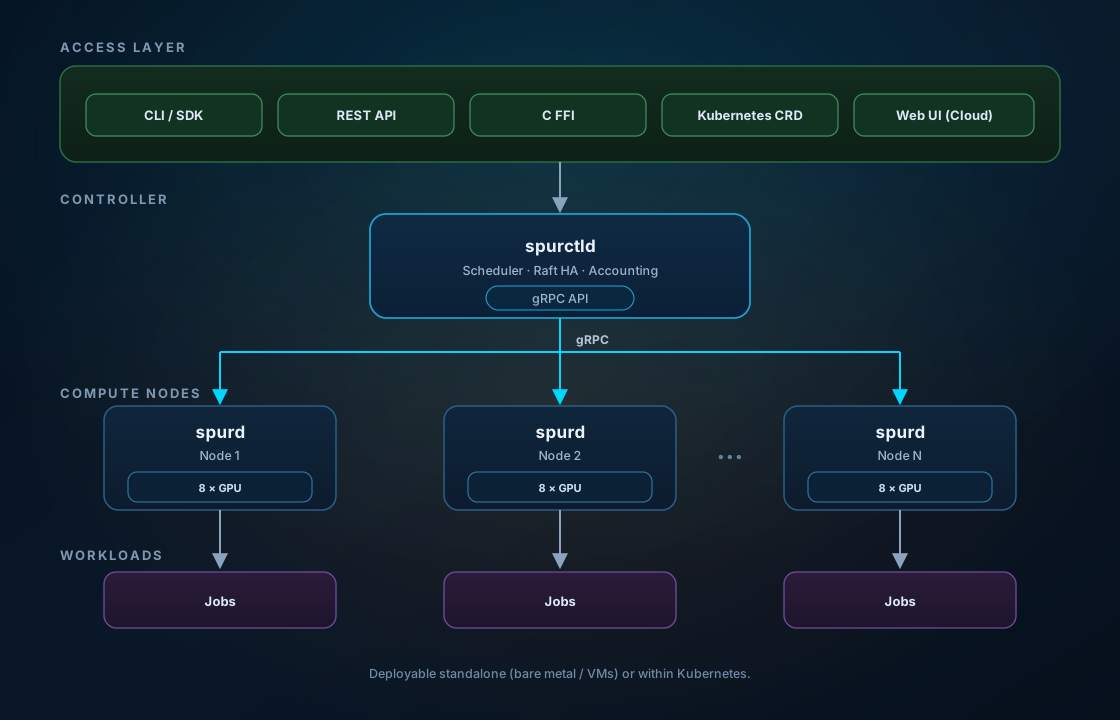
Components:
spurctld — Controller daemon that manages cluster state, runs the scheduler, and handles job submissions (gRPC port 6817)
spurd — Agent daemon running on each compute node, responsible for resource discovery, job execution, and health reporting (port 6818)
spurrestd — REST API server exposing Slurm-compatible endpoints for legacy tooling
spur-k8s operator — Kubernetes controller that watches SpurJob CRDs and creates Pods with GPU resources
spur-cli — Multi-call binary providing
sbatch,squeue,scancel, etc., for CLI compatibility
State and persistence: Cluster scheduling state—jobs, nodes, partitions, and the queue—is replicated via embedded Raft consensus in spurctld. No external database is required to submit, schedule, and run jobs. Spur-Cloud adds its own PostgreSQL database for billing and session metadata.
Core Capabilities#
1. GPU-First Scheduling with Topology Awareness#
Spur’s backfill scheduler understands GPU topology through CDI device annotations and system topology detection. When you request GPUs, the scheduler considers:
Device type matching (
gpu:mi300x:4,gpu:a100:2)Interconnect topology (XGMI, NVLink, PCIe) to minimize communication overhead
Fractional allocation for efficient multi-tenancy on high-capacity nodes
The default Kubernetes scheduler treats GPUs as opaque extended resources and does not natively understand XGMI/NVLink locality—but production K8s clusters often add topology awareness via schedulers like Volcano, Yunikorn, or Kueue, and Operators with Dynamic Resource Allocation (DRA). Spur integrates topology-aware batch scheduling into the controller itself, without requiring a separate scheduler stack for HPC-style jobs.
Here’s an example—submitting a distributed training job across 2 nodes with 8 MI300X GPUs each:
#!/bin/bash
#SBATCH --job-name=llama-pretrain
#SBATCH --nodes=2
#SBATCH --gres=gpu:mi300x:8
#SBATCH --time=12:00:00
#SBATCH --partition=gpu

export MASTER_ADDR=$(scontrol show hostname $SPUR_JOB_NODELIST | head -n1)
export MASTER_PORT=29500

srun torchrun \
  --nnodes=$SPUR_JOB_NUM_NODES \
  --nproc_per_node=$SPUR_JOB_GPUS \
  --rdzv_id=$SPUR_JOB_ID \
  --rdzv_backend=c10d \
  --rdzv_endpoint=$MASTER_ADDR:$MASTER_PORT \
  train.py --model llama3-70b
Submit the job:
$ spur submit pretrain.sh
Submitted batch job 1042

$ spur queue
JOBID  PARTITION  NAME            USER   ST  TIME   NODES  NODELIST
1042   gpu        llama-pretrain  alice  R   0:23   2      mi300-[1-2]
The scheduler automatically:
Selected nodes
mi300-1andmi300-2with available MI300X GPUsSet
ROCR_VISIBLE_DEVICES=0,1,2,3,4,5,6,7on each allocated nodeProvided environment variables (
SPUR_JOB_NODELIST,SPUR_JOB_GPUS,SPUR_JOB_NUM_NODES) for MPI-style coordination
2. Vendor-Agnostic Device Management via CDI#
Spur uses the Container Device Interface (CDI) for GPU device management, eliminating hardcoded vendor logic. CDI specifications describe how to inject devices, including AMD ROCm GPUs and other vendor accelerators, into containers.
From the CDI implementation in the spur-devices crate, here’s how Spur discovers GPUs:
// Auto-discover AMD GPUs via KFD when CDI cache is empty
pub fn discover_to_cdi(vendor: &str) -> Result<Vec<CdiSpec>> {
    match vendor {
        "amd.com" => {
            let gpus = kfd::discover_gpus()?;
            let specs = gpus.into_iter().map(|gpu| CdiSpec {
                kind: "amd.com/gpu".into(),
                devices: vec![CdiDevice {
                    name: format!("gpu{}", gpu.device_id),
                    container_edits: ContainerEdits {
                        device_nodes: vec![
                            DeviceNode { path: "/dev/kfd".into(), .. },
                            DeviceNode {
                                path: format!("/dev/dri/renderD{}", gpu.render_node),
                                ..
                            },
                        ],
                        env: vec![format!("ROCR_VISIBLE_DEVICES={}", gpu.device_id)],
                        ..
                    },
                }],
                ..
            }).collect();
            Ok(specs)
        }
        _ => bail!("Unsupported vendor: {}", vendor),
    }
}
This approach provides several advantages:
Vendor neutrality — Support new GPU types by adding CDI specs, no code changes
Rootless containers — Device injection works without privileged containers
Interoperability — CDI is a CNCF standard supported by containerd, CRI-O, Podman
On startup, spurd reads CDI specs from /etc/cdi/ and /var/run/cdi/, falling back to auto-discovery via sysfs for AMD GPUs if no specs exist. Administrators can provide custom CDI specs for exotic hardware without modifying Spur.
3. Built-in High Availability with Raft Consensus#
Traditional HPC schedulers rely on external databases (MySQL, MariaDB) for accounting state and often use manual failover for the controller. Spur embeds Raft consensus directly in spurctld for scheduling state, providing:
Leader election — Active-passive HA with sub-second failover
State replication — Job and cluster state replicated to followers via the Raft log
Operational simplicity — Scheduling durability without running a separate consensus service (contrast with Kubernetes, which uses etcd—a separate Raft-backed store—for control-plane state)
This is not a novel consensus algorithm; etcd and Spur both rely on Raft. The difference is deployment model: Spur co-locates scheduling state with the controller binary, which reduces moving parts for bare-metal and batch-focused clusters.
Deploy a 3-node Raft cluster in Kubernetes:
apiVersion: apps/v1
kind: StatefulSet
metadata:
  name: spurctld
  namespace: spur
spec:
  serviceName: spurctld
  replicas: 3
  selector:
    matchLabels:
      app: spurctld
  template:
    metadata:
      labels:
        app: spurctld
    spec:
      containers:
      - name: spurctld
        image: ghcr.io/rocm/spur:v0.9.0
        command: ["/usr/local/bin/spurctld"]
        args:
        - --config=/etc/spur/spur.conf
        - --log-level=info
        volumeMounts:
        - name: config
          mountPath: /etc/spur
        - name: state
          mountPath: /var/spool/spur
      volumes:
      - name: config
        configMap:
          name: spur-config
  volumeClaimTemplates:
  - metadata:
      name: state
    spec:
      accessModes: ["ReadWriteOnce"]
      resources:
        requests:
          storage: 10Gi
The corresponding config (spur.conf):
cluster_name = "spur-k8s"

[controller]
peers = [
  "spurctld-0.spurctld.spur.svc.cluster.local:6821",
  "spurctld-1.spurctld.spur.svc.cluster.local:6821",
  "spurctld-2.spurctld.spur.svc.cluster.local:6821",
]

[scheduler]
interval_secs = 2
plugin = "backfill"

[[partitions]]
name = "default"
state = "UP"
default = true
The Raft node ID is auto-detected from the StatefulSet pod ordinal (spurctld-0 → node 1, spurctld-1 → node 2). On leader failure, the remaining nodes elect a new leader within ~1-3 seconds, and job submissions resume automatically.
4. Native Kubernetes Integration#
Spur runs jobs as native processes on bare metal or VMs for maximum performance, but it also integrates with Kubernetes for hybrid deployments. The spur-k8s-operator watches SpurJob custom resources and submits them to spurctld:
apiVersion: spur.amd.com/v1alpha1
kind: SpurJob
metadata:
  name: benchmark-rocm
spec:
  script: |
    #!/bin/bash
    #SBATCH --job-name=rocblas-bench
    #SBATCH --gres=gpu:mi300x:1
    #SBATCH --time=00:10:00

    rocblas-bench -f gemm -m 8192 -n 8192 -k 8192 --precision f16_r
Apply the CRD:
$ kubectl apply -f benchmark.yaml
spurjob.spur.amd.com/benchmark-rocm created

$ spur queue
JOBID  PARTITION  NAME            USER     ST  TIME   NODES  NODELIST
2001   default    rocblas-bench   k8s-svc  R   0:02   1      gpu-node-3
The operator creates a Kubernetes Pod with GPU resource requests (amd.com/gpu: 1) on the allocated node. This provides:
Unified scheduling — K8s workloads and HPC batch jobs share the same GPU pool
Thin operator — The K8s operator delegates scheduling logic to spurctld
Topology-aware batch placement — Spur understands multi-node gang requirements and GPU interconnect locality for distributed training jobs
Where Spur adds value over the default kube-scheduler is multi-node batch coordination: a job requesting 4 nodes with 8 GPUs each needs gang scheduling and topology constraints that vanilla Pod scheduling does not express natively. A single Pod requesting nvidia.com/gpu: 8 (or amd.com/gpu: 8) is typically packed onto one node by Kubernetes—but coordinating a 32-GPU job across 4 nodes with locality constraints is where dedicated batch schedulers (Volcano, Kueue) or Spur’s integrated approach matter. Spur targets teams that want Slurm-compatible job semantics on top of (or alongside) their K8s cluster.
5. Rootless Containerized Workloads#
Spur includes a built-in container runtime for running unprivileged containers without requiring site-wide installation of Singularity, Enroot, or Apptainer—common requirements in Slurm environments. Kubernetes clusters can also run rootless workloads via containerd user namespaces, CRI-O rootless mode, and related runtimes; Spur’s advantage is shipping an integrated, HPC-oriented runtime in the agent itself.
The container runtime uses:
Squashfs images (same format as Enroot) for fast, read-only rootfs
User namespaces for rootless execution
CDI for GPU injection via bind mounts of
/dev/kfd,/dev/dri/renderD*, ROCm libraries
Example workflow—import a Docker image and run a containerized job:
# Import an OCI image into Spur's squashfs format
$ spur image import docker://rocm/pytorch:rocm6.1_ubuntu22.04_py3.10_pytorch_2.3.0

# Submit a job using the container
$ cat > container_job.sh << 'EOF'
#!/bin/bash
#SBATCH --job-name=pytorch-train
#SBATCH --gres=gpu:mi300x:4
#SBATCH --container-image=rocm-pytorch-2.3.0
#SBATCH --time=02:00:00

python train.py --data /mnt/dataset --epochs 100
EOF

$ spur submit container_job.sh
Submitted batch job 3005
Inside the container, GPU devices are automatically available via ROCR_VISIBLE_DEVICES. The container filesystem is read-only by default (overlayfs writeable layer optional), and the job’s home directory is bind-mounted for persistent storage.
This eliminates the “works on my machine” problem—users package dependencies in container images, and admins don’t need to install CUDA/ROCm toolchains on every node.
6. WireGuard Mesh Networking for Multi-Site Clusters#
Cloud bursting and multi-datacenter GPU clusters require secure, low-latency communication across network boundaries. Spur includes integrated WireGuard mesh networking to create a unified overlay network for job communication—configured in the scheduler stack rather than as a separate CNI or VPN project.
Kubernetes clusters can achieve similar encryption and multi-cluster connectivity via CNI plugins (Cilium and Calico support WireGuard) and tools like Submariner for multi-cluster networking. Spur’s mesh is aimed at batch jobs spanning on-prem and cloud nodes: agents auto-register WireGuard endpoints and multi-node jobs communicate over the encrypted overlay without per-job VPN setup.
Configure the mesh in spur.conf:
[network]
wg_enabled = true
wg_interface = "spur0"
wg_cidr = "10.44.0.0/16"
Agents auto-detect their WireGuard IP and self-report it during registration. Multi-node jobs communicate over the mesh without exposing public IPs—when a job runs across on-prem and cloud nodes, MPI or NCCL communication happens over the encrypted WireGuard tunnel, transparent to the application.
7. Slurm Compatibility: Migration Path#
Organizations with existing Slurm workflows can migrate incrementally. Spur provides a growing compatibility surface:
CLI compatibility — Core commands (
sbatch,squeue,scancel,sinfo,srun) and common#SBATCHdirectives work today; advancedscontrol/sacctmgrfeatures and edge-case script compatibility are still expandingREST API compatibility — Slurm REST clients (Jupyter, portals) can connect with minimal changes
C FFI shim —
libspur_compat.soprovides ABI compatibility for Slurm-linked binaries
Create symlinks for familiar command names:
cd /usr/local/bin
for cmd in sbatch srun squeue scancel sinfo sacct scontrol; do
    ln -sf spur $cmd
done
Many legacy scripts work without modification:
$ sbatch --ntasks=16 --cpus-per-task=4 mpi_app.sh
Submitted batch job 4201

$ squeue -u alice
JOBID  PARTITION  NAME     USER   ST  TIME   NODES  NODELIST
4201   default    mpi_app  alice  R   0:05   2      node-[7-8]
Under the hood, sbatch is the spur-cli binary invoked via a symlink. It parses Slurm batch script directives (#SBATCH), converts them to gRPC SubmitJobRequest, and talks to spurctld on port 6817. Sites with complex Slurm plugin ecosystems should plan a phased migration—see the Roadmap for ongoing parity work.
Comparison with Slurm#
Slurm has served the HPC community for two decades and remains the de facto standard. It offers unmatched maturity, a vast ecosystem of plugins, and deep integration with HPC site management tools. Spur doesn’t aim to replace Slurm wholesale—instead, it targets operational pain points where a modern architecture provides clear advantages:
Capability |
Slurm |
Spur |
|---|---|---|
GPU scheduling |
Gres plugin (type-aware, no topology by default) |
First-class GPU support with CDI, topology-aware via XGMI/NVLink detection |
Scheduling state |
|
Embedded Raft in |
High availability |
|
Raft auto-failover in ~1-3 seconds |
Container runtime |
Requires Singularity/Enroot/Apptainer installed |
Built-in rootless runtime, squashfs images |
Kubernetes integration |
Via slurm-operator or federation (complex) |
Native K8s operator with SpurJob CRD |
Networking |
IP-based, external VPN for multi-site |
Integrated WireGuard mesh |
Codebase |
C (legacy), 500K+ LoC |
Rust (memory-safe), 50K LoC |
Spur’s Slurm compatibility layer enables brownfield migration—start by running Spur alongside existing infrastructure, migrate workloads incrementally, and cut over when ready.
Spur vs. a Full Kubernetes GPU Stack#
This post focuses on Spur’s strengths; a production Kubernetes GPU cluster is rarely “vanilla K8s” alone. The table below compares Spur to the ecosystem teams typically deploy—not just the default scheduler:
Capability |
Typical K8s GPU stack |
Spur |
|---|---|---|
GPU topology scheduling |
Volcano, Yunikorn, Kueue; Operators with DRA |
Integrated in spurctld backfill scheduler |
Job queueing |
Kueue, Volcano queues |
Native partitions, priorities, backfill |
Fractional GPUs |
Hardware partitioning, device-plugin time-slicing |
Scheduler-level |
HA state |
etcd (Raft) + controller leader election |
Embedded Raft in spurctld |
Multi-tenancy |
Namespaces, ResourceQuotas, NetworkPolicies |
Partitions, user quotas; Spur-Cloud adds web UI and billing |
Slurm CLI / batch scripts |
Not native (requires slurm-on-k8s bridges) |
First-class |
Complementary, not competing: AMD’s Open Ecosystem includes Operators (GPU, Network, and more) that bring device-aware scheduling, DRA, and topology awareness to Kubernetes—deployed at scale across AI and HPC infrastructure. Spur addresses a different need—Slurm-compatible batch scheduling with an opinionated, integrated stack for HPC and AI training clusters. Many organizations will run both: Kubernetes with Operators for services and cloud-native workloads, Spur for batch GPU jobs (bare metal, VMs, or via the SpurJob CRD).
Choose Spur when you want a unified batch scheduler with Slurm migration paths and integrated HA, containers, and mesh networking. Choose a full K8s GPU stack when your workloads are already Pod-native and you have invested in Volcano/Kueue, GPU operators, and cloud-native tooling.
Spur-Cloud: GPU-as-a-Service#
While Spur handles job scheduling, Spur-Cloud extends it into a complete GPU-as-a-Service platform with web UI, billing, and multi-tenancy. It provides:
Web-Based Session Management#
Users launch GPU sessions from a React dashboard without touching YAML or CLI:
Select GPU type (MI300X, MI250, A100) and count
Choose container image (prebuilt ROCm/PyTorch, CUDA/TensorFlow, or custom)
Enable SSH access (optional, with key injection)
Click “Launch”
Spur-Cloud submits a job to spurctld via gRPC, the scheduler places it, and the K8s operator creates a Pod. The web UI provides:
Integrated terminal (xterm.js over WebSocket via
kubectl exec)SSH NodePort for IDE remote development (VSCode, PyCharm)
Session management (view status, terminate)
Billing and Usage Tracking#
Spur-Cloud tracks GPU usage per session and per user, storing records in PostgreSQL:
$ curl -H "Authorization: Bearer $JWT" \
  https://gpu.example.com/api/billing/summary
{
  "total_gpu_hours": 482.3,
  "by_gpu_type": [
    { "gpu_type": "mi300x", "hours": 320.5 },
    { "gpu_type": "mi250",  "hours": 161.8 }
  ]
}
Usage events are emitted when sessions start, stop, or hit time limits. Admins can export usage records for integration with accounting systems or apply their own pricing models for chargebacks.
Authentication and Multi-Tenancy#
Spur-Cloud supports three authentication providers:
Local — Email/password with Argon2 hashing
GitHub OAuth — Login via GitHub, automatic user provisioning
Okta OIDC — Enterprise SSO with group-based admin role mapping
Configuration example:
[auth]
jwt_secret = "generate-with-openssl-rand-hex-32"

[auth.github]
enabled = true
client_id = "Iv1.abc123"
client_secret = "secret"

[auth.okta]
enabled = true
issuer = "https://mycompany.okta.com/oauth2/default"
client_id = "0oa123"
client_secret = "secret"
admin_groups = ["gpu-admins"]
All methods produce a platform JWT used for API authorization. Sessions are isolated per-user—users see only their own jobs and usage data (admins see all). Quotas are enforced as concurrent GPU limits (e.g., max 8 GPUs at once) to prevent resource monopolization.
Fractional GPU Allocation#
Spur-Cloud leverages Spur’s scheduler-level fractional GPU allocation for cost efficiency—assigning whole GPUs to jobs via gres without requiring hardware partitioning configurations. Kubernetes can also fractionalize GPUs via hardware partitioning and device plugins; Spur’s model is simpler for multi-tenant batch and session workloads on bare-metal-style clusters.
A single MI300X node with 8 GPUs can serve multiple concurrent sessions, each isolated via ROCR_VISIBLE_DEVICES. For example:
Session |
Request |
Assigned GPUs |
|---|---|---|
A |
|
GPU 0 |
B |
|
GPU 1 |
C |
|
GPU 2-3 |
D |
|
GPU 4 |
The remaining GPUs (5-7) stay available for additional sessions. This maximizes utilization—no need to over-provision nodes or leave GPUs idle.
Getting Started#
Quick Start (Single Node)#
Try Spur locally in under 5 minutes. Step-by-step instructions are in the Quickstart guide:
# Install binaries
curl -fsSL https://raw.githubusercontent.com/ROCm/spur/main/install.sh | bash
export PATH="$HOME/.local/bin:$PATH"

# Start controller
mkdir -p /tmp/spur-state
spurctld -D --state-dir /tmp/spur-state

# Start agent (new terminal)
spurd -D --controller http://localhost:6817

# Submit a job
cat > hello.sh << 'EOF'
#!/bin/bash
#SBATCH --job-name=hello
echo "Hello from $(hostname) with $SPUR_CPUS_ON_NODE CPUs"
EOF

spur submit hello.sh

# Check queue
spur queue
Production Deployment (Multi-Node)#
For a production GPU cluster, see the deployment guide and the native-host reference. A multi-node startup playbook and Kubernetes Helm chart are landing in the repository to simplify first production deployments—check the deployment docs for the latest scripts and charts.
Key steps:
Install binaries on all nodes (controller + compute nodes)
Configure
/etc/spur/spur.confwith partition and node definitions:
cluster_name = "ai-cluster"

[controller]
listen_addr = "[::]:6817"
state_dir = "/var/spool/spur"

[scheduler]
plugin = "backfill"
interval_secs = 1

[[partitions]]
name = "gpu"
default = true
state = "UP"
max_time = "7-00:00:00"

[[nodes]]
names = "gpu-[01-08]"
cpus = 192
memory_mb = 1536000
gres = ["gpu:mi300x:8"]
Start services via systemd:
sudo systemctl enable --now spurctld
sudo systemctl enable --now spurd
Verify cluster health:
$ spur nodes
NODELIST    STATE   CPUS  MEMORY  GRES
gpu-01      idle    192   1536000 gpu:mi300x:8
gpu-02      idle    192   1536000 gpu:mi300x:8
...
For Kubernetes, see the Kubernetes deployment guide.
Spur-Cloud Deployment#
Deploy Spur-Cloud on top of an existing Spur cluster:
# Clone repo
git clone https://github.com/ROCm/spur-cloud
cd spur-cloud

# Build backend and frontend
cargo build --release
cd frontend && npm install && npm run build && cd ..

# Configure
cp spur-cloud.toml.example spur-cloud.toml
# Edit: set database URL, Spur controller address, auth providers

# Start API server (migrations run automatically on startup)
./target/release/spur-cloud-api --config spur-cloud.toml

# Serve frontend (or use nginx)
cd frontend && npm run preview
Access the UI at http://localhost:5173, create an account, and launch your first GPU session.
For Kubernetes deployment, manifests are in deploy/k8s/. The platform integrates with your existing K8s cluster—no separate infrastructure needed.
Example Workflows#
The scenarios below illustrate how Spur fits common GPU cluster patterns—they are representative workflows, not references to specific production deployments.
Example: Large-Scale LLM Training#
Consider a team training a large model across 128 MI300X GPUs (16 nodes, 8 GPUs each). Key requirements:
Topology-aware allocation — Scheduler places nodes with XGMI-connected GPUs
Reproducible environments — PyTorch, ROCm, and custom tokenizers in a container
Operational visibility — Queue management and node health via familiar Slurm-style commands
Spur configuration:
[[nodes]]
names = "mi300x-[01-16]"
cpus = 192
memory_mb = 1536000
gres = ["gpu:mi300x:8"]
features = ["xgmi", "nvme"]
Submit the job:
#!/bin/bash
#SBATCH --job-name=llama3-405b
#SBATCH --nodes=16
#SBATCH --gres=gpu:mi300x:8
#SBATCH --constraint=xgmi
#SBATCH --time=72:00:00
#SBATCH --container-image=rocm-pytorch-2.3.0

srun python train.py \
  --model llama3-405b \
  --data /mnt/nvme/pile \
  --checkpoint-dir /mnt/shared/checkpoints
The --constraint=xgmi ensures only nodes with XGMI interconnect are selected. Node failures during a long-running job are surfaced to operators via agent health reporting; automatic checkpoint resume and gang re-queue behaviors are on the Roadmap.
Example: Multi-Tenant Inference Platform#
A startup offers a fine-tuning API where customers upload datasets and train custom models. Each customer job needs isolated GPU resources without over-provisioning.
Spur-Cloud provides:
Per-user quotas (e.g., max 4 concurrent GPUs per user)
Session isolation via K8s namespaces and Spur’s user-based scheduling
Usage tracking to monitor GPU consumption by customer
Customers interact via web UI (no CLI knowledge required), and sessions auto-terminate after a configurable timeout to prevent runaway usage.
Example: Hybrid Cloud Bursting#
An autonomous vehicle company runs daily simulation workloads on-prem but bursts to AWS for peak demand. Spur’s WireGuard mesh connects on-prem nodes (10.44.0.0/24) and cloud instances (10.44.1.0/24) into a unified cluster.
When local capacity is exhausted, Spur schedules jobs to cloud nodes:
$ spur nodes
NODELIST        STATE  LOCATION   GRES
on-prem-01      idle   datacenter gpu:mi300x:8
on-prem-02      idle   datacenter gpu:mi300x:8
aws-gpu-001     idle   us-west-2  gpu:a100:8 (cloud)
aws-gpu-002     idle   us-west-2  gpu:a100:8 (cloud)
Jobs submitted without --constraint can land anywhere. Jobs requiring low-latency data access use --constraint=datacenter to stay on-prem.
Roadmap and Community#
Spur is under active development by AMD and the open-source community. Upcoming features include:
Broader Slurm parity — Deeper CLI and REST API coverage, migration tooling, and seamless replacement for more site-specific Slurm workflows
GPU Portioning and SR-IOV support — Fractional GPU partitioning at the hardware level
Advanced preemption — Suspend low-priority jobs to free GPUs for urgent work
Multi-cluster federation — Submit once, route to the cluster with availability
Observability enhancements — Prometheus metrics, OpenTelemetry tracing, scheduler dashboards
As part of AMD’s Open Ecosystem initiative, Spur is fully open-source (Apache 2.0) and welcomes contributions:
GitHub: ROCm/spur
Discussions: ROCm/spur#discussions
Issues: ROCm/spur#issues
Whether you’re managing a 10-node lab cluster or a 1000-GPU datacenter, we’d love to hear your feedback and see how Spur fits your workflow. AMD backs this project as part of our broader open ecosystem—alongside ROCm, Operators deployed at scale, and cloud-native tooling.
Summary#
In this blog, you explored how Spur reimagines GPU job scheduling for the AI era. You saw why traditional HPC schedulers and full Kubernetes GPU stacks fall short for GPU-first batch workloads, and how Spur closes that gap with topology-aware GPU scheduling, vendor-agnostic device management through CDI, embedded high availability via Raft consensus, a built-in rootless container runtime, and WireGuard mesh networking — all behind a Slurm-compatible CLI and API for incremental migration. You also walked through hands-on examples spanning single-node quickstart, multi-node LLM training, Kubernetes integration via the SpurJob CRD, and how Spur-Cloud layers on a web UI, billing, and multi-tenancy to deliver GPU-as-a-Service.
This is only the beginning. Our team is actively expanding Spur toward broader Slurm parity, hardware-level GPU partitioning (SR-IOV), advanced preemption, multi-cluster federation, and richer observability — which we’ll cover in future series posts. Whether you’re managing a 10-node lab cluster or a 1000-GPU datacenter, we’d love to hear your feedback and see how Spur fits your workflow. We invite you to try Spur on your own cluster, join the discussion, and help shape where the project goes next.
GPU scheduling doesn’t have to be painful. As an AMD-backed, fully open-source project built on AMD’s Open Ecosystem principles, Spur is designed to work across your entire GPU infrastructure stack. Get started, explore the docs, and join the community on GitHub.
Additional Resources#
Disclaimers#
The information presented in this document is for informational purposes only and may contain technical inaccuracies, omissions, and typographical errors. The information contained herein is subject to change and may be rendered inaccurate for many reasons, including but not limited to product and roadmap changes, component and motherboard version changes, new model and/or product releases, product differences between differing manufacturers, software changes, BIOS flashes, firmware upgrades, or the like. Any computer system has risks of security vulnerabilities that cannot be completely prevented or mitigated. AMD assumes no obligation to update or otherwise correct or revise this information. However, AMD reserves the right to revise this information and to make changes from time to time to the content hereof without obligation of AMD to notify any person of such revisions or changes. THIS INFORMATION IS PROVIDED ‘AS IS.” AMD MAKES NO REPRESENTATIONS OR WARRANTIES WITH RESPECT TO THE CONTENTS HEREOF AND ASSUMES NO RESPONSIBILITY FOR ANY INACCURACIES, ERRORS, OR OMISSIONS THAT MAY APPEAR IN THIS INFORMATION. AMD SPECIFICALLY DISCLAIMS ANY IMPLIED WARRANTIES OF NON-INFRINGEMENT, MERCHANTABILITY, OR FITNESS FOR ANY PARTICULAR PURPOSE. IN NO EVENT WILL AMD BE LIABLE TO ANY PERSON FOR ANY RELIANCE, DIRECT, INDIRECT, SPECIAL, OR OTHER CONSEQUENTIAL DAMAGES ARISING FROM THE USE OF ANY INFORMATION CONTAINED HEREIN, EVEN IF AMD IS EXPRESSLY ADVISED OF THE POSSIBILITY OF SUCH DAMAGES. AMD, the AMD Arrow logo, Instinct, EPYC, ROCm, and combinations thereof are trademarks of Advanced Micro Devices, Inc. Other product names used in this publication are for identification purposes only and may be trademarks of their respective companies. © 2026 Advanced Micro Devices, Inc. All rights reserved