TraceLens: Democratizing AI Performance Analysis#

Profiling modern AI workloads produces huge traces that are hard to interpret. Framework profilers record thousands of operations, kernels, and communication events, and engineers often end up staring at tools like Perfetto UI doing manual calculations. TraceLens speeds this up: it consumes existing framework traces and turns them into structured summaries and comparisons, allowing you to move on to the actual diagnosis and optimization.
TraceLens was briefly introduced in a previous blog; in this blog, we take a deeper look at the tool’s capabilities and how to get started with generating reports that quantify compute, communication, and idle time across backends and environments. Because TraceLens works at the framework level on profiler traces, it works with any backend that supports the PyTorch profiler—ROCm, CUDA, and others. This blog focuses on PyTorch but TraceLens also supports JAX.
TraceLens is open source and provides the following capabilities:
Trace2Tree: converts flat traces into a hierarchical event tree that links Python ops, CPU dispatches, and GPU kernels for full end-to-end context.
Hierarchical Performance Breakdowns: pinpoints performance issues such as slow kernels.
Compute & Roofline Modeling: gathers efficiency metrics like TFLOPS/s and TB/s for popular ops.
Multi-GPU Communication Analysis: accurately assesses scaling via payloads, latencies, and bandwidth.
Trace Comparison: finds targeted gaps between platforms and software versions.
Event Replay: generates minimal reproducers for specific operations for focused debugging.
Extensible SDK: starts with ready-to-use scripts, then uses the flexible Python API for custom workflows and integrations.
Contributions are welcome across the entire project—reports, SDK, docs, or anything else.
Trace2Tree: Building a Tree Data Structure from Traces#
Raw GPU traces are often just a flat list of kernels and lack the context of what part of the model launched them. The PyTorch profiler adds host-side call-stack information to the trace, but this is tedious to analyze in the Perfetto UI. TraceLens parses that into a hierarchical data structure so you can navigate and analyze it programmatically.
Trace2Tree connects the high-level Python operations (like an nn.Module) to the mid-level CPU dispatches and all the way down to the individual GPU kernels they launch.
This structure provides the complete context for every event, revealing hidden framework-level details (e.g., memory copies from automatic mixed precision or unfused bias additions) that impact performance but are invisible at the Python level. Figure 1 illustrates this transformation from a flat trace to a hierarchical tree.
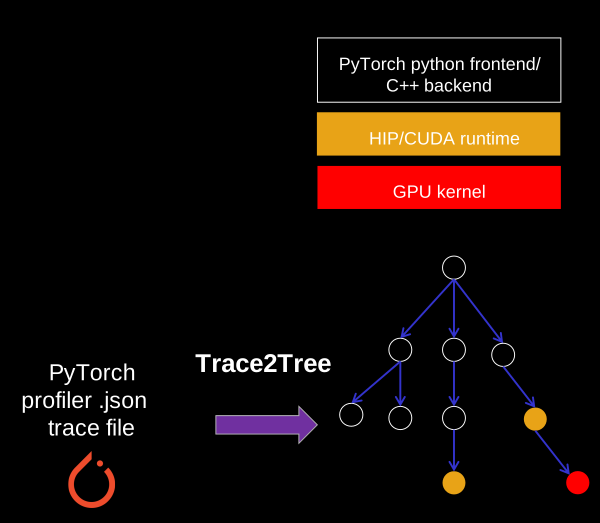
Figure 1: Trace2Tree flow. TraceLens builds a hierarchical tree data structure from the trace, linking Python ops to CPU dispatches and GPU kernels for programmatic analysis.#
Figure 2 shows a snippet of the string-formatted tree representation produced by Trace2Tree. Here, a Linear module yields not only a matrix multiplication kernel (e.g., a ROCm Tensile Cijk_Alik_Bljk.. kernel) but also several elementwise kernels from AMP typecasting and an unfused bias addition. Such operations are hidden at the Python level but affect performance; the tree exposes them in a structured, interpretable form. Refer to the Trace2Tree example notebook for more information.
└── (python) nn.Module: Linear_75
    └── (python) forward @ linear.py:124
        └── (cpu) aten::linear
            ├── (cpu) aten::to
            │   └── (cpu) aten::_to_copy
            │       └── (cpu) aten::copy_
            │           └── (cuda_runtime) hipLaunchKernel
            │               └── (kernel) elementwise_kernel...
            ├── (cpu) aten::to
            │   └── (cpu) aten::_to_copy
            │       └── (cpu) aten::copy_
            │           └── (cuda_runtime) hipLaunchKernel
            │               └── (kernel) elementwise_kernel...
            └── (cpu) aten::linear
                └── (cpu) aten::addmm
                    ├── (cuda_runtime) hipLaunchKernel
                    │   └── (kernel) elementwise_kernel...
                    └── (cuda_runtime) hipExtModuleLaunchKernel
                        └── (kernel) Cijk_Alik_Bljk_BBS_BH_Bias_HAS_SAV...
Figure 2: Trace2Tree print example for a Linear module during training.
This tree serves as a crucial intermediate representation (IR) that underpins many other TraceLens features. We expose this IR through a flexible API, enabling you to build custom analyses, such as the morphological trace comparison described later in the Trace comparison section or the neural network module view shown in Figure 3 below.
....................... ......................................(GPU Time µs)
└── nn.Module: DeepseekV2DecoderLayer_2 ..................... (10233.51)
    ├── nn.Module: RMSNorm_8 ................................ (148.46)
    ├── nn.Module: DeepseekV2AttentionMLA_2 ................. (6775.96)
    │   ├── nn.Module: ReplicatedLinear_4 ................... (817.78)
    │   ├── nn.Module: RMSNorm_9 ............................ (19.67)
    │   ├── nn.Module: ColumnParallelLinear_2 ............... (268.80)
    │   ├── nn.Module: ReplicatedLinear_5 ................... (469.98)
    │   ├── nn.Module: RMSNorm_10 ........................... (10.21)
    │   ├── nn.Module: DeepseekScalingRotaryEmbedding_0 ..... (139.27)
    │   ├── nn.Module: RadixAttention_2 ..................... (3204.62)
    │   ├── nn.Module: RowParallelLinear_4 .................. (1446.40)
    │   └── Non-nn.Module GPU Ops ........................... (399.22)
    ├── nn.Module: RMSNorm_11 ............................... (154.43)
    └── nn.Module: DeepseekV2MLP_2 .......................... (3154.66)
        ├── nn.Module: MergedColumnParallelLinear_2 ......... (1592.94)
        ├── nn.Module: SiluAndMul_2 ......................... (84.44)
        └── nn.Module: RowParallelLinear_5 .................. (1477.28)
Figure 3: NN Module view. Shows the performance impact of your architecture directly from the module hierarchy.
This view is especially useful for model developers.
See the NN module view notebook to build this view yourself.
Hierarchical Performance Breakdowns: Find the Bottleneck Fast#
The first step in optimization is knowing where to look. TraceLens simplifies this by organizing performance data in a top-down hierarchy, letting you drill down from a high-level summary to the exact operations causing slowdowns. This analysis is broken down into several key tables. To generate the report from your PyTorch trace, see the perf report guide or run TraceLens_generate_perf_report_pytorch.
Here, we use an example of a Llama FSDP training run.
The 10,000-Foot View: GPU Timeline#
The analysis starts with the GPU Timeline breakdown, which gives you a high-level accounting of how the GPU spent its time. It answers the most basic question: was my GPU busy with useful work or was it waiting?
The report breaks down the total time into the relevant categories, as shown in Table 1, so you can immediately see if your workload is compute-bound, communication-bound, or CPU-bound (high idle time).
type |
time ms |
percent |
|---|---|---|
computation_time |
56305.19 |
99.30 |
exposed_comm_time |
240.88 |
0.42 |
exposed_memcpy_time |
14.44 |
0.03 |
busy_time |
56560.52 |
99.75 |
idle_time |
143.16 |
0.25 |
total_time |
56703.68 |
100.00 |
total_comm_time |
17203.43 |
30.34 |
total_memcpy_time |
14.47 |
0.03 |
Table 1: GPU Timeline breakdown.
Finding Hotspots: Ops Summary by Category#
Once you know the GPU was busy computing, the next question is, “Computing what?” The ops_summary_by_category report rolls up all individual operations into families like CONV_fwd, GEMM, and elementwise. This view helps you quickly identify which category of operations is responsible for the most kernel time, guiding you on where to focus your optimization efforts first. Table 2 shows this breakdown.
op category |
Count |
Kernel time (ms) |
Percentage (%) |
|---|---|---|---|
GEMM |
3046 |
45706.79 |
79.47 |
SDPA_fwd |
320 |
4011.13 |
6.97 |
SDPA_bwd |
160 |
3282.01 |
5.71 |
triton |
4008 |
1938.21 |
3.37 |
multi_tensor_apply |
644 |
1278.03 |
2.22 |
other |
1000 |
839.26 |
1.46 |
elementwise |
2104 |
362.71 |
0.63 |
reduce |
326 |
99.61 |
0.17 |
Table 2: Ops summary by category.
In this example, GEMM (matrix multiplies) and SDPA (attention) dominate and take ~92% of end-to-end time.
The Root Cause: Ops Summary and Input Shapes#
To identify the root cause, you need a stable, fine-grained view. The ops_summary table lists performance at the leaf CPU dispatch level (e.g., aten::mm). This is a powerful abstraction because, while GPU kernel names can change between hardware, drivers, or compiler versions, the framework’s dispatch-level operations remain consistent, enabling reliable comparisons.
The key metric here is Kernel time, which measures the time spent in kernels launched directly by that op, excluding any time from child operations. This isolates the true cost and prevents double-counting time in nested calls. Table 3 lists each operation by name.
name |
Count |
Kernel time (ms) |
Percentage (%) |
|---|---|---|---|
aten::mm |
3046 |
45706.79 |
79.47 |
flash_attn::_flash_attn_forward |
320 |
4011.13 |
6.97 |
flash_attn::_flash_attn_backward |
160 |
3282.01 |
5.71 |
|
640 |
1203.75 |
2.09 |
triton_poi_fused_add_fill_mul_sigmoid_silu_sub_7 |
160 |
458.78 |
0.80 |
aten::_chunk_cat |
162 |
401.01 |
0.70 |
aten::split_with_sizes_copy |
320 |
365.63 |
0.64 |
aten::mul |
962 |
276.39 |
0.48 |
triton_poi_fused_mul_silu_7 |
160 |
270.23 |
0.47 |
Table 3: Ops summary.
Unlike the ops summary by category (Table 2), which aggregates similar operations (e.g., Torch Compile-generated Triton kernels) into a single row, this view preserves the granularity by showing each distinct operation separately.
Breaking Down Operations by Type and Unique Input Shape#
Finally, the finest level of granularity comes from breaking down each operator by its unique input shapes, as shown in Table 4. This allows you to see if a specific tensor shape, dimension, or data type is the source of a performance regression. By moving from the whole timeline down to a single op with a specific shape, you can precisely pinpoint where and why time is being spent.
This table is for illustration; the actual report includes stride, dtype, and concrete args.
name |
Input Dims |
Count |
Kernel time mean (µs) |
Kernel time sum (ms) |
Percentage (%) |
|---|---|---|---|---|---|
aten::mm |
(24576,8192), (8192,28672), (24576,28672) |
640 |
22255.71 |
14243.65 |
24.76 |
aten::mm |
(28672,24576), (24576,8192), (28672,8192) |
320 |
19729.18 |
6313.34 |
10.98 |
aten::mm |
(24576,28672), (28672,8192), (24576,8192) |
320 |
18973.62 |
6071.56 |
10.56 |
flash_attn::_flash_attn_forward |
(3,8192,64,128), (3,8192,8,128), … |
320 |
12534.78 |
4011.13 |
6.97 |
aten::mm |
(24576,8192), (8192,28672), (24576,28672) |
160 |
21028.56 |
3364.57 |
5.85 |
flash_attn::_flash_attn_backward |
(3,8192,64,128), (3,8192,8,128), … |
160 |
20512.53 |
3282.01 |
5.71 |
aten::mm |
(8192,24576), (24576,28672), (8192,28672) |
160 |
20040.82 |
3206.53 |
5.57 |
Table 4: Ops by unique args.
Compute Modeling: Are Your Kernels Using the Hardware Efficiently?#
A kernel’s duration tells you how long it took, but not how efficiently it used the hardware. To understand efficiency, you need to compare the work performed (FLOPs and bytes moved) against that duration. TraceLens automates this by integrating a compute model for popular deep learning operations. For key ops like GEMM, Convolution, and Scaled Dot-Product Attention, TraceLens parses arguments like tensor shapes directly from the trace. It then applies a theoretical model to translate raw timings into powerful efficiency metrics like TFLOPS/s and TB/s.
The process works in two stages, as illustrated in Figure 4:
Theoretical work: computed from the operator’s arguments (e.g., for GEMM: FLOPs = 2·M·N·K, bytes = (M·K + K·N + M·N) × element size).
Achieved performance: computed from the actual kernel duration in the trace, e.g., TFLOPS/s (FLOPs / time) and TB/s (bytes / time).
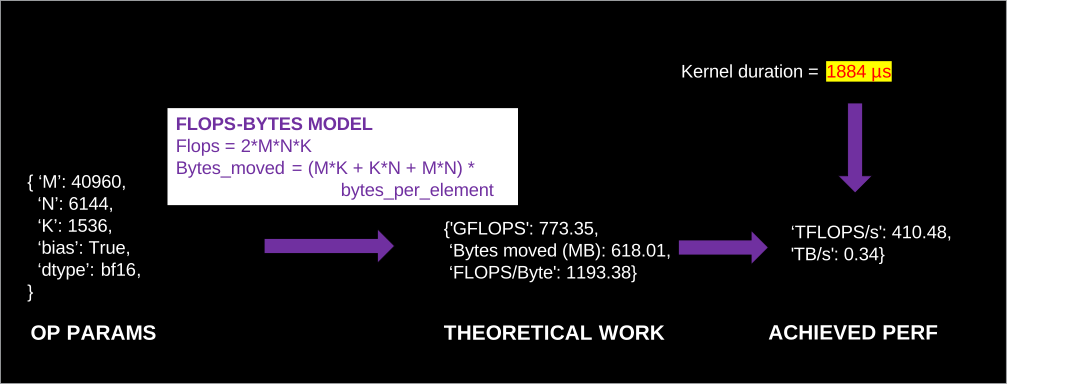
Figure 4: FLOPs-Bytes model. Example of how operator parameters (e.g., M, N, K) and trace timing are combined to compute theoretical work and achieved performance for a GEMM.#
These metrics enable direct roofline analysis, helping you determine if an operation is compute-bound or memory-bound, a critical insight for choosing the right optimization strategy. Table 5 shows example GEMM compute metrics from the same Llama FSDP run.
name |
param: M |
param: N |
param: K |
FLOPS/Byte |
TB/s |
TFLOPS/s |
|---|---|---|---|---|---|---|
aten::mm |
24576 |
28672 |
8192 |
5059.77 |
0.10 |
523.15 |
aten::mm |
28672 |
8192 |
24576 |
5059.77 |
0.12 |
585.51 |
aten::mm |
24576 |
8192 |
28672 |
5059.77 |
0.12 |
608.79 |
aten::mm |
24576 |
28672 |
8192 |
5059.77 |
0.11 |
551.08 |
aten::mm |
8192 |
28672 |
24576 |
5059.77 |
0.11 |
576.23 |
Table 5: GEMM compute metrics.
For a primer on how model architecture and tensor shapes map to GEMM (M, N, K), see this tutorial.
These metrics are theoretical estimates derived from operator semantics. TraceLens needs no reruns or instrumentation, unlike hardware-counter-based profilers. By “useful work” we mean the ideal case: inputs read once, outputs written once; FLOPs ignore padding and redundant computation. That is what TraceLens derives from the trace. Hardware profilers, in contrast, show what the GPU actually executed (padding, cache effects, extra memory traffic). Used together, the two perspectives give a complete picture: hardware counters expose low-level execution, TraceLens exposes the efficiency of the intended computation.
Best of all, the framework is extensible, allowing you to integrate custom performance models for your own unique operations. The FLOPs/bytes compute models are modular and can be used outside of trace analysis (e.g., for back-of-the-envelope roofline estimates or custom tooling). Additionally, because TraceLens extracts concrete operator parameters (e.g., M, N, K for GEMMs) directly from the trace, these can be fed into specialized hardware simulators to produce more sophisticated, architecture-aware roofline estimates beyond the basic analytical model described here.
Multi-GPU Communication Analysis: Finding True Scaling Bottlenecks#
When training across multiple GPUs, a common question is whether the network is the bottleneck. However, total collective time can be misleading; it often includes significant time where one GPU is simply waiting for another to catch up. This is known as inter-rank synchronization skew.
TraceLens dissects collective operations to separate this skew from pure communication time, as illustrated in Figure 5. This allows you to accurately diagnose scaling issues by revealing the true performance of your network based on your specific workload, not a synthetic benchmark.
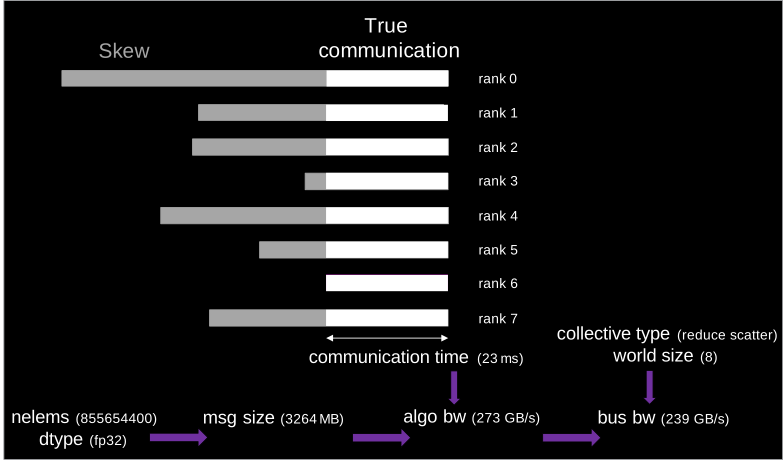
Figure 5: Collective analysis flow.#
To generate the multi-GPU collective report from your PyTorch trace, see the multi-rank collective report guide.
By isolating the true communication duration, TraceLens calculates the effective algorithmic bandwidth and bus bandwidth achieved during the run. Algorithmic bandwidth is simply the data size divided by time, while bus bandwidth applies a correction factor to reflect how efficiently the inter-GPU links are utilized, independent of the number of ranks (for details, see the RCCL performance documentation). This reveals whether your model is hitting network limits or if there are other inefficiencies, such as workload imbalance, causing GPUs to wait on each other.
Table 6 provides a summary for each type of collective operation, showing the message size, total latency, achieved bandwidth, and the average skew.
Collective name |
In msg size (MB) |
dtype |
comm latency (µs)_mean |
count |
Total latency (ms) |
algo bw (GB/s)_mean |
bus bw (GB/s)_mean |
skew (µs)_mean |
|---|---|---|---|---|---|---|---|---|
allgather |
204.00 |
BFloat16 |
6041.88 |
318 |
1921.32 |
264.00 |
231.04 |
11779.36 |
reduce_scatter |
3264.06 |
Float |
11662.77 |
160 |
1866.04 |
273.43 |
239.25 |
60238.77 |
reduce_scatter |
8016.03 |
Float |
22988.50 |
2 |
45.98 |
340.53 |
297.96 |
146.48 |
allgather |
501.00 |
BFloat16 |
11920.84 |
2 |
23.84 |
41.04 |
35.91 |
15405.14 |
Table 6: Collective analysis summary (same Llama FSDP run as above).
This level of detail lets you move beyond guessing and pinpoint the true sources of scaling inefficiencies in your multi-GPU training jobs.
Trace Comparison: Quantify the Impact of Your Changes#
One of the most common tasks in performance engineering is measuring the impact of a change: a new software version, a different hardware platform, or a code modification. Answering “Did this make things faster, and where?” can be a tedious manual process.
To quantify the impact of these changes, TraceLens’s performance report comparison leverages the hierarchical breakdown described earlier. But what happens when the changes are more complex than a simple operator-for-operator swap? For more complex scenarios where the model structure or call stack differs between runs, TraceLens uses a morphological comparison to intelligently align the two traces. This advanced analysis automatically identifies the lowest point of divergence in the call stack (see Figure 6), pinpointing the exact sources of performance deltas even when a direct one-to-one comparison isn’t possible. The result is a clear report showing which operations saw the biggest improvements or regressions.
(cpu) aten::convolution
└── (cpu) aten::_convolution
     |
     |--- Trace 1 (e.g., ROCm Backend) ------------------
     |
     - (cpu) aten::miopen_convolution
     |    └─ (runtime) hipExtModuleLaunchKernel
     |         └─ (kernel) igemm_fwd_gtcx3_...
     - (cpu) aten::add_
     |    └─ (runtime) hipLaunchKernel
     |         └─ (kernel) elementwise_kernel<...>
     |
     |--- Trace 2 (e.g., CUDA Backend) -----------------
     |
     + (cpu) aten::cudnn_convolution
     |    └─ (runtime) cuLaunchKernelEx
     |         └─ (kernel) nvjet_tst_...
     + (cpu) aten::add_
     |    └─ (runtime) cudaLaunchKernel
     |         └─ (kernel) elementwise_kernel<...>
Figure 6: Morphological alignment example. TraceLens identifies the lowest point of divergence (here, aten::_convolution) and aligns the subtrees for comparison. This example shows a cross-backend comparison, but the same workflow applies when comparing two ROCm software versions or two runs on different hardware.
Table 7 shows a sample comparison, with the time difference in milliseconds. Negative values indicate that the operation became faster in the new trace.
name |
row_count |
total_diff_sum (ms) |
|---|---|---|
aten::convolution_backward |
736 |
-175.82 |
aten::_batch_norm_impl_index |
448 |
-86.91 |
aten::_convolution |
736 |
-71.37 |
aten::copy_ |
2859 |
-64.51 |
aten::mul |
408 |
-15.99 |
aten::mm |
300 |
5.97 |
aten::clamp_min_ |
416 |
8.95 |
Table 7: Trace diff summary.
Refer to the trace diff example notebook for more information.
Event Replay: Isolate and Debug Operations#
When you find a slow or problematic operation, the next step is to debug it. This can be difficult, as it often requires the original model, the full data pipeline, and specific inputs just to reproduce the issue. Sharing this complex environment with kernel developers or hardware vendors is often impractical due to IP concerns.
TraceLens’s Event Replay feature solves this by generating minimal, self-contained replay scripts directly from trace metadata. It reconstructs the arguments of a target operation (including tensor shapes, data types, and strides), allowing you to reproduce its behavior in isolation.
This creates portable reproductions that are perfect for:
Focused Debugging: isolate and analyze a single operation’s performance without needing the original model.
Share reproducers without exposing the model architecture: share minimal test cases with other teams or vendors so they can debug on their end without revealing your model architecture.
Cross-Platform Benchmarking: run the exact same operation on different hardware to get a true apples-to-apples performance comparison.
Figure 7 shows how the Event Replay flow works.
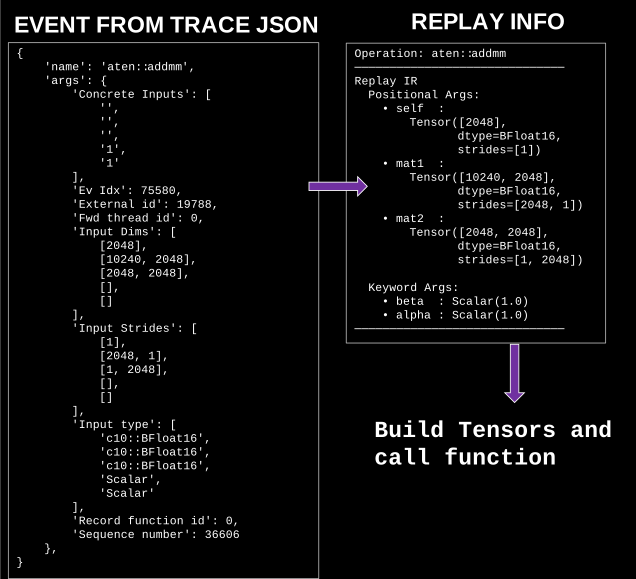
Figure 7: Event Replay flow.#
See the Event Replay documentation and example notebook to get started.
Summary#
In this blog, we’ve demonstrated how TraceLens transforms complex profiler traces into clear, actionable insights for AI workloads. TraceLens streamlines performance analysis by automating the tedious work of sifting through raw data, making bottlenecks easier to find, efficiency simpler to measure, and regressions faster to catch. From debugging a single kernel’s efficiency to diagnosing multi-node scaling issues, TraceLens provides a consistent and powerful analysis workflow across different backends.
Beyond the built-in reports, TraceLens’s extensible Python SDK gives you full control: you can script custom analyses, integrate with internal tooling, or prototype new diagnostics without touching the core system. It’s not just a collection of tools, but a flexible foundation designed for custom workflows. To explore the API hands-on (e.g., TreePerfAnalyzer, GPU timeline, kernel launchers, roofline metrics), see the TreePerf example notebook.
By turning gigabytes of data into structured reports, TraceLens helps you move from diagnosis to optimization faster and with greater confidence.
Try It#
Install TraceLens from source:
pip install git+https://github.com/AMD-AGI/TraceLens.gitGenerate a report from your PyTorch trace:
TraceLens_generate_perf_report_pytorch --profile_json_path path/to/your/trace.json
Need a trace? See the PyTorch profiling guide for how to collect one, or use the demo traces to try TraceLens without profiling first.
TraceLens is open source. To try it yourself, visit the TraceLens GitHub repository and follow the quick-start guide. We welcome contributions! Whether it’s adding new metrics, improving visualizations, or integrating with your pipelines, the TraceLens SDK is designed to be extensible and well-suited for collaboration with the developer community.
Additional Resources#
Disclaimers#
Note: All performance data shown in this blog are example outputs from TraceLens, intended to illustrate the tool’s capabilities. They are not official performance benchmarks.
Third-party content is licensed to you directly by the third party that owns the content and is not licensed to you by AMD. ALL LINKED THIRD-PARTY CONTENT IS PROVIDED “AS IS” WITHOUT A WARRANTY OF ANY KIND. USE OF SUCH THIRD-PARTY CONTENT IS DONE AT YOUR SOLE DISCRETION AND UNDER NO CIRCUMSTANCES WILL AMD BE LIABLE TO YOU FOR ANY THIRD-PARTY CONTENT. YOU ASSUME ALL RISK AND ARE SOLELY RESPONSIBLE FOR ANY DAMAGES THAT MAY ARISE FROM YOUR USE OF THIRD-PARTY CONTENT.