Accelerating ComfyUI Workflows on AMD Instinct™ MI355X GPUs with ROCm#
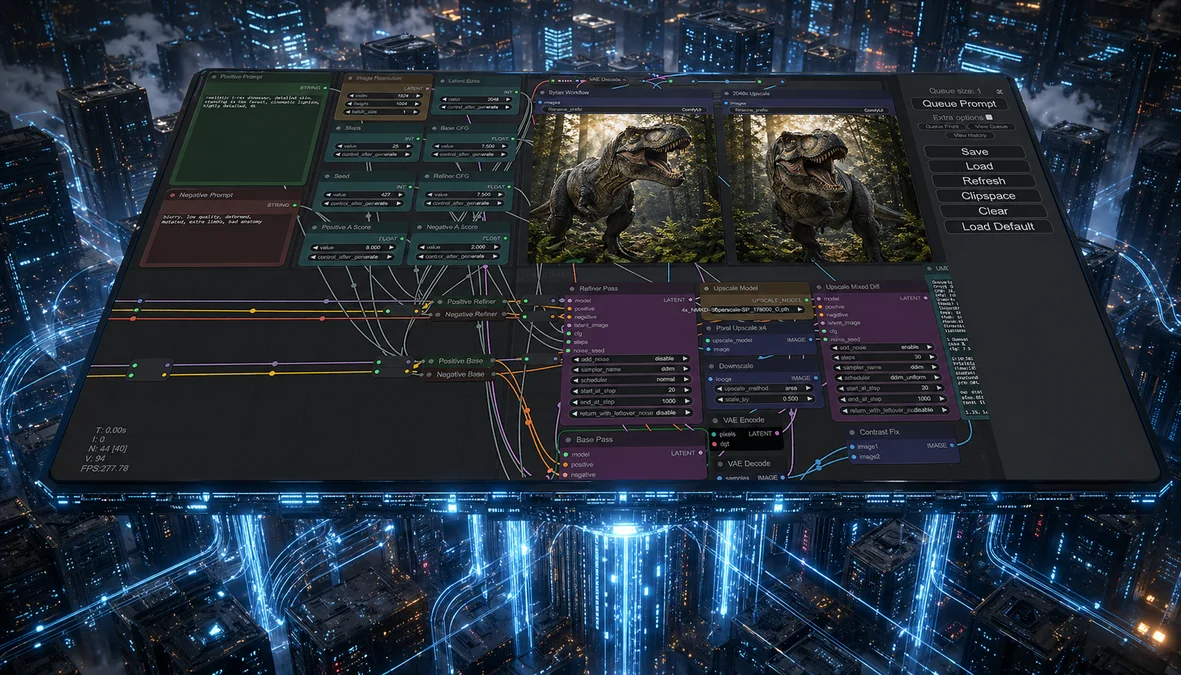
ComfyUI is an open-source, graphical node-based interface for building generative AI workflows using diffusion models. With over 100,000 stars on GitHub, it has become one of the most widely adopted tools for text-to-image, text-to-video, and image-to-3D generation. You can build workflows by connecting nodes in a drag-and-drop visual interface (no coding required). A large community contributes custom nodes and workflow templates, making ComfyUI a versatile front-end for models ranging from 12B to 27B parameters. For background and setup across AMD platforms, see the earlier ROCm blogs Running ComfyUI on AMD Instinct, Getting Started with ComfyUI on AMD Radeon™ RX 9000 Series GPUs, and Running ComfyUI in Windows with ROCm on WSL.
The models behind these workflows (Diffusion Transformers or DiTs, rectified flow transformers, and multi-view diffusion networks) are both compute- and memory-intensive, making GPU acceleration critical for practical use. This blog benchmarks three production-relevant ComfyUI workflows on AMD Instinct MI355X and NVIDIA B200 and shows that MI355X is up to 1.439x faster[1], enabled by PyTorch Attention optimizations for the CDNA4 (gfx950) architecture shipped with ROCm 7.2.0. You can follow along to set up your environment, run ComfyUI, and reproduce these results.
ComfyUI on ROCm#
You can access ComfyUI on ROCm through the following resources:
Getting Started#
See the installation guide for detailed instructions on installing ComfyUI on ROCm for various platforms. This blog focuses on the following setup. Before getting started, ensure that you meet the following requirements:
Linux: Ubuntu 24.04 (see supported distributions)
Hardware: AMD Instinct MI355X (gfx950 / CDNA4 architecture)
To run ComfyUI with ROCm 7.2.0 enabled, the recommended approach is to use the pre-built Docker image. It includes a fully configured ComfyUI installation along with all required dependencies.
If you prefer to install ComfyUI from source instead of the pre-built image, follow the instructions in the installation guide above or the ComfyUI GitHub repository.
Using the Pre-built Docker Image#
First, pull the Docker image from Docker Hub.
docker pull rocm/comfyui:comfyui-0.18.2.amd0_rocm7.2.0_ubuntu24.04
Next, start a Docker container using this image.
docker run -it \
  --rm \
  --device=/dev/kfd \
  --device=/dev/dri \
  --group-add video \
  --cap-add=SYS_PTRACE \
  --security-opt seccomp=unconfined \
  --ipc=host \
  -p 8188:8188 \
  rocm/comfyui:comfyui-0.18.2.amd0_rocm7.2.0_ubuntu24.04
Finally, launch the remote ComfyUI server.
python $COMFYUI_PATH/main.py --port 8188 --listen
This will start the server on the default port 8188. The port can be changed by setting
the environment variable COMFYUI_PORT_HOST or by using the --port flag.
You have the following server options:
--listen: Allow connections from any network interface (needed for remote or container access).--port <PORT>: Change the default port (default:8188). Can also be set via theCOMFYUI_PORT_HOSTenvironment variable.--gpu-only: Force all operations to run on the GPU.
Testing the Installation#
To test the ComfyUI installation, run the following command inside the running container.
python3 -c "import torch; print(torch.cuda.is_available()); print(torch.cuda.get_device_name(0))"
The expected output is True followed by your AMD GPU device name, for example:
True
AMD Instinct MI355X
Benchmark Models#
This section benchmarks three workflows spanning the most popular ComfyUI use cases:
Wan2.2 (Text-to-Video, 1280x1280): A 27B-parameter Diffusion Transformer (DiT) with Mixture-of-Experts, where only 14B parameters are active at inference. Uses flow matching with 20-50 denoising steps and Wan-VAE for 4x8x8 spatiotemporal compression.
FLUX.1-dev (Text-to-Image, 2560x2560): A 12B-parameter rectified flow transformer from Black Forest Labs, trained with guidance distillation for efficient high-fidelity image generation.
Hunyuan3D v2.1 (Image-to-3D, 4096): Tencent’s two-stage 3D asset generator. Hunyuan3D-DiT generates shapes via flow-based diffusion, followed by Hunyuan3D-Paint for PBR material synthesis.
All three are attention-heavy transformer architectures, making them ideal candidates for measuring GPU-accelerated diffusion performance.
Why MI355X is Faster: PyTorch Attention on CDNA4#
The performance advantage of the MI355X over the B200 in these workflows stems from the combination of CDNA4 hardware capabilities and targeted software optimizations in the ROCm stack.
MI355X Hardware#
The AMD Instinct MI355X is built on the CDNA4 architecture (gfx950), fabricated on a 3nm process node. Key specifications relevant to diffusion workloads include:
Specification |
MI355X |
|---|---|
Compute Units |
256 |
HBM3e Memory |
288 GB |
Memory Bandwidth |
8 TB/s |
FP16 Matrix Performance |
2.5 PFLOPS |
FP8 Performance |
5.0 PFLOPS |
Compared to the MI300X, MI355X delivers a 77% improvement in FP16 and FP8 compute throughput. The 8 TB/s memory bandwidth is critical for attention-heavy transformer workloads where key-value tensors must be streamed from HBM at every denoising step.
Attention Optimizations for gfx950#
All three benchmark models are attention-heavy: Wan2.2 and FLUX.1-dev use full transformer architectures (DiT and rectified flow transformer, respectively), and Hunyuan3D’s DiT stage processes 3D latents through self-attention layers. PyTorch’s Scaled Dot-Product Attention (SDPA) serves as the primary attention dispatch path in ComfyUI. On ROCm, SDPA routes to AOTriton – the AMD-optimized Triton backend for attention kernels. Several gfx950-specific optimizations contribute to the speedups observed:
AOTriton gfx950 support: AOTriton 0.9.2b added native gfx950 kernel support, removing the “experimental” designation and enabling production-quality attention on MI355X.
Occupancy tuning: Upstream PyTorch reduced warp counts from 8 to 4 for bfloat16 configurations on attention head dimensions commonly used by these models (64, 128, 256), achieving up to 1.78x speedup on FlexAttention microbenchmarks.
Pipelining: Enabling
num_stages=2pipelining for attention on ROCm delivers a 1.13x geo-mean speedup across diverse sequence lengths and batch sizes.GEMM tuning: ROCm 7.2 includes hipBLASLt optimizations with tuned GEMM kernels for FP8, BF16, and FP16 on MI350/MI355X – directly benefiting the linear projections (Q/K/V and feed-forward layers) in every transformer block.
ThinLTO compiler optimization: ROCm 7.2’s ThinLTO support enables cross-file inlining and dead-code removal across the PyTorch and kernel stack, reducing overhead in the hot inference path.
The pre-built Docker image ships with all of these optimizations pre-configured, so users benefit from full performance out of the box.
Performance Comparison: NVIDIA B200 vs AMD Instinct MI355X#
The three workflows described above were benchmarked on AMD Instinct MI355X and NVIDIA B200 to compare end-to-end execution time.
Benchmark Configuration#
AMD System |
NVIDIA System |
|
|---|---|---|
GPU |
AMD Instinct MI355X |
NVIDIA B200 |
Software Stack |
ROCm 7.2.0 |
CUDA 12.x |
Framework |
PyTorch (with SDPA + AOTriton) |
PyTorch (with SDPA + FlashAttention) |
ComfyUI |
v0.18.2 |
v0.18.2 |
All runs used default ComfyUI workflow templates with default parameters (sampler, steps, CFG scale). Execution time is measured end-to-end from queue submission to output save. Lower is better.
Results#
Workflow |
MI355X (s) |
B200 (s) |
MI355X Speedup |
|---|---|---|---|
Wan2.2 (Text-to-Video, 1280x1280) |
116.91 |
168.28 |
1.439x[1] |
FLUX.1-dev (Text-to-Image, 2560x2560) |
24.77 |
35.09 |
1.416x[2] |
Hunyuan3D v2.1 (3D Generation, 4096) |
21.51 |
25.84 |
1.201x[3] |
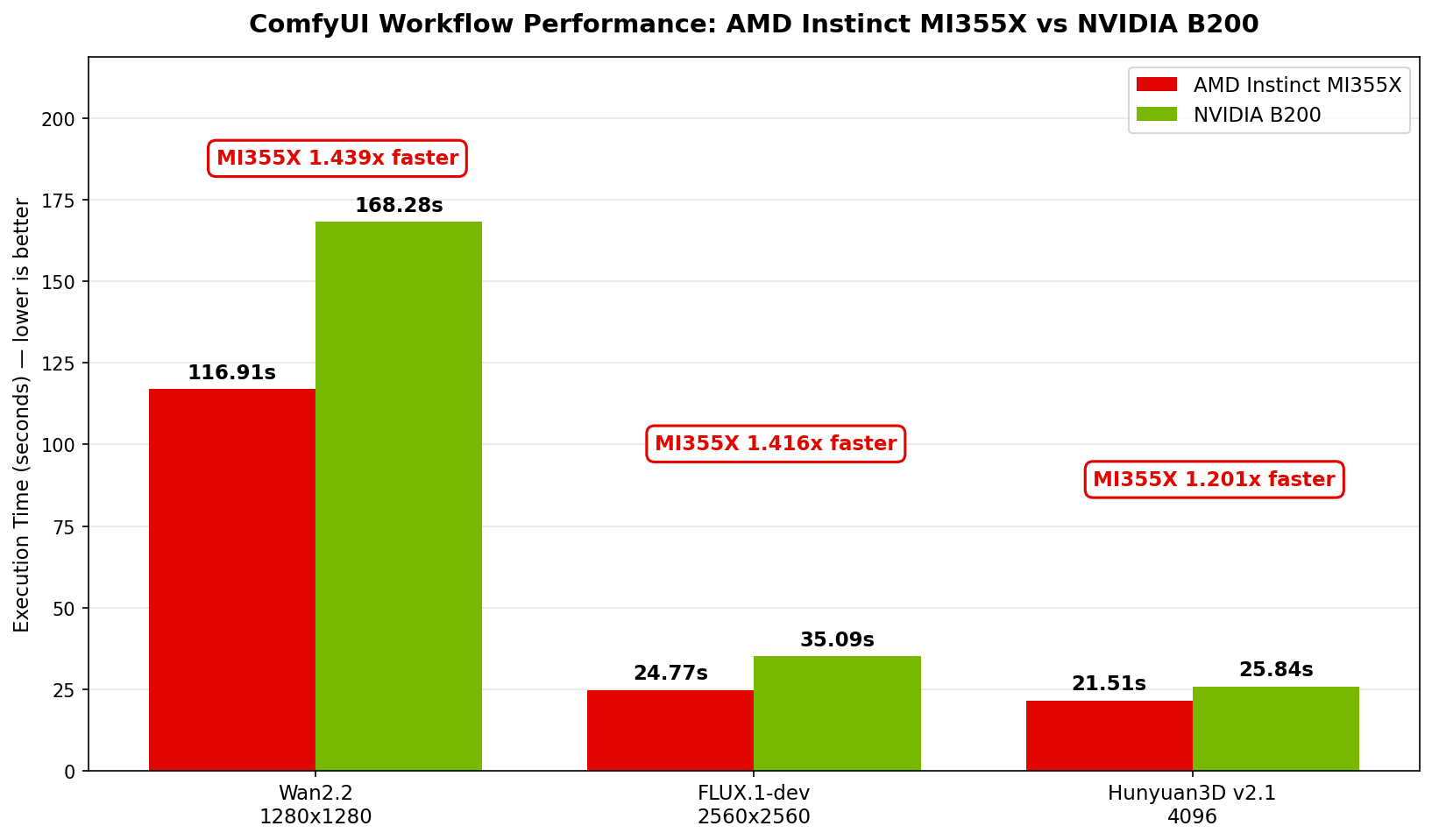
Execution time (seconds, lower is better) for three ComfyUI workflows on AMD Instinct MI355X vs NVIDIA B200.#
Across all three workloads, AMD Instinct MI355X delivers faster execution than the NVIDIA B200:
Wan2.2 text-to-video — MI355X completes the workflow in 116.91 s versus 168.28 s on B200, a 43.9% speedup[1]. Video generation is compute-heavy, and the MI355X’s advantage is most pronounced here.
FLUX.1-dev text-to-image — At 2560x2560 resolution, MI355X finishes in 24.77 s compared to 35.09 s on B200, delivering a 41.6% speedup[2].
Hunyuan3D v2.1 3D generation — MI355X runs in 21.51 s versus 25.84 s on B200, a 20.1% speedup[3].
These gains come from the PyTorch Attention and GEMM optimizations for gfx950 described in the previous section, shipped with ROCm 7.2 and pre-configured in the Docker image.
Summary#
This blog benchmarked three production-relevant ComfyUI workflows (Wan2.2 text-to-video, FLUX.1-dev text-to-image, and Hunyuan3D v2.1 image-to-3D) on AMD Instinct MI355X and NVIDIA B200. The MI355X delivered up to 1.439x faster[1] end-to-end execution across all three workloads. These gains are driven by PyTorch Attention optimizations targeting the CDNA4 (gfx950) architecture, including AOTriton kernel support, occupancy and pipelining tuning, and hipBLASLt GEMM improvements, all shipped with ROCm 7.2.0 and pre-configured in the provided Docker image.
Getting started is straightforward: pull the pre-built Docker image, launch the ComfyUI server, and begin building workflows. Try reproducing these benchmarks on your own MI355X hardware and explore the growing ecosystem of ComfyUI nodes and templates.
Looking ahead, a natural next direction is scaling these diffusion workflows beyond a single GPU. ComfyUI does not currently offer native multi-GPU support, so multi-GPU diffusion inference today relies on community or third-party tooling. One candidate worth tracking is xDiT – an open-source parallel inference engine for Diffusion Transformers that supports Sequence Parallelism, Unified Sequence Parallelism (USP), and PipeFusion, with existing ComfyUI integration paths. How far we take this direction will depend on community momentum and customer demand, but it is a promising starting point for higher-throughput diffusion serving on AMD Instinct GPUs.
Follow the ROCm Blogs for upcoming posts on diffusion-model performance, multi-GPU inference on AMD Instinct, and additional ComfyUI workflows on the AMD platform.
Acknowledgements#
Thank you to the broader AMD team whose contributions made this work possible: Amit Kumar, Anisha Sankar, Dipto Deb, James Smith, Anuya Welling, Ritesh Hiremath, Bhavesh Lad, Matthew Steggink, Ehud Sharlin, Marco Grond, Marilyn Basanta, Lindsey Brown, Sriranjani Ramasubramanian, Cindy Lee, Gazi Rashid, Amanzhol Salykov, Liz Li, Andy Luo, Nick Ni, Nico Holmberg, Albin Toft, Daniel Huang, George Wang, Warren Eng, Johanna Yang, Kristoffer Peyron, Sopiko Kurdadze.
Disclaimers#
Third-party content is licensed to you directly by the third party that owns the content and is not licensed to you by AMD. ALL LINKED THIRD-PARTY CONTENT IS PROVIDED “AS IS” WITHOUT A WARRANTY OF ANY KIND. USE OF SUCH THIRD-PARTY CONTENT IS DONE AT YOUR SOLE DISCRETION AND UNDER NO CIRCUMSTANCES WILL AMD BE LIABLE TO YOU FOR ANY THIRD-PARTY CONTENT. YOU ASSUME ALL RISK AND ARE SOLELY RESPONSIBLE FOR ANY DAMAGES THAT MAY ARISE FROM YOUR USE OF THIRD-PARTY CONTENT.