Multi-Accelerator Support for AIMs and AMD Solution Blueprints#
With the latest release of AMD enterprise AI reference stack, Version 2.2 Release notes, we’re now introducing Multi-accelerator support. AMD Inference Microservices (AIMs) now run across AMD Instinct™ GPUs (MI300X, MI325X, MI350X, MI355X), AMD Radeon™ Pro GPUs (W7900 and R9700), and AMD EPYC™ CPUs (EPYC 9965). That same coverage also extends to the AMD Solution Blueprints.
This blog introduces:
The new AIMs for AMD Instinct™ GPUs, AMD EPYC™ Server Processors, and AMD Radeon™ GPUs
The expanded AMD Solution Blueprint support for AMD EPYC and AMD Radeon
In addition, we will walk you through the Document Summarization Solution Blueprint across all three accelerator types.
AMD Inference Microservices#
AIMs provide standardized, portable inference microservices for serving AI models on AMD hardware. Distributed as Docker images, AIMs abstract away the complexities involved in model serving through an intelligent orchestration layer that automatically configures runtime environments, detects available accelerators, and selects a performance profile.
The following AIMs are new in this release.
For the complete list of supported models per accelerator, see the accelerator support page. The source code is also publicly available in the AIM build repository.
AMD Solution Blueprints#
AMD Solution Blueprints are reference applications built with AIMs. They offer an easy way to explore AIMs in the context of a complete microservice solution, such as document summarization, RAG chatbots, AI coding assistants, and agentic workflows. For developers, Solution Blueprints act as starting points and example implementations, making it fast and easy to solve real-world needs with ROCm™ software. Browse the full set of AMD Solution Blueprints, including per-accelerator support, in the Solution Blueprint catalog.
AMD Solution Blueprints are packaged as Helm charts for deployment on a Kubernetes cluster. For development or further exploration, the source code is publicly available in the Solution Blueprints GitHub repository.
In this blog we deploy the Document Summarization Solution Blueprint which supports all three accelerators.
Document Summarization Solution Blueprint#
The Document Summarization (DocSum) Solution Blueprint uses LLMs to generate summaries from varied document types. It can process and summarize PDFs, DOCX files, and plain text, as well as multimedia files (both audio and video), across a variety of domains such as customer service, scientific research, and legal text. Figure 1 shows the architecture.
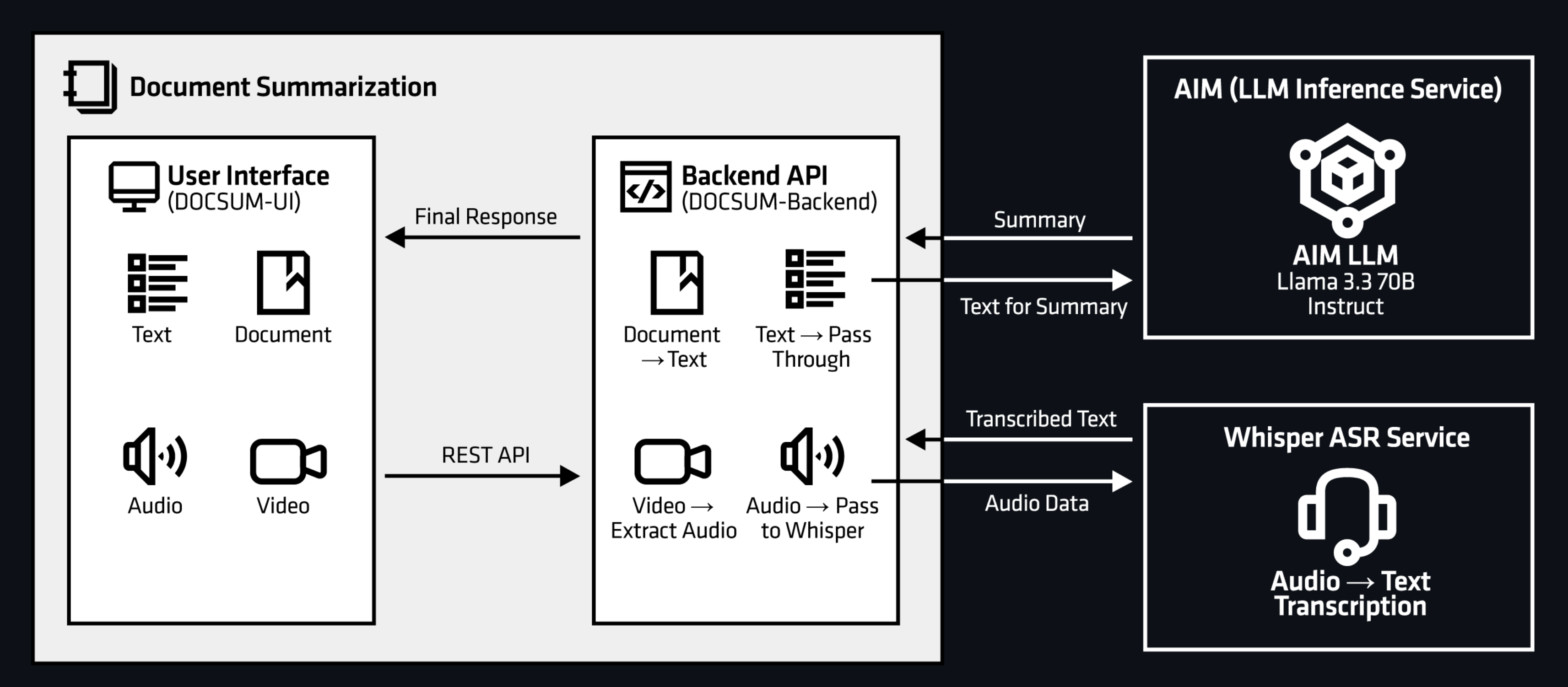
Figure 1: Document Summarization Architecture.
The Solution Blueprint deploys the following AIM by default:
Instinct:
Llama 3.3 70B InstructRadeon:
Qwen3-VL 8B InstructEPYC:
Llama 3.1 8B Instruct
Prerequisites#
To deploy to the Kubernetes cluster, ensure the following prerequisites are met:
kubectl: Installed and configured to communicate with the cluster
Helm: Installed on your local machine
Kubernetes namespace:
We will use a namespace called
demoYou can create a namespace using
kubectl create namespace "demo".
This blog post was validated on clusters powered by AMD Instinct MI300X GPUs, AMD EPYC™ 9965 CPUs and AMD Radeon AI PRO R9700S GPUs and with AMD AI Workbench installed.
Hugging Face Token#
AIM images are hosted publicly on Docker Hub and do not require authentication to pull. However, certain models are gated on Hugging Face and require an access token to download. Store your token as a Kubernetes secret so it can be referenced securely by the deployment.
Create a secret for the demo namespace:
kubectl create secret generic hf-token \
    --from-literal="hf-token=YOUR_HUGGINGFACE_TOKEN" \
    -n demo
secret/hf-token created
Deployment#
AMD Solution Blueprints are packaged as OCI-compliant Helm charts in the Docker Hub registry and can be deployed to a Kubernetes cluster with a single command. Define the name (deployment name) and the namespace (Kubernetes namespace), then pipe the output of helm template to kubectl apply -f -.
The chart ships defaults for three platforms, selected with --set global.platform=<platform>: instinct (GPU, the default), epyc (CPU), and radeon (GPU). Each sets a matching AIM image and resource profile. You can inspect them by using: helm show values oci://registry-1.docker.io/amdenterpriseai/aimsb-docsum --jsonpath '{.llm.platformDefaults}'.
Click on each tab to see the deployment instruction for each accelerator.
To deploy the Solution Blueprint, run the command below. We generate the deployment manifest and save it to a file called manifest.yaml for easier debugging.
name="my-deployment"
namespace="demo"
helm template $name oci://registry-1.docker.io/amdenterpriseai/aimsb-docsum \
  --set llm.env_vars.HF_TOKEN.name=hf-token \
  --set llm.env_vars.HF_TOKEN.key=hf-token \
  > manifest.yaml
kubectl apply -f manifest.yaml -n $namespace
To deploy the blueprint, run the command below. We generate the deployment manifest and save it to a file called manifest.yaml for easier debugging.
name="my-deployment"
namespace="demo"
helm pull oci://registry-1.docker.io/amdenterpriseai/aimsb-docsum --untar
helm template $name ./aimsb-docsum \
  --set global.platform=epyc \
  --set llm.cpus=188 \
  --set llm.memory=128 \
  --set llm.env_vars.HF_TOKEN.name=hf-token \
  --set llm.env_vars.HF_TOKEN.key=hf-token \
  > manifest.yaml
kubectl apply -f manifest.yaml -n $namespace
Performance note: On multi-socket EPYC nodes, configure the kubelet for NUMA alignment (CPU Manager static, Topology Manager single-numa-node, Memory Manager Static); otherwise the LLM’s CPUs and memory can land on different NUMA nodes and vLLM runs effectively single-threaded.
To deploy the blueprint, run the command below. We generate the deployment manifest and save it to a file called manifest.yaml for easier debugging. Note that this deploys Qwen3-VL 8B Instruct, which is a public model, so a Hugging Face token is not required.
name="my-deployment"
namespace="demo"
helm template $name oci://registry-1.docker.io/amdenterpriseai/aimsb-docsum \
  --set global.platform=radeon \
  > manifest.yaml
kubectl apply -f manifest.yaml -n $namespace
To check the status of the deployment, run:
kubectl get pods -n $namespace
Wait until all pods report Running and Ready. Summarization requires the LLM (and Whisper for media paths) to be up.
Connect to UI#
To connect to the UI, port-forward to 5173. The UI is then available at http://localhost:5173 in your browser.
kubectl port-forward services/aimsb-docsum-${name}-ui 5173:5173 -n $namespace
Note
If your cluster has a Gateway API–compatible gateway (for example, Kubernetes Gateway or Istio), you can enable HTTPRoute creation to route traffic through the gateway. Use --set http_route.enabled=true in the helm template command to enable HTTPRoute creation.
The URL to access the blueprint via HTTPRoute is formed by the service name and the hostname of the gateway. Use this command to produce the URL by querying the hostname from the cluster:
echo "https://aimsb-docsum-$name$(kubectl get gtw -A -o jsonpath='{.items[*].spec.listeners[?(@.name=="https")].hostname}' | tr -d \*)/"
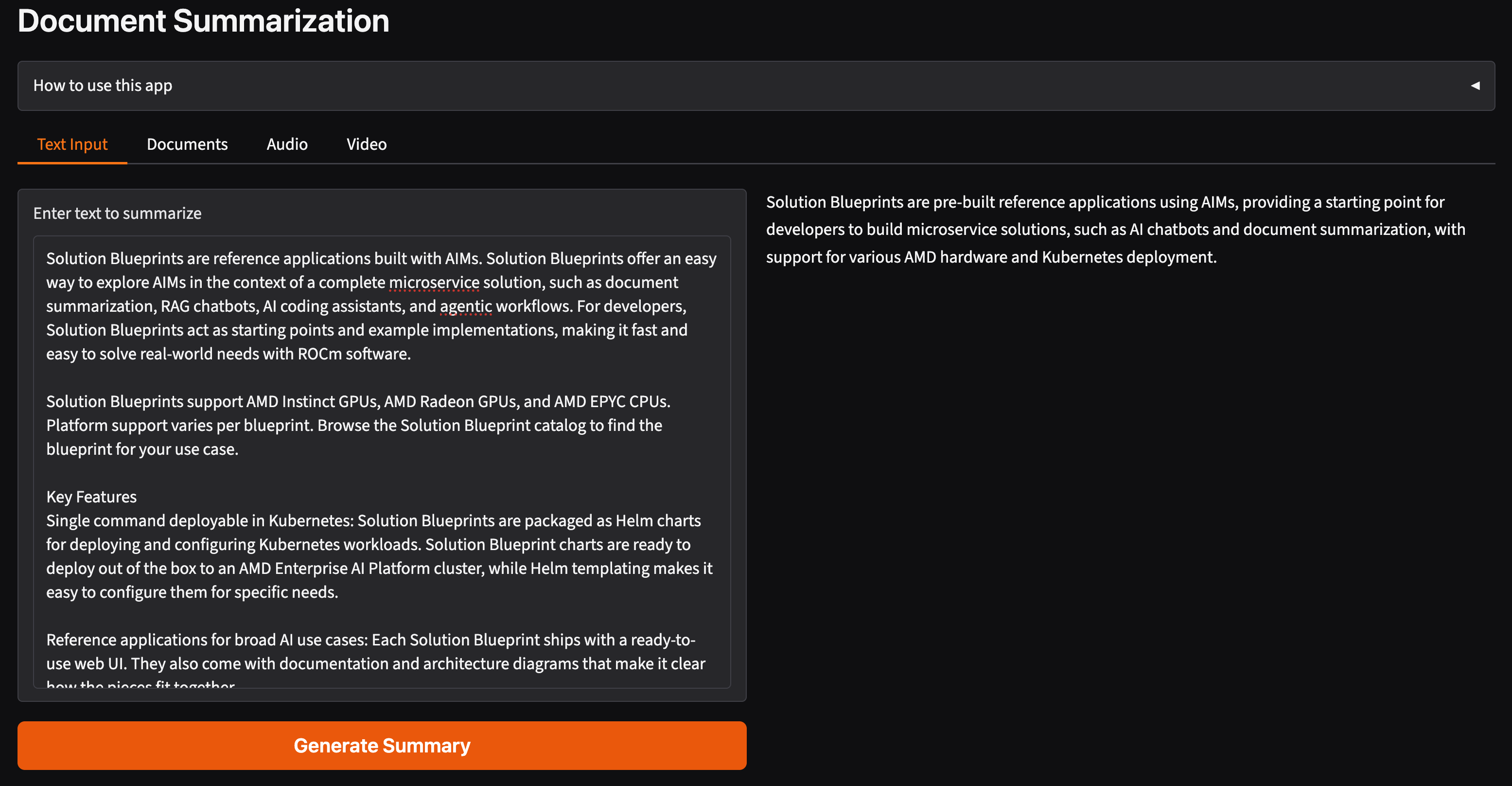
Once connected, use the application as follows:
Choose a source: Upload one or more supported files (Text, Documents, Audio, or Video)
Click “Generate Summary” to submit the request and wait for the summarization to finish
Review the generated summary in the UI
Clean Up#
When you are finished, remove the deployed resources with kubectl delete using the same manifest file:
kubectl delete -f manifest.yaml -n $namespace
Summary#
This blog highlighted the new AIMs on each accelerator and showed that AMD Solution Blueprints now run on AMD Instinct GPUs, AMD Radeon GPUs, and AMD EPYC Server Processors. Using the Document Summarization Solution Blueprint as an end-to-end example, we walked through rendering a Helm chart to a manifest, deploying it on Kubernetes, and connecting to the UI, with platform-specific defaults for Instinct, EPYC, and Radeon.
To explore further, see the accelerator support page for available AIMs and the Solution Blueprint catalog for available Solution Blueprints.
Additional resources#
Disclaimers#
The information presented in this document is for informational purposes only and may contain technical inaccuracies, omissions, and typographical errors. The information contained herein is subject to change and may be rendered inaccurate for many reasons, including but not limited to product and roadmap changes, component and motherboard version changes, new model and/or product releases, product differences between differing manufacturers, software changes, BIOS flashes, firmware upgrades, or the like. Any computer system has risks of security vulnerabilities that cannot be completely prevented or mitigated. AMD assumes no obligation to update or otherwise correct or revise this information. However, AMD reserves the right to revise this information and to make changes from time to time to the content hereof without obligation of AMD to notify any person of such revisions or changes. THIS INFORMATION IS PROVIDED ‘AS IS.” AMD MAKES NO REPRESENTATIONS OR WARRANTIES WITH RESPECT TO THE CONTENTS HEREOF AND ASSUMES NO RESPONSIBILITY FOR ANY INACCURACIES, ERRORS, OR OMISSIONS THAT MAY APPEAR IN THIS INFORMATION. AMD SPECIFICALLY DISCLAIMS ANY IMPLIED WARRANTIES OF NON-INFRINGEMENT, MERCHANTABILITY, OR FITNESS FOR ANY PARTICULAR PURPOSE. IN NO EVENT WILL AMD BE LIABLE TO ANY PERSON FOR ANY RELIANCE, DIRECT, INDIRECT, SPECIAL, OR OTHER CONSEQUENTIAL DAMAGES ARISING FROM THE USE OF ANY INFORMATION CONTAINED HEREIN, EVEN IF AMD IS EXPRESSLY ADVISED OF THE POSSIBILITY OF SUCH DAMAGES. AMD, the AMD Arrow logo, AMD Instinct, AMD Radeon, AMD EPYC, ROCm and combinations thereof are trademarks of Advanced Micro Devices, Inc. Other product names used in this publication are for identification purposes only and may be trademarks of their respective companies. © 2026 Advanced Micro Devices, Inc. All rights reserved