ROCm 7.13: Expanding Hardware, Tools, and Reach#

AMD released ROCm Core 7.13, the AMD GPU Driver 31.30, and AMD GPU Virtualization 9.0. With these releases, ROCm software expands hardware support across enterprise datacenters. The platform introduces AMD’s latest Instinct accelerators, enables GPU virtualization on VMware ESXi and KVM, and delivers optimized performance for generative AI and large language models. The developer experience has been refined with streamlined profiling tools and open-source visibility into low-level performance analysis. As a result, AI development has become more practical across a broader range of hardware, spanning the latest AMD Instinct hardware and newly supported virtualized GPU partitioning modes.
In this blog, you will explore the key highlights of these releases. ROCm 7.13 includes powerful new profiling and visualization capabilities, and a new modular packaging and installation model. AMD GPU Driver 31.30 enables the new MI350P GPU, expanding our hardware ecosystem. AMD GPU Virtualization 9.0 brings new capabilities to GPU partitioning support to KVM and support for newer ESXi versions.
Finally, ROCm introduces new packaging and installation distributions tailored to specific workloads, along with ROCm-Extras packages, starting with ROCm Validation Suite (RVS), all supported as optional packages on top of the ROCm Core SDK. Whether you’re prototyping at home or deploying production infrastructure at scale, the platform provides the capabilities to match your environment.
TheRock Powers the ROCm Core SDK#
ROCm 7.13 continues the evolution of TheRock, AMD’s automated, open-source build and release system for the ROCm software stack. Building on a foundation laid by preview releases from ROCm 7.9 to 7.12, TheRock streamlines ROCm by packaging the necessary foundational components for running high-performance workloads on AMD GPUs.
TheRock introduces the ROCm Core, a base installation containing the essential components that most users need, with optional expansion SDKs available for specialized domains, including HPC, computer vision (ROCm-CV), data science (ROCm-DS), and life sciences (ROCm-LS). Built on a unified, pure CMake build system, TheRock provides stable nightly builds with support for Linux and Windows distributions.
The open-source nature of ROCm accelerates adoption through public PRs, transparent CI pipelines, and code developed directly in public GitHub repositories. This approach results in a faster, continuous release cycle with improved quality and stability, reliable validation, and a smoother out-of-the-box experience.
Expanded Hardware & Platform Enablement#
ROCm 7.13 brings support for AMD Instinct MI350-series datacenter accelerators, adding bare-metal and Kubernetes support for the MI350P and extending GPU partitioning to the MI350X and MI355X.
ROCm 7.13 adds bare-metal support for the MI350P in SPX and CPX modes with NPS1 partitioning, giving you two ways to configure the accelerator depending on your workload. SPX mode dedicates all four XCDs to a single compute partition for maximum throughput. In contrast, CPX mode splits the GPU into four independent compute partitions with one XCD each, allowing multiple workloads to run on a single accelerator. ROCm validates MI350P on Ubuntu 24.04.4, Ubuntu 26.04, and RHEL 9.6.
Beyond bare-metal deployments, the AMD GPU Operator now supports MI350P on Vanilla Kubernetes v1.31 and Red Hat OpenShift v4.21, allowing you to orchestrate MI350P accelerators like any other cloud resource. The operator handles driver installation, GPU health monitoring, metrics export, and partition management, making MI350P practical for containerized AI workloads in production Kubernetes environments.
The MI350X and MI355X gain bare-metal support for QPX with NPS2 partitioning, offering flexible compute configurations for different workload requirements.
GPU Virtualization Across KVM and VMware ESXi#
Running AI workloads in virtual environments means you can share GPU resources across teams, isolate workloads for security, and manage infrastructure with the same tools you already use for the rest of your datacenter. ROCm 7.13 expands GPU virtualization support across the AMD Instinct lineup on both KVM and VMware ESXi, giving you flexible options for allocating GPU resources to virtual machines.
GPU passthrough dedicates an entire GPU to a single virtual machine, delivering bare-metal performance for workloads that need maximum compute power. ROCm 7.13 supports GPU passthrough on the MI350X, MI355X, MI325X, MI300X, and MI210X accelerators on KVM with Ubuntu and RHEL host and guest environments. Additionally, ROCm 7.13 introduces GPU passthrough support for MI300X on VMware ESXi 8.0 Update 3, bringing AMD Instinct accelerators into VMware-based enterprise environments.
GPU virtualization lets you divide a single GPU across multiple virtual machines, so several workloads can share one accelerator without interfering with each other. ROCm 7.13 supports GPU virtualization on the MI355X, MI350X, MI325X, MI300X, and MI210X on KVM across Ubuntu and RHEL environments. On VMware ESXi 9.1, ROCm 7.13 brings GPU virtualization support for the MI350X and MI355X, enabling organizations to share Instinct accelerators across multiple VMs in VMware-managed infrastructure.
The MI300X extends its GPU virtualization capabilities with Multi-VF (Virtual Function) support under CPX+NPS4 configurations on KVM, allowing you to create up to 8 isolated virtual GPUs from a single accelerator. Each virtual GPU receives dedicated compute and memory resources in complete isolation, making Multi-VF ideal for running multiple lightweight inference services or AI agents concurrently without dedicating a full GPU to each one.
Whether you need the full power of a dedicated GPU for training or want to efficiently share accelerators across inference workloads, ROCm 7.13 gives you the flexibility to match your virtualization strategy to your workload requirements.
Multi-Node Communication Strix Halo#
RCCL (ROCm Collective Communications Library) receives targeted optimizations for Strix Halo multi-node configurations over Ethernet. Building on the initial multi-node enablement delivered in ROCm 7.12, this release optimizes RCCL for distributed AI inference using tensor parallelism (TP) and expert parallelism (EP) across up to four Ethernet-connected nodes, standardizing the network topology for Strix Halo clustering deployments.
Additionally, RCCL integrates rocSHMEM operations to improve all-to-all collective communication. rocSHMEM is AMD’s GPU-native communication library that enables GPUs to directly read and write each other’s memory without routing data through the CPU. By using rocSHMEM for GPU Direct Access (GDA) in all-to-all operations, RCCL reduces the overhead of exchanging data between GPUs. RCCL also implements threshold-based point-to-point batching by default, which groups smaller messages together to reduce communication overhead in multi-node configurations.
Developer Experience#
ROCm 7.13 focuses on removing friction from common development workflows. This release tackles two persistent pain points. First, profiling commands have been simplified with intuitive defaults, eliminating the need to memorize complex flag combinations. Second, Radeon enablement ensures the same AI development tools work identically on laptop hardware and datacenter accelerators, so prototyping on consumer GPUs translates directly to production deployments.
Streamlined Profiling with rocprofiler-systems#
rocprofiler-systems receives significant usability improvements in this release. The CLI has been simplified with smarter defaults and domain-based options that group related settings logically. Instead of memorizing dozens of flags, developers can work with intuitive configurations that match their mental model of the profiling task.
AI Development on Radeon#
AMD AI Workbench enablement on Radeon extends professional AI development capabilities to consumer GPUs. Developers can now use the same tools and workflows on laptop hardware that they will use in production datacenter deployments. This means enterprise developers can rapidly prototype and develop AI applications on laptop systems before deploying to datacenter GPUs.
Major Tool Enhancements#
Understanding how your code behaves at the hardware level is critical for achieving peak performance. ROCm 7.13 enhances our tooling with both new capabilities and greater transparency. This release opens the black box of GPU execution through three key improvements: open-sourcing the ROCprof Trace decoder to give developers direct access to low-level trace interpretation, live attach/detach profiling that enables performance investigation on running processes without disruption, and integrated visualization that transforms raw performance data into actionable insights. Together, these enhancements enable developers to trace exactly how code executes on AMD hardware, profile production workloads in real time, and quickly identify bottlenecks using tools that can be inspected, extended, and integrated into custom workflows.
Open Source ROCprof Trace Decoder#
The ROCprof Trace decoder is now open source. ROCprof Trace provides low-level performance analysis and debugging by capturing detailed information about GPU execution. Having an open-source decoder means that, after many requests, the community can now understand exactly how trace data is interpreted, extend the tool for specific use cases, and integrate ROCprof Trace analysis into custom performance workflows.
Live Attach/Detach Profiling#
rocprof-v3 now supports improved live attach and detach capabilities, with the key enhancement being support for Program Counter (PC) sampling use cases. This allows you to profile running processes without restarting them, including the ability to perform PC sampling on already-running applications, which is critical when investigating performance issues in long-running services or when the problem only manifests after extended operation. Being able to attach a profiler, collect PC sampling data, detach, and analyze without disrupting the running application makes production debugging practical in scenarios where it was previously difficult or impossible.
Visualization with ROCm Optiq#
ROCm Optiq is a unified visualization and analysis tool designed to help developers make sense of performance data collected by ROCm profiling tools, including the ROCm Systems Profiler and ROCm Compute Profiler. By bringing system-level traces and kernel-level metrics into a single interface, ROCm Optiq enables deep insight into application behavior across CPUs and GPUs—making it easier to identify bottlenecks, understand hardware utilization, and optimize workloads at scale.
In Figure 1, you can see the user interface of this new tool and some of its profiling capabilities:
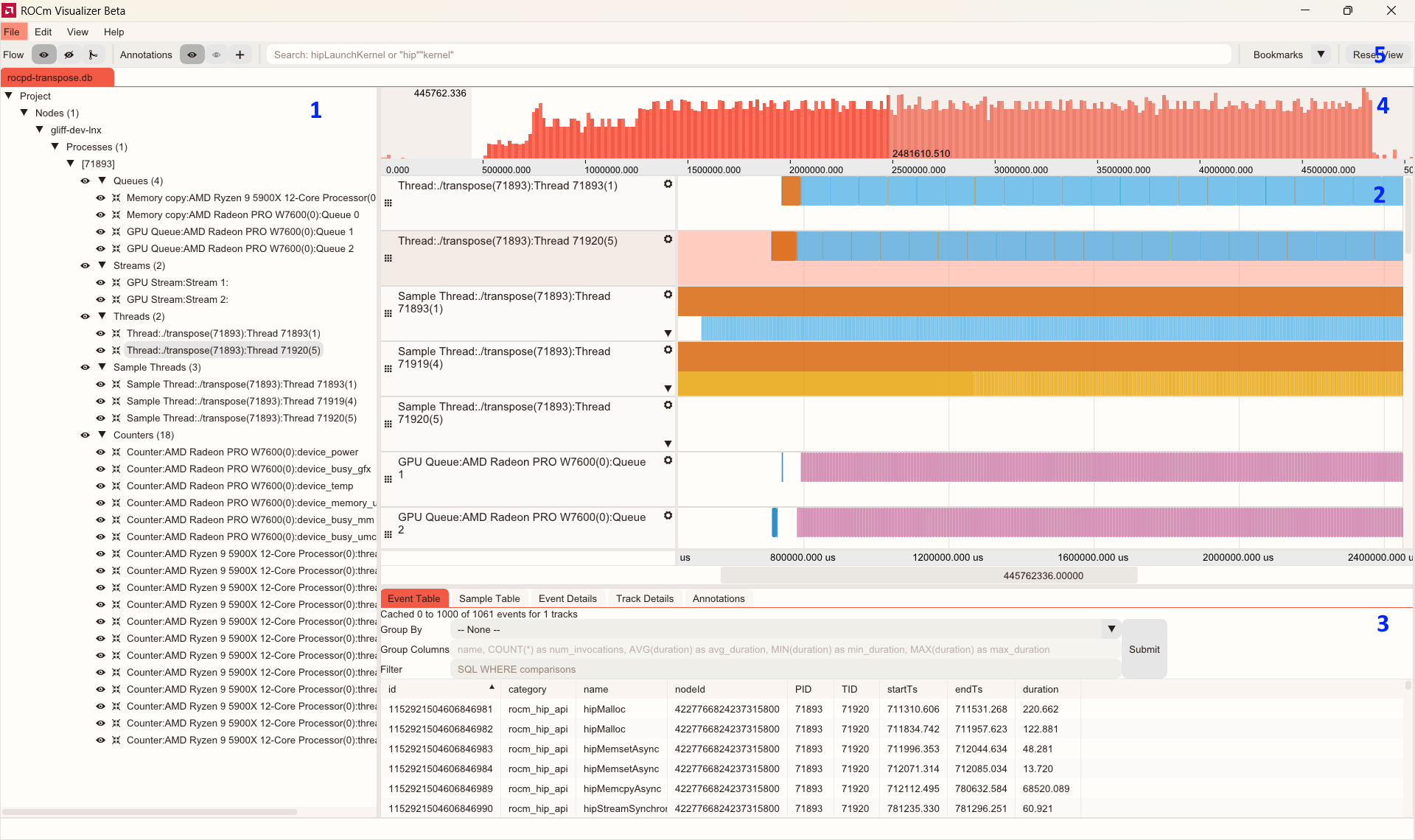
Figure 1: User Interface for ROCm Optiq#
The figure highlights the following features (each feature number corresponds to a labeled section of the interface shown in Figure 1):
System Topology Tree: Expand tree nodes to see relationships between tracks.
Timeline View: Displays tracks containing event or sample counter data.
Advanced Details Area: Shows detailed information about selected events and tracks.
Histogram Area: Shows an event density histogram.
Toolbar: Provides controls for various functions.
In an earlier release, ROCm Optiq added support for ROCm Compute Profiler data, and provided powerful features such as summary dashboards, kernel-level tables and charts, roofline analysis, memory and speed-of-light visualizations, and advanced filtering for GPU metrics, all aimed at accelerating performance tuning workflows. The latest ROCm Optiq 0.4.0 release expands functionality with enhanced kernel analysis, aggregated system speed-of-light across all kernels, and a bar‑chart‑enhanced Kernel Selection Table. Furthermore, new capabilities include side‑by‑side baseline comparison with per‑metric deltas and configurable thresholding to quickly spot regressions, improvements, and behavior changes.
While still in beta and not yet recommended for production use, ROCm Optiq (available at the ROCm/roc-optiq repository) represents a major step toward a cohesive, data-driven performance engineering experience on the ROCm platform.
Packaging and Installation with ROCm 7.13#
TheRock introduces a modular packaging structure built around the ROCm Core SDK, which contains the essential runtime and development components needed for most GPU workloads. Domain-specific packages extend the core with specialized libraries tailored to specific use cases. The new packaging architecture, documented in TheRock’s OS Packaging Requirements, reorganizes ROCm components into a more maintainable and user-friendly structure:
Core SDK: Essential runtime and development tools, including HIP, compiler toolchains, and fundamental libraries
Domain-specific packages: Libraries for AI/ML (MIGraphX, ONNX Runtime), scientific computing, and other specialized workloads in future releases
Extras: Validation, benchmarking, and diagnostic tools
ROCm-Extras#
The ROCm-Extras collection includes tools and libraries that operate downstream from the ROCm Core SDK, covering inference, validation, and benchmarking. This collection is launching with RVS along with the ROCm 7.13 release. The ROCm Validation Suite (RVS) is a comprehensive GPU stress and validation framework that verifies hardware stability and performance through modules for GPU stress testing (GEMM operations at various precision levels), PCIe bandwidth and error checking, power and thermal monitoring, and memory stability tests. RVS is now part of TheRock packaging initiative and integrates with the ROCm Validation Tool (RVT) framework for streamlined external developer testing.
Supported Linux and Windows Distributions#
ROCm 7.13 provides support for a comprehensive range of Linux distributions and Windows platforms. Public Linux distributions receive standard support and include:
Ubuntu LTS: 22.04.5, 24.04.4, and 26.04
Enterprise Linux: RHEL 8.10 through 10.1, SLES 15 SP7 and 16, Rocky Linux 9, Oracle Linux 8.10/9.7/10, CentOS Stream 9
Debian: versions 12 and 13
For detailed compatibility information, consult the ROCm System Requirements Documentation.
Multi-Architecture Support#
ROCm packages now use new technology for architecture splitting to consolidate multiple GPU targets into a single installation. See the RFC for technical details.
Architecture-specific packages are built using the following three stages with technology called rocm-kpack (kernel packaging):
Stage 1: Generic Build (Once)
  → Compiler
  → Host-only components
  → Architecture-independent libraries
  → Headers, documentation, tools

Stage 2: Architecture Builds (Parallel, with integrated kpack split)
  gfx900-build/  → Device code for gfx900 + kpack artifact split
  gfx906-build/  → Device code for gfx906 + kpack artifact split
  gfx908-build/  → Device code for gfx908 + kpack artifact split
  gfx90a-build/  → Device code for gfx90a + kpack artifact split
  gfx1100-build/ → Device code for gfx1100 + kpack artifact split
  ...
  Each build extracts device kernels and creates architecture-specific kpack archives

Stage 3: Package Assembly (with kpack recombine)
  → Recombine split artifacts from all architecture builds
  → Create base packages (host code + headers)
  → Create architecture packages (device code + kpack archives)
  → Generate metadata for dependency resolution
The unique aspect of this approach is the use of sharded builds, which results in the creation of multi-architecture packages. The multi-architecture system currently supports rpm, deb, tar, and pip packages. Users are encouraged to consume single GPU architecture packages for lower installation footprints unless managing fleets of GPUs families where multi-architecture packages are required. Future ROCm releases will build on rocm-kpack to provide additional installation options.
Summary#
In this blog, you learned about the key deliverables in ROCm 7.13, including the ROCm Core SDK’s modular packaging structure, expanded support for MI350-series datacenter accelerators, GPU virtualization across KVM and VMware ESXi, optimized AI model support on Radeon discrete GPUs, and improved multi-node communication for Strix Halo with RCCL and rocSHMEM optimizations. You also explored streamlined profiling with rocprofiler-systems, open-sourced ROCprof Trace decoding, live attach/detach profiling with PC sampling, unified visualization through ROCm Optiq, and the new ROCm-Extras packaging for validation and benchmarking tools.
ROCm 7.13 delivers improvements across multiple fronts, reflecting AMD’s continued investment in an AI software platform that scales from individual developers to cloud-scale deployments, with the flexibility and transparency that open ecosystems require. For detailed release notes, installation instructions, and migration guidance, visit the revamped ROCm Docs site, which has been restructured to reflect the new modular architecture of the ROCm releases.
Additional Resources#
Explore the AMD Enterprise AI Documentation to learn more about the AMD Enterprise AI Suite.
To learn more about TheRock, see TheRock Blog Post.
For more technical information on the latest ROCm release, see the ROCm 7.13 Release Notes.
For information on the AMDGPU Driver (amdgpu) release, see the AMDGPU Driver 31.30.0 Release Notes.
For more information on the AMD GPU Virtualization (GIM) release, see the GIM 9.0.0.K Release Notes.
Disclaimers#
The information presented in this document is for informational purposes only and may contain technical inaccuracies, omissions, and typographical errors. The information contained herein is subject to change and may be rendered inaccurate for many reasons, including but not limited to product and roadmap changes, component and motherboard version changes, new model and/or product releases, product differences between differing manufacturers, software changes, BIOS flashes, firmware upgrades, or the like. Any computer system has risks of security vulnerabilities that cannot be completely prevented or mitigated. AMD assumes no obligation to update or otherwise correct or revise this information. However, AMD reserves the right to revise this information and to make changes from time to time to the content hereof without obligation of AMD to notify any person of such revisions or changes. THIS INFORMATION IS PROVIDED ‘AS IS.” AMD MAKES NO REPRESENTATIONS OR WARRANTIES WITH RESPECT TO THE CONTENTS HEREOF AND ASSUMES NO RESPONSIBILITY FOR ANY INACCURACIES, ERRORS, OR OMISSIONS THAT MAY APPEAR IN THIS INFORMATION. AMD SPECIFICALLY DISCLAIMS ANY IMPLIED WARRANTIES OF NON-INFRINGEMENT, MERCHANTABILITY, OR FITNESS FOR ANY PARTICULAR PURPOSE. IN NO EVENT WILL AMD BE LIABLE TO ANY PERSON FOR ANY RELIANCE, DIRECT, INDIRECT, SPECIAL, SOR OTHER CONSEQUENTIAL DAMAGES ARISING FROM THE USE OF ANY INFORMATION CONTAINED HEREIN, EVEN IF AMD IS EXPRESSLY ADVISED OF THE POSSIBILITY OF SUCH DAMAGES. AMD, the AMD Arrow logo, and combinations thereof are trademarks of Advanced Micro Devices, Inc. Other product names used in this publication are for identification purposes only and may be trademarks of their respective companies. © [2026*] Advanced Micro Devices, Inc. All rights reserved