Getting Started with FlyDSL Nightly Wheels on ROCm#

In the previous post on FlyDSL, we introduced the motivation behind FlyDSL and how it enables Python-native GPU kernel development using the AMD ROCm™ software stack. FlyDSL combines the flexibility of Python with the performance of MLIR and LLVM-based compilation, allowing developers to write GPU kernels in Python while targeting modern AMD hardware.
In this follow-up article, we focus on getting started with FlyDSL using prebuilt nightly wheels. These wheels allow developers to install the latest version of FlyDSL without building the project from source, making it easier to experiment with new features and improvements as the project evolves.
Why Use Nightly Wheels?#
FlyDSL is actively developed and integrated with evolving components of the ROCm ecosystem, including MLIR and LLVM. Nightly wheels provide a convenient way to access the latest functionality and performance improvements.
Nightly builds provide several advantages:
Immediate access to the latest FlyDSL updates
No need to build LLVM or MLIR locally
Prebuilt artifacts tested on supported AMD GPUs
A simple installation workflow using pip-compatible tooling
Nightly wheels are automatically generated by the FlyDSL continuous integration pipeline and published to an AMD hosted Python package index.
System Requirements#
Before installing FlyDSL, ensure your system meets the following requirements:
Python 3.12 or Python 3.13
ROCm 7.1 or ROCm 7.2 compatible environment (ROCm 7.13 is not yet supported)
Supported GPUs:
AMD Instinct™ MI300X/MI325X
AMD Instinct™ MI350X/MI355X
PyTorch with ROCm support
Option A: Bare-metal install (without Docker)#
If you have ROCm and PyTorch already installed on your system, you can install FlyDSL directly:
Ensure ROCm 7.1+ is installed (ROCm installation guide)
Ensure PyTorch with ROCm support is installed (PyTorch ROCm install)
Install FlyDSL using pip or uv (see Installing FlyDSL Nightly Wheels below)
Option B: Container-based install (recommended)#
For convenience, we recommend using one of the official ROCm PyTorch container images, which provide a fully configured runtime environment with ROCm, Python, and PyTorch pre-installed.
For Python 3.12 (ROCm 7.1):
docker pull rocm/pytorch:rocm7.1_ubuntu24.04_py3.12_pytorch_release_2.9.1
For Python 3.13 (ROCm 7.2):
docker pull rocm/pytorch:rocm7.2_ubuntu24.04_py3.13_pytorch_release_2.10.0
Installing FlyDSL Nightly Wheels#
FlyDSL nightly wheels are available through an AMD-hosted Python package index. Using uv is recommended because it provides faster dependency resolution and installation compared to traditional pip workflows, though pip can also be used if preferred.
Install with Python 3.12 (ROCm 7.1)#
To install the latest nightly build:
uv pip install --extra-index-url https://rocm.frameworks-nightlies.amd.com/whl/gfx942-gfx950/ flydsl
To install a specific nightly build (for example, the March 15 build), specify the full version:
uv pip install --extra-index-url https://rocm.frameworks-nightlies.amd.com/whl/gfx942-gfx950/ "flydsl==0.1.0+20260315.366302d"
These commands install the nightly FlyDSL wheel built for ROCm GPUs targeting the AMD Instinct™ MI300X/MI325X GPU (gfx942) and AMD Instinct™ MI350X/MI355X GPU (gfx950) architectures.
Install with Python 3.13 (ROCm 7.2)#
To install the latest nightly build using the Python 3.13 environment:
uv pip install --extra-index-url https://rocm.frameworks-nightlies.amd.com/whl/gfx942-gfx950/ flydsl
To install a specific nightly build (for example, the March 23 build), specify the full version:
uv pip install --extra-index-url https://rocm.frameworks-nightlies.amd.com/whl/gfx942-gfx950/ "flydsl==0.1.1+20260323.77e1352"
Version Naming Convention#
Nightly wheel versions follow the format <base_version>+<date>.<commit_hash>:
Component |
Example |
Meaning |
|---|---|---|
Base version |
|
FlyDSL release series |
Date |
|
Build date (YYYYMMDD) |
Commit hash |
|
Short git commit hash of the source |
For example, flydsl==0.1.1+20260323.77e1352 is FlyDSL version 0.1.1, built on March 23, 2026, from commit 77e1352.
Currently supported versions:
FlyDSL 0.1.1 — nightly builds for Python 3.12 and Python 3.13
Nightly builds are triggered automatically on a daily schedule. Each run compiles the latest FlyDSL source, executes the full test suite on GPU hardware, and publishes validated wheels to the AMD package index.
Installing FlyDSL in a Container Environment#
Using containers can simplify environment setup and ensure compatibility with the ROCm software stack. For more information on pulling and configuring ROCm Docker images, see the ROCm Docker documentation.
Container Setup with Python 3.12 (ROCm 7.1)#
Pull and start the ROCm PyTorch container:
docker run -it --device=/dev/kfd --device=/dev/dri rocm/pytorch:rocm7.1_ubuntu24.04_py3.12_pytorch_release_2.9.1
Once inside the container, install FlyDSL:
uv pip install --extra-index-url https://rocm.frameworks-nightlies.amd.com/whl/gfx942-gfx950/ flydsl
Container setup with Python 3.13 (ROCm 7.2)#
Pull and start the ROCm 7.2 PyTorch container with Python 3.13:
docker run -it --device=/dev/kfd --device=/dev/dri rocm/pytorch:rocm7.2_ubuntu24.04_py3.13_pytorch_release_2.10.0
Once inside the container, install FlyDSL:
uv pip install --extra-index-url https://rocm.frameworks-nightlies.amd.com/whl/gfx942-gfx950/ flydsl
This approach provides a reproducible environment for experimenting with FlyDSL kernels and integrating them into machine learning workflows.
Nightly Build and Validation Pipeline#
FlyDSL nightly wheels are built and validated using automated workflows in the FlyDSL repository. Each nightly run executes the following stages:
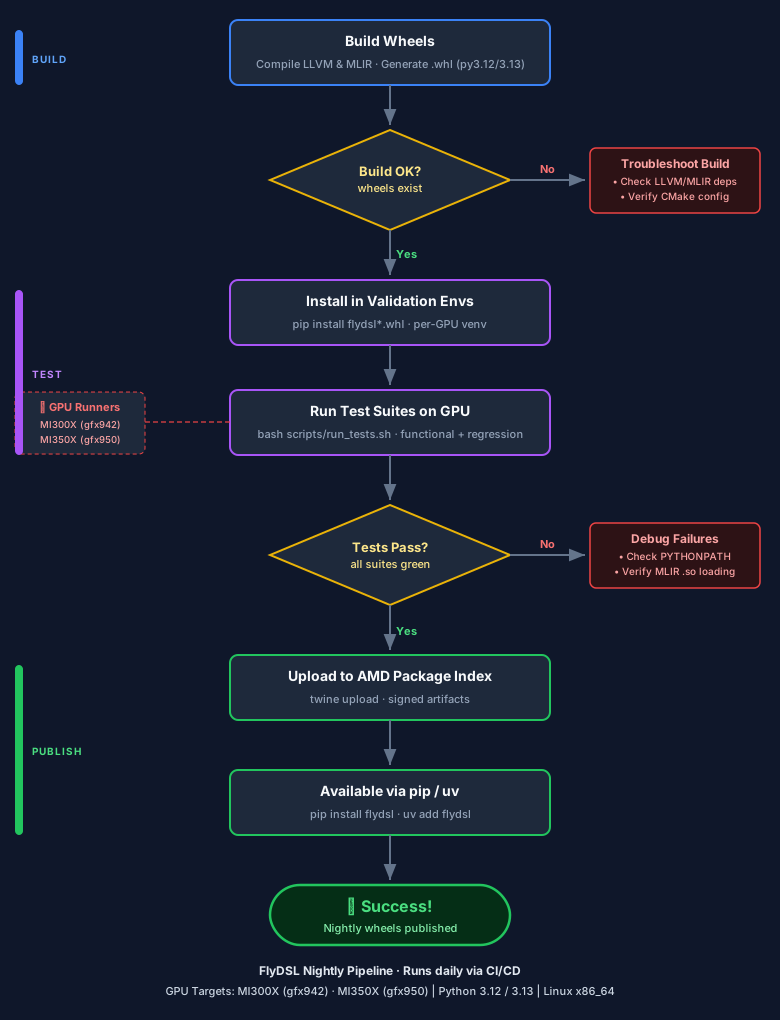
Build stage#
LLVM and MLIR dependencies are compiled
FlyDSL Python wheels are generated for Python 3.12 and 3.13
Test stage#
Wheels are installed into validation environments
Full test suites are executed on GPU hardware
Publish stage#
Only validated wheels are published to the public package index, where they become available for installation.
Hardware Validation#
To ensure compatibility across supported hardware platforms, nightly builds are validated on the following GPU runners:
Runner |
GPU |
|---|---|
linux-flydsl-mi325-1 |
MI325 |
linux-flydsl-mi355-1 |
MI355 |
This hardware-backed validation helps ensure that nightly builds function correctly on supported AMD Instinct GPUs.
Using FlyDSL#
Once installed, FlyDSL can be used to write GPU kernels directly in Python while leveraging the MLIR-based compilation flow.
Developers can:
Write kernels using FlyDSL’s Python-native abstractions
Compile them through MLIR and LLVM
Execute them on ROCm-enabled GPUs
Integrate kernels with PyTorch-based workflows
This approach provides a streamlined path from Python code to optimized GPU execution, enabling rapid experimentation and iteration.
Summary#
In this blog, you learned how to install and use FlyDSL nightly wheels on ROCm-enabled AMD Instinct GPUs. You explored how to set up your environment using either bare-metal or container-based workflows, install the latest nightly builds via pip or uv, and begin writing Python-native GPU kernels using FlyDSL’s MLIR-based compilation pipeline.
Key takeaways:
Nightly wheels provide prebuilt, hardware-validated binaries updated daily
Installation requires a single pip/uv command with the AMD package index
Both Python 3.12 and Python 3.13 are supported across ROCm 7.1 and 7.2
To get started now, run:
uv pip install --extra-index-url https://rocm.frameworks-nightlies.amd.com/whl/gfx942-gfx950/ flydsl
Looking ahead, the FlyDSL team is working on expanding GPU target support, improving kernel performance, and deepening integration with the PyTorch ecosystem. Stay tuned for future posts covering advanced FlyDSL kernel patterns and performance optimization techniques.
Disclaimers#
Third-party content is licensed to you directly by the third party that owns the content and is not licensed to you by AMD. ALL LINKED THIRD-PARTY CONTENT IS PROVIDED “AS IS” WITHOUT A WARRANTY OF ANY KIND. USE OF SUCH THIRD-PARTY CONTENT IS DONE AT YOUR SOLE DISCRETION AND UNDER NO CIRCUMSTANCES WILL AMD BE LIABLE TO YOU FOR ANY THIRD-PARTY CONTENT. YOU ASSUME ALL RISK AND ARE SOLELY RESPONSIBLE FOR ANY DAMAGES THAT MAY ARISE FROM YOUR USE OF THIRD-PARTY CONTENT.